Google Play Books v3.5 Lets You Sync Your Notes and Bookmarks to Google Drive

Google rolled out a new update to its Android ebook app on Thursday which delivered on new features that Google has been hinting about for the past couple months.
Google Play Books v3.5 has a whole new interface, a new book discovery page, tweaks to how your library is displayed, and more.
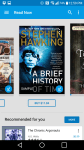
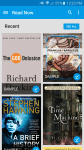
To start, the "read now" page is now based on a damnable carousel rather than a simple tile or list view. In order to see your ebooks, you’ll need to swipe left or right (or switch to the "my library" page). Google has also added a new prompt which asks you to "tell us what you like" so they can help you discover new works, and each book’s icon now integrates a progress bar which tells you how far along you are.
And inside the book Google has added a fit-width option for full-screen horizontal viewing, an image zoom mode, and the option to turn the page while zoomed in (useful for comics and large PDFs, I think).
And that’s not even the best part.
The new version of Google Play Books now lets you back up your annotations to Google Drive. You’ll need to first enable the option in the settings menu, but once you have done so the notes and highlights from each ebook will be saved as a Google Doc (one doc per ebook).
Here’s one example I threw together real quick just to show you that it works. As you can see, the text notes came through but the highlights did not. Each note or highlight is has a link to the page in the ebook where it was made.
It’s not clear why the highlights did not sync for that ebook, but the highlights did sync for another ebook, one which I uploaded to my Play Books account. I suspect that the publisher of the first book blocked this option behind the scenes.
In any case, Google has given us a new way to export or share our notes from ebooks in Google Play Books. That’s going to prove quite useful, don’t you think?
The app is free in Google Play.