Amazon Releases Kindle Convert – Its First Paid Conversion App for the Kindle

For as long as I’ve known them, Amazon has always released free tools which you could use to make ebooks to sell in the Kindle Store. That’s a common modus operandi for tech companies, so when a reader told me today that Amazon was charging for an en ebook making app, I was surprised.
Kindle Convert is a $19 app which is designed to help users digitize their archives. Based on the description, I would say that this is less intended to create a sellable ebook than to help users make a more accessible copy of any scanned documents and images.
The app is only available to US residents, and it’s only available for Windows 7 and 8.
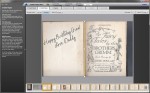
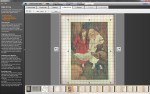
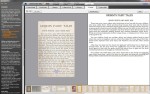
Amazon says that the app works by turning scans of English-language printed books and documents into ebooks. A user can either elect to leave a scanned page as an image, or run the image through Amazon’s OCR software and convert it to text. If you stick with the image, you can crop the image, rotate it, center it on a page, and perform other basic image editing tricks. The text generated via OCR can be edited to remove errors, and styled.
Once a user is done cleaning up the source material, they can save the resulting ebook to their Kindle account. There’s no way to upload an ebook to the Kindle Store, but the app does offer the option of delivering the ebook to any of a user’s Kindle apps or devices.

As I said earlier in this post, this tool is intended for personal use, and not for making ebooks to sell. I suppose you could use it for that purpose, though; it would just require a few extra steps.
I do find it curious, though, that Amazon made those extra steps difficult and slapped a price tag on this app.
Kindle Convert is Amazon’s 5th ebook creation tool, and it’s the first one Amazon has charged for. KindleGen, Kindle Comic Creator, Kindle Kids Book Creator, and Kindle Textbook Creator are all free downloads for Windows and OSX.
This app is $19, and it is probably an experiment on Amazon’s part. They want to see if they can sell this kind of app, and in this case I think the price is worth it.
Thanks, Timothy!
No Comments