Voyage vs Paperwhite Comparison Review: the Web Browser

When I first reported on the new Kindle Voyage earlier this week I mentioned that the Voyage was running the same software as the Paperwhite. It turns out that is not entirely correct. While the two Kindles use what looks like the same web browser, the software running underneath the UI is not even close to being the same.
At the request of a reader, I spent some time yesterday playing with both Kindles, testing the web browsers, and I can report that the Voyage has the much better web browser. It’s enough better that I sincerely hope that the Paperwhite gets it in an update otherwise this could be a strong selling point for the Voyage.
While the web browsers look the same, offer the same features (like article mode), and are about equally fast at loading a page, there are ways that they differ.
For example, the Voyage loads the settings menu faster, but the Paperwhite responds faster when you scroll the page. I played with both web browsers, and I visited websites like Google, Boing Boing, Techcrunch, and this blog. I noticed that simple things like website menus opened faster on the Paperwhite.
I also found that the web browser on the Voyage is more stable. It didn’t crash, while the web browser on the Paperwhite crashed a bunch of times – and it also froze when I tried to plug it in to the USB cable. This necessitated a holding down the power button to force a reboot.
Update: At the request of another reader, I tried Dropbox and the Manage Your Kindle page on Amazon.com. Those crashed on the Paperwhite, and they also crashed the Voyage’s web browser.
All in all, the Voyage has the better web browser, but rather than laud it I am going to sit back and hope that the Paperwhite gets the improved web browser in an update. I for one would rather browse the web on the Paperwhite’s lower resolution screen.
This might sound counter-intuitive, but the higher resolution screen on the Voyage might not actually be a good thing when it comes to web browsing. Because the resolution was so high (1080 pixels wide), websites with responsive layouts served up the full desktop webpage to the Voyage. The Paperwhite with a screen width of 758 pixels, on the other hand, was served a mobile version of the same website.
The latter was IMO much easier to use on a 6″ screen.
As you can see in the screenshots below, the Voyage packs more content into a single screen image. This gives you smaller text and more ads.
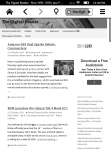
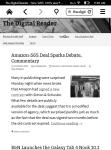
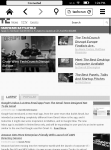

To be fair, I’m sure you would appreciate the higher resolution of the Voyage’s screen more when reading in article mode, but getting there is another matter. Much to my surprise, we’ve found an example of where more is not necessarily better.
But that’s just my opinion, and as I read it again I think it might be a minority opinion. What do you think?
No Comments