How IP Rotation Works With 4G and 5G Mobile Proxies
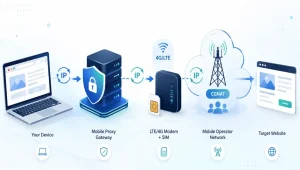
Toggle airplane mode on your phone, turn it off, and check your IP address. It has probably changed. That small trick is how 4G and 5G mobile proxies rotate IPs, and it works differently from the rotation most guides describe.
Quick answer
IP rotation is the practice of changing the IP address your traffic comes from, either on a timer, on demand, or with every request. With 4G and 5G mobile proxies, rotation happens when the modem reconnects to the carrier, which then assigns a new IP from its pool. It usually takes seconds, and many real mobile users share the new IP.
What is IP rotation
IP rotation means your requests don’t all come from one address. Thousands of requests from one IP look automated, while the same requests spread across many look like ordinary traffic. That’s why IP address rotation matters for price monitoring, ad verification, and SEO tracking.
There are two main ways to get a rotating IP address:
- Pool rotation: a provider routes each request through a different IP from a large pool, common with residential proxies.
- Reconnect rotation: a device gets a fresh IP from its network, as mobile proxies do.
How mobile carriers assign IP addresses
There aren’t enough IPv4 addresses for every phone, so carriers use carrier-grade NAT (CGNAT). Many phones share a small group of public IPs, which the carrier hands out as devices connect and disconnect. This is what makes 4G rotating proxies possible.
A 2016 study of CGNAT deployment found that "more than 90% of all cellular ASes" (carrier networks) use it. Cloudflare notes that "a single IPv4 address may represent hundreds or even thousands of users."
Blocking a shared mobile IP could cut off many real customers, so websites use them carefully.
Step by step: How 4G and 5G proxies rotate IPs
A mobile proxy is a modem or phone with a SIM card, connected to a carrier’s network. Here’s what happens when it rotates:
- You trigger rotation. This happens on a timer, through a rotation link, or through an API call.
- The modem disconnects. It’s the same idea as toggling airplane mode, which forces "a reconnection to the carrier and a new IP assignment."
- The carrier assigns a new IP. The carrier assigns the new address from its CGNAT pool.
- Traffic resumes. Your next requests leave from the new address.
Providers typically quote a few seconds. Two caveats most guides skip: the carrier controls the pool, so rotation can take longer, and it sometimes hands back the same IP.
IP rotation methods compared
| Method | How it works | Best for |
| Timed rotation | New IP every set number of minutes | Steady scraping and monitoring |
| On-demand rotation | You trigger a change by link or API | Changing IP between tasks |
| Per-request rotation | Each request uses a different IP | Large-scale public data collection |
| Sticky session | Same IP held for a set time | Logins, checkouts, account work |
Dedicated mobile proxies usually rotate by timer or on demand. Pooled mobile gateways can rotate per request because they spread traffic across many devices.
4G vs 5G: does it change IP rotation
Less than you’d think. Many 5G networks still run in "non-standalone" mode, which, as RCR Wireless explains, is "connected to an Evolved Packet Core that also supports LTE data transmissions." Much 5G traffic still relies on the 4G core network, where IP assignment happens, so rotation works the same way on both.
What makes the best rotating proxy
The best rotating proxy depends on your task. Look for:
- Flexible rotation: timed, on-demand, and sticky options
- Real carrier IPs: for mobile, SIM-based connections rather than relabelled datacenter IPs
- Location targeting: country, city or carrier
- Clear traffic pricing: unlimited traffic or a transparent per-GB rate
- Honest rotation limits: providers should explain cooldowns and carrier delays
Providers such as CyberYozh offer both approaches. Its LTE/5G mobile proxies run on real carrier networks with unlimited traffic, and its rotating residential proxies support per-request rotation or sticky sessions of up to 24 hours.
Pro tip: Don’t rotate during a logged-in session. Rotate between tasks, not during them.
The bottom line
IP rotation with 4G and 5G mobile proxies isn’t magic. It’s a modem reconnecting and a carrier handing out a shared address. Match the rotation method to each task, and you’ll get cleaner results.
FAQs about IP rotation
Does turning airplane mode on and off change your IP address?
Usually, yes, on mobile data. Turning on airplane mode ends your connection to the carrier, and reconnecting often gets you a new IP from the carrier’s shared pool. It doesn’t work on Wi-Fi, and the carrier may sometimes give you the same address again.
How often should I rotate my IP address?
It depends on the task. For collecting public data at scale, rotate per request or every few minutes. For anything involving a login, keep one sticky session throughout, because rotating during account work can trigger more security checks.
What’s the difference between sticky and rotating proxies?
A rotating proxy changes your IP automatically, per request or on a timer. A sticky proxy keeps the same IP for a set period, often minutes to hours. Use rotating proxies for broad data collection and sticky sessions for logins, carts, and anything that needs a consistent identity.
Are rotating proxies legal?
Using a proxy is generally legal. As ScrapingBee puts it, "using a proxy server in and of itself is not illegal." Legality depends on what you do with it and where you are. Accessing restricted data, committing fraud, or breaching a site’s terms can still create legal risk.
Why are 4G rotating proxies more expensive?
They rely on physical hardware: real SIM cards, modems, and mobile data plans, which cost more than datacenter servers. You’re paying for trust: carrier IPs shared through CGNAT are rarely blocked outright, which means fewer failed requests and CAPTCHAs.