Kobo & Overdrive – What We Know So Far

In addition to a night-reading mode, what sets the newly launched Kobo Aura One apart from other ereaders is the way it supports library ebooks.
The Aura One features close integration with Overdrive, the library ebook vendor bought by Rakuten last spring. There are no first-hand reports yet, and I am still waiting for Kobo and OverDrive to get back to me with answers to my questions, but here’s what we know so far.
- the Aura One is running firmware 3.20.7280
- no other Kobo ereader has this firmware, and it’s not mentioned on their product listings
- the feature only works in US, UK, Canada, NZ, and Australia
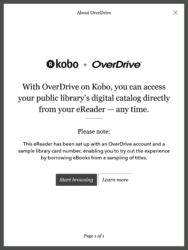
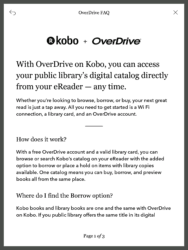
The way this is supposed to work is that once you have entered your Overdrive info in the settings menu, you can simply search the Kobo store on the Aura One and the ebooks you see will list their price as well as whether they are available to be checked out of your library.
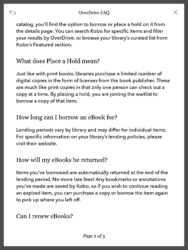
You can check out an ebook on the Aura One, and you can also place a hold for an ebook. Any borrowed book will indicate how long until the library loan expires. This detail is displayed when you put the Aura One to sleep.
I use the word "supposed" because this feature does not work yet.
My Aura One came with an OD account set up, but I couldn’t find any ebooks to borrow. There’s no way to filter for this option when browsing the Kobo store on the Aura One, and there’s no way to just browse your library’s ebook catalog.
Since I couldn’t find any ebooks, I went into the settings menu, logged out of OverDrive, and tried to enter my account. This didn’t work. The Aura One wouldn’t accept my info, and with good reason.
It turns out that the feature is not yet live. I’ve just been told by Kobo that the software is a demo, "a high-level overview of Library Lending (the feature is not yet live). When the device launches in September, you will be able to add your library card and borrow then."
In other words there’s not much I can say about this feature until Kobo turns it on sometime next month, but I won’t send you away empty handed.
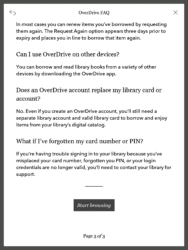
The following four screenshots show you all the info the Aura One has on the is feature. Until we can pry a user manual out of Kobo, this is most of what we know about how this feature will work.
Enjoy.
No Comments