Nate Hoffelder

Nate Hoffelder

Kobo to carry audiobooks?

Along with Google, Kobo is one of only two major ebook retailers which doesn’t also sell audiobooks, but that might be about to change.

An observant bibliophile discovered earlier today that Kobo was then listing audiobook titles from HarperAudio in its ebookstore. The listings were incomplete and nonfunctional, but it was pretty clear that they referred to audiobooks:

A brief spin through Google turned up a couple hundred similar listings from HarperAudio. They have all since been taken down, but the ones in the Google cache looked like this:

When I queried Kobo on this topic, they neither confirmed or denied the implications of the listings. Instead, Rene said that "This seems to be an error in the metadata provided in this case." That is a curious answer, so I double checked the ISBNs. They match up with the respective HC audiobook titles.

Kobo isn’t currently selling audiobooks, and they haven’t announced plans along those lines, so it’s not clear what the new listings mean. They could have been a technical error, but they could also have inadvertently leaked Kobo’s future plans.

Remember, I broke the news on Kindle Unlimited after members of KBoards noticed that several pages for that section had been posted on the Amazon website. That could well be what is happening here.

Kobo could be quietly signing publishers with the goal of launching an audiobook section, or they might be taking the same path as B&N, which slapped the Nook brand on an audiobook platform developed by Findaway World earlier this month. Findaway offers a catalog of 50,000 titles. That’s far smaller than the 150,000 carried in Audible but it could still be enough to attract customers.

On the other hand, this could just be a technical error. We’ll just have to wait and see.

I for one hope that it is true because Amazon could really use the competition in this market. More retailers means more competition means lower prices, and that’s good for consumers.

If Kobo does get into audiobooks, they will be competing with Audible, iTunes, Nook, Downpour.com, Audiobooks.com, and Random House Audio, which distributes titles and also sells direct. Amazon’s Audible is believed to dominate the market.

MobileRead

Comparison Review: Pocketbook InkPad vs Bookeen Cybook Ocean

The Pocketbook InkPad and the Bookeen Cybook Ocean are the only two 8″ ereaders on the market at the moment, but in spite of having the same size screen they could not be more different.

My Ocean arrived on Friday, and I’ve had it for a few days now. At first I felt an initial distaste for the hardware design, but once I got past that I noticed that the Ocean was slightly faster and did a better job at displaying an Epub. But in spite of being weaker in the software dept, the InkPad is more pleasant to hold and read on.

Table of Contents
[—ATOC—] [—TAG:h2—]

Hardware

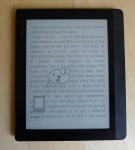
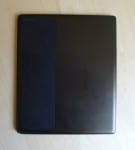
As I explained in my review, the InkPad has a brown shell with rounded edges and a lopsided design which enables one-handed reading. It has a black rubber pad to the right of the screen and a corresponding pad on the back which makes it easier for me to grip the InkPad.

The Ocean, on the other hand, is all sharp edges with an angled rear shell and page turn buttons placed below the screen on either side of the menu button. And when I say sharp edges; I am not exaggerating; trying to hold the Ocean by the edges is unpleasant.

Both ereaders have a microSD card slot, and they both ship with 4GB of storage. But the InkPad also has a headphone jack which supports an mp3 player and TTS.

When it comes to the screens, the InkPad has a higher resolution screen than the Ocean. The InkPad has a Pearl E-ink display with screen resolution of 1,600 x 1,200, while the Ocean has a "knockoff" epaper display from E-ink’s Chinese competitor, Guangzhou OED Technologies. This screen has a resolution of 1,024 x 768, or about the same number of pixels as you would find on the Kindle Paperwhite.

Both devices have a frontlight and touchscreen. I haven’t found a reason to comment on the touchscreens yet (they’re fine), but I have observed that the frontlight on the InkPad has both a lower minimum setting and a brighter maximum setting (both frontlights can be turned off, of course).

When the frontlight is dialed up near the brightest setting, the screen on the Ocean looks decidedly grayer than the screen on the InkPad. The same is true for when the frontlights are turned off; the InkPad has the whiter screen.

Software

The InkPad and the Ocean each run a proprietary OS developed by their respective makers. The devices each have their quirks, and they offer very different software features.

The InkPad supports apps which add a number of functions, including a web browser, calculator, games, and Dropbox (more details here). The InkPad also supports a broader range of formats than the Ocean, including Mobi, DjvU, and DOC (more details here).

I would like to say some nice things about the Ocean, but in reality all it has going for it are the faster page turn and the formatting options for Epub files. The Ocean offers more formatting options, including ragged right and an option to bold all text, than can be found on the InkPad. On the other hand the InkPad does handle PDFs better. It’s not just the higher resolution screen; the InkPad offers more options, including margin cropping and more zoom options (more details here).

The InkPad also shipped with several text to speech voices and with more dictionaries (the Ocean doesn’t even have an English language dictionary). While both devices have a search function and annotation features, they’re a lot easier to use on the InkPad. Adding a note to an ebook on the InkPad is only one click away, not three. Also, the InkPad offers a separate TOC-like journal for keeping your annotations (highlights, notes, and bookmarks) organized.

Conclusion

As much as I would like to say that each device has its strengths, I can’t. The Ocean is in almost every way inferior to the InkPad. Just about the only point in the Ocean’s favor is the Epub formatting, and that you can buy an Ocean right now from Bookeen. The InkPad is back-ordered.

If I were looking to get one or the other, I would wait to get the Inkpad.

Cybook Ocean Specs

  • CPU: 1GHz
  • RAM: 128MB
  • Display: 8″ epaper display
  • Screen resolution: 1024 x 768 (160 ppi)
  • Touchscreen, frontlight
  • Storage: 4GB internal, microSD card slot
  • Wifi
  • Battery: 2.1Ah, one month runtime
  • Dimensions: 150 X 196 X 7 mm
  • Weight: 300 grams
  • eBook Formats: ePub, PDF, HTML, Txt, FB2, DJVU

InkPad Specs

  • CPU: 1GHz
  • RAM: 512MB
  • Screen: 8″earl E-ink display,
  • Screen resolution: 1,600 x 1,200
  • Frontlight, Touchscreen
  • Storage: 4GB internal, microSD card slot
  • Connectivity: Wifi
  • Battery: 2.5Ah, one month runtime
  • Audio: headphone jack (TTS, MP3 supported)
  • eBook Format Support (more details here): Epub, PDF, FB2, DJVu, Mobi, PRC, CHM
  • Office and Other File Format Support: Doc, Docx, RTF, txt, HTML
  • Weight: 350 grams
  • Dimensions: 195.5 x 162.8 x 7.3 mm
Where Yahoo went wrong when they decided to sell prints of CC-Licensed Flickr images

WSJ reported last week that Yahoo’s latest move to increase its revenues was pissing off Flickr users:

More than 300 million publicly shared Flickr images use Creative Commons licenses, making it the largest content partner. Yahoo last week said it would begin selling prints of 50 million Creative Commons-licensed images as well as an unspecified number of other photos handpicked from Flickr.

For the handpicked photos, the company will give 51% of sales to their creators. For the Creative Commons images, Yahoo will keep all of the revenue.

Just to be clear, Yahoo is only selling prints of works licensed under the CC clause which allows for commercial use, so they what they are doing is completely legal. But that doesn’t mean it isn’t ruffling feathers.

For some time now I’ve believed that the Creative Commons license needed more variations of the commercial use clause, and now it would appear that some creators feel the same way.  The WSJ found several creators (six out of 14 contacted) who apparently wouldn’t mind my using their images in a blog post, but are not happy that Yahoo is going to sell prints.

That includes Nelson Lourenço, a photographer based in Lisbon, who told the ESJ that "When I accepted the Creative Commons license, I understood that my images could be used for things like showing up in articles or other works where they could be showed to public". He’s not so happy about Yahoo selling prints, adding that "selling my work and getting the full money out of it came as a surprise".

And he’s not the only one who is viewing this move askance. Flickr co-founder Stewart Butterfield said that the move was "a little shortsighted". He added, "It’s hard to imagine the revenue from selling the prints will cover the cost of lost goodwill."

He’s not wrong in calling this move shortsighted; by annoying users Yahoo is poisoning the well. At least some of those users will stop uploading photos which Yahoo can use, and even if they continue to use Flickr those users might simply switch to a non-commercial CC license. That would stick Flickr with all of the cost of hosting the images with no chance to generate revenue, something I would describe as the worst possible outcome (for Yahoo, at least).

I think this move was particularly boneheaded not just because of the loss of goodwill but also because I can see how it would not have been hard for Yahoo to turn this to their advantage. How?

By paying a royalty on each print sold. While Yahoo is going to pay a select group of photographers, most are going to be left out in the cold.

That royalty is not required under US law but it would still be a good idea.  It would mollify most of Yahoo’s critics, and what’s more it could potentially have been used to turn all those creators into salespersons. They could direct requests for prints to Yahoo, generating more revenues all around.

It’s a shame Yahoo didn’t think of that before stepping in this mess.

This isn’t the first time that Yahoo has tried to generate revenue from Flickr since acquiring it in 2005. The photo hosting service offers a Pro service level, and in researching this post I found hints that Flickr was somehow using the uploaded photos commercially as far back as 2007 (I can’t find any specifics on that, though).

image by Dave Ward Photography

Review: Pocketbook InkPad 840

Pocketbook’s new 8″ ereader has been delayed so often that it is a solid runner up for that title, but it has proven to be worth it.

I’ve had my InkPad for a couple weeks now, and it has proven to be far better device than the early reports from Russia led me to expect. The price tag and limited supply will likely keep it out of the hands of most readers, which is a shame.

The InkPad will never be a blockbuster but it does have its strengths.

Table of Contents
[—ATOC—] [—TAG:h2—]

Review Date: 29 November 2014

I bought my review unit from Pocketbook France in early September 2014. They  never actually got around to shipping it, and then stopped responding to my emails, forcing me to complain to Pocketbook corporate in order to get the parent company to ship my order.

Update

This review is based on a Pocketbook InkPad running the v5.4 firmware. About a month after posting the review I got the chance to downgrade my InkPad to the v4.x firmware. This fixed the problem with the Epub bug, and it added more formatting options (as well as another Epub bug). I am happier now than I was with the original firmware, but in either case I like the InkPad and  continue to use it as my main ebook reader.

Pro & Con

Pro

  • Screen & build quality
  • PDF support
  • Reading experience

Con

  • Epub support
  • Price
  • Availability & customer service

Hardware

The InkPad runs Pocketbook’s proprietary OS on a 1GHz CPU with 512MB RAM. It has 4GB internal storage, a microSD card slot, Wifi, and a headphone jack. It sports an 8″ Pearl E-ink screen with frontlight and touchscreen. The screen resolution is 1,600 x 1,200.

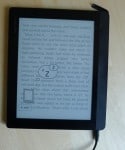
Based on the design of the Color Lux, the 8″ color E-ink ereader which Pocketbook released last year, the InkPad has an unbalanced design which makes it ideal for one handed use.  It has a brown plastic shell with page turn buttons to the right of the screen. There’s also a strip of rubber above and below the buttons to help you grip the InkPad, and a corresponding rubber pad on the back.

The only obvious detail on the front of the InkPad are the page turn buttons and that strip, but if you look closely you’ll find a sensor strip above the screen. That is the control for the frontlight, and it is one of the nicer features.  It takes 6 or 7 swipes to go from off to maximum brightness, offering finely grained control of the screen brightness.

You’ll find the headphone jack on the bottom right edge, and under a cap on the upper right edge are the microUSB port and the microSD card slot. The power button is next to that cap.

Of the five larger ereaders in my office at the moment*, the InkPad is easily the nicest to hold and use. Given its size you wouldn’t think this would be a one-handed ereader, but thanks to the lop-sided design it is the only one of the larger ereaders which I feel can be used that way (and since the text – but not the menus-  can be reversed, the InkPad is equally good for righties and lefties).

* (Kobo Aura HD, Bookeen Ocean, Onyx Boox T68 Lynx, Kindle DX, and the InkPad)

Screen & Frontlight

With an 8″ Pearl E-ink screen, the InkPad clearly won’t have as good of a screen as the latest premium ereaders, but the screen was still far better than I expected. In many ways the screen on my InkPad is nicer than the one on my T68 Lynx or my Paperwhite (2013).

In comparison to the KPW, the Inkpad’s frontlight much whiter and brighter.  When the frontlights are off, the InkPad’s screen is slightly grayer, but whether the light is on or off the KPW still has a noticeable brown tint. And whether the frontlight is on or off, the text on the Paperwhite’s screen is sharper and blacker; if I didn’t know better I would think the KPW had the sharper screen.

In comparison to the T 68 Lynx, the Inkpad’s frontlight is again whiter and brighter. It makes the T68 Lynx’s frontlight look fuzzy in comparison, and when the frontlight is off the InkPad’s screen is still slightly whiter than the the screen on the T68 Lynx.

Software

This section will be abbreviated because  I’ve already covered the apps and ebook format support in some detail. (On a related note, I’ve recently updated the post on ebook formats with a new opinion on the usefulness of the limited support for Mobi and other formats.)

The InkPad runs Pocketbook’s software, which I found satisfactory – so long as I didn’t have to interact with it much.

While the home screen was good at getting me into whichever book I had open, the library screen was only good at wasting screen real estate. Rather than show a neat and orderly grid of icons for the ebooks on my InkPad, it insisted on showing the ebooks shelved in alphabetical order. If there was only a single ebook who’s title or author began with a given character, it would be shelved by itself – thus wasting the screen to the right

The only to get that neat and orderly grid was to sort the library chronologically – by the day an ebook was added to the InkPad or last opened. Neither suits me.

Reading Experience

The InkPad supports a number of different ebook formats, including Epub and PDF as well as office doc formats. I’ve already covered how well the various file formats are supported (here), so in this section I’ll just focus on Epub and PDF.

Text PDF support is great, although I don’t read much in the way of text PDFs so that doesn’t matter much to me. I would like to use the InkPad for graphic novels, but each page was abysmally slow to load.

Epub wasn’t so well supported. The InkPad forced full justification, which was annoying, but I actually didn’t mind so much.  But the other bugs, including the tendency to freeze, the general inability to go a page back in the text, and the slow page turns, did detract from the reading experience.

But in spite of the problems I still liked reading on the InkPad. Given the issue with bugs, you’d think I would be as frustrated with it. Strangely, I’m not. Even though the InkPad was noticeably slower to turn a page than the Paperwhite, I didn’t mind to much.

Curiously, over the past 3 or 4 days before publishing this review I have been reading ebooks in Mobi format. In spite of the incomplete support for that format I am enjoying reading on the InkPad.

Comparison Reviews

(more to come)

Video

I’m not one to shoot videos (I don’t like watching them much, either) but I have found several worth watching.

Verdict

In spite of the hassles in buying an InkPad, I love this baby. It’s a lot bigger than I am used, but I like reading on it.

It’s solidly built with a decent quality frontlight and screen. It works great with text PDFs, and while it’s not so great with Epub I am still enjoying it. With its 8″ screen, the InkPad would best be described as the equivalent of reading from a hardback (in comparison to 6″ ereaders, which are like reading from a paperback.)

But it’s also hard to get, and with a $240 price tag it is very expensive. And as much as I like it, I’m not sure it justifies the price tag.

It’s good, yes, but is it $240 good?

That would really depend on  what you need it to do, and it would depend on what you compare the InkPad to. There are some really good but smaller ereaders on the market, but not much that is as big or bigger than the InkPad which compares well.

The InkPad can’t quite match the screen sharpness or the ebook format support of the Onyx Boox T68 Lynx (6.8″ screen, Android 4.0). It doesn’t have the super-high resolution screen of the Kindle Voyage, or the waterproof and high-quality screen of the Kobo Aura H2O (6.8″ Carta E-ink screen).

On the other end, the InkPad offers a sharper screen and a lower price than the Kindle DX or the Onyx Universe, and there isn’t that much else in the 8″ and above range.

The InkPad is good at PDFs, and one thing I do like about the InkPad is the page turn buttons. They’re rather anemic, but the InkPad does have more functional page turn buttons than any of the 3 ereaders mentioned above.

That makes one handed reading a lot easier, and when combined with the 8″ screen the InkPad offers the best reading experience of any of the 8″ or larger ereaders.

Where to Buy

The InkPad is available from a number of retailers in Europe and Russia, including Pocketbook’s official sites, Amazon, and smaller retailers. It’s also out of stock at the time I wrote this review, so I’m not sure you will be able to get one.

You will have even more trouble getting one outside of Europe. While it is possible to order an InkPad from Pocketbook France, I would not trust them to ship it.

I bought my unit from them at the beginning of September, and after numerous production delays they promised they would ship in the middle of October. And then they stopped responding to my emails, forcing me to complain to Pocketbook corporate.

While I did get one, Pocketbook France did not ship it and thus I cannot recommend them.

Specs

  • CPU: 1GHz
  • RAM: 512MB
  • Screen: 8″ Pearl E-ink display, 1,600 x 1,200 resolution
  • Frontlight, Touchscreen
  • Storage: 4GB internal, microSD card slot
  • Connectivity: Wifi
  • Battery: 2.5Ah, one month runtime
  • Audio: headphone jack (TTS, MP3 supported)
  • eBook Format Support (more details here): Epub, PDF, FB2, DJVu, Mobi, PRC, CHM
  • Office and Other File Format Support: Doc, Docx, RTF, txt, HTML
  • Weight: 350 grams
  • Dimensions: 195.5 x 162.8 x 7.3 mm

 

Amazon Now Bundling Kindle Unlimited With New Kindles, Fire Tablets

If you’ve been waiting to pick up a Kindle on Black Friday then I have some good news for you: a better deal has come along. I’ve just learned that Amazon is now offering Kindle Unlimited as part of bundles with select Kindle and Fire hardware.

Kindle Unlimited is Amazon’s subscription ebook service. It usually costs $10 a month for access to a catalog of around 750,000 ebooks (and a few audiobooks). But under the new bundle program you can get the basic Kindle with 6 months KU for $99, or about $40 less than what it would cost separately ($79 + 6*10 = $139).

Amazon is also offering similar bundles for Fire HD 6, Kindle Paperwhite, and the Fire HD 7.

The bundle offer is only good for these 4 devices, so you can’t buy a Voyage or a Fire HDX and get the 6 months free, alas. But on the upside I’ve checked and I can confirm that you can buy a bundle as a gift. And like Amazon’s past bundle deals, the discount is applied when you check out.

  • Kindle $99
  • Kindle Paperwhite $149
  • Fire HD 6 – $129
  • Fire HD 7 $169

So far as I know this is the first time Amazon has offered a bundle for KU. Their smaller competitor Oyster has worked with QVC to bundle its service with select tablets, and as you might recall Amazon offered a bundle last week which combined Amazon prime and Amazon hardware.

Are you going to get one? What about giving one as a gift?

An Incomplete Report on a Flawed Pilot Program Suggests that Library eBook Loans Don’t Drive Sales

Earlier today the UK Publishers Association released a 6 month status report on the small scale library ebook lending project which had been carried on in the UK for the past 8 months. If the report is to be believed, ebook loans don’t affect the lending rate for paper books, and they also don’t drive sales *.

I wouldn’t be so sure about that last point.

As I reported in March, 4 local libraries in the UK were selected to participate in a pilot which was going to test the impact of library ebook loans on the market for paper books and ebooks. A total of 893 ebook titles (rather than the planned 1,000 titles) were contributed for the pilot by UK publishers. That’s a larger number than it appears to American eyes; the library ebook market in the UK is much more anemic than in the US.

The 6 month status report released today found that:

  •  An overall growth in e-lending.  All four authorities have seen a significant increase in e-lending, with the pilot titles constituting a significant proportion of the overall e-book downloads.
  •  A longer loan period leads to more titles being borrowed. Longer lending periods (i.e. 21 days) appears to have led to a higher number of different titles being borrowed and more patrons joining the waiting lists.
  • The increase in e-lending is not leading to a decrease in physical lending.  The participating libraries do not appear to have seen a decline in footfall or in the lending of physical books.
  • No evidence of e-book lending leading to buying. There has been extremely low take up of the opportunity to buy the borrowed e-book through use of the “click to purchase” facility.

There are some interesting conclusions here, but did you catch what was missing from the publicly available information?

For one thing, a list of titles included in the pilot, and a list of the stores which were available via the libraries' websites. There was also no mention on the possible effect that the library ebook loans may have had on sales in ebookstores elsewhere.

While I do agree that measuring the impact of library ebook loans is important, you can’t do that without at least trying to survey the entire ebook market. That was not discussed in the status report, and thus the report is incomplete.

Another problem this report is that it says that there was no evidence of ebook lending leading to buying via a co-located buy button, but what the report doesn’t mention is that the pilot neglected to offer buying solutions that a library patron might actually want to use.

I checked a few dozen titles, and the only retail option offered was Kobo (about half of the titles had no buying option at all). While I am sure some of my readers like Kobo, it has been widely reported that the Kindle Store controls three-quarters of the UK ebook market. If that is even remotely true then this part of the pilot was a complete and utter waste of time. In not offering a retail option which patrons might want, the pilot might as well not have offered any retail option at all.

And that is a shame, because the concept of pushing sales through a library website is worth investigating. The idea has its upsides, including pleasing publishers, supporting libraries via a commission, and satisfying frustrated patrons, but unfortunately I have yet to see a valid test of the idea.

As I reported last week, OverDrive isn’t adequately supporting the option here in the US. Of the 5 S&S titles in my local library, three only offered a single retail option, and that was a site I had never heard of.

And now it is clear that they are not adequately supporting it in the UK, either.

image by ironypoisoning

Germans Call for Reduced Taxes on eBooks

The US may be blessed with lower taxes on the ebooks we buy (it’s the downside of fewer social services) but most of Europe isn’t so lucky. In Europe ebooks are taxes as a service with 17% to 25% VAT bundled into the retail price (and not the 5% to 12% most EU member countries apply to paper books) and a lot of people are not happy about that.

Bitkom released the results of a survey today which shows that there is strong support in Germany for lowering the taxes on ebooks. Almost nine out of ten Germans (87%) support charging a lower tax of 7% on ebooks sold in that country rather than the full 19% collected on most goods and services.

The results are based on a survey of 2,310 German consumers which showed that only 8% of respondents thought that ebooks should be taxed at a different rate than paper books, and 5% actually took the position that paer books should be taxed at a higher rate.

Bitkom calls on the German gov’t to respond by lowering the tax rate, noting that a recent EU court ruling (C219 / 13-K, dated 11 September 2014)  gave the gov’t leeway to do so.

The topic of taxes on ebooks is becoming a pressing issue as the new year approaches. Thanks to a change in EU tax law, retailers will soon have to start collecting taxes based on where the customer is located in the EU, and not where the retailer is located. The change neatly wipes out what is known as the Amazon loophole, the sweetheart deal that Amazon (and a number of other retailers) secured by setting up their ebook operations in Luxembourg or other low tax environs.

The change in EU tax law is expected to increase the average price of ebooks in some parts of the EU, including the UK, but it’s not clear how Germany and other parts will be affected.

A number of countries have fixed price book laws, including Germany, so the price of ebooks published in those countries cannot go up without direct publisher action. eBooks published elsewhere, on the other hand, might see a price increase. The KDP contract suggests that Amazon may have that power, and their less public contracts with publishers outside of Germany might also grant them some wiggle room on price.

We’ll just have to wait and see.

Self Publishing Bibel

images by pj_vanf


In Relaunching Pelican Books, Penguin Breaks With the Past in Pursuit of a Digital Future

When it was launched in the 1930s, Pelican Books was the nonfiction imprint for the then-new paperback publisher Penguin. It brought self-improvement and  self-education to a customer base which was unable to afford the more common hardback books (then as now a luxury item).

But in relaunching Pelican Books 30 years after it closed, Penguin has shown that it has either forgotten about or simply doesn’t care about Pelican’s original goal; aside from one small modernization the new Pelican Books bears little resemblance to the old.

The one modernization was caught by Creative Review last week. They reported that the new Pelican was letting digital drive print:

One of the most interesting aspects to the Pelican relaunch, which we covered in detail in the CR June Monograph, was that on-screen development had influenced the design of the printed editions, and vice-versa.

While the rich heritage of the imprint could have weighed down on the shoulders of the design team – Penguin’s non-fiction brand originally ran from 1937 to 1984 and spawned a multitude of great cover design – it was in fact the digital era that influenced its new direction in 2014.

Perhaps even more unusual was that the idea for how the online versions of the books might work came out of Penguin’s art department and its work on the new Pelican range, rather than from any editorial or marketing directive.

Given that ebooks are the new paperback, letting digital lead print is in keeping with Pelican’s history, and the attention paid to the quality of the digital edition follows logically from that conclusion.

And Pelican is doing some great work with digital, including well-designed footnotes, large interactive maps, and other features:

But that is about the only way that Pelican honored the past; the new digital editions are neither as prevalent as the paperbacks which Pelican produced when it launched 80 years ago nor are the ebooks as cheap (even accounting for inflation).

Pelican’s new digital editions are sold directly to the public (good) from a website that works on most web browsers (great) but have to be read online (bad) and cost £4.99 (terrible).

When Penguin first introduced paperbacks in the 1930s, they cost sixpence in the UK and ten cents in the US. It’s difficult to find an exact match in today’s dollars, but the official inflation index based on the CPI would peg the value of a dime 1935 as being worth about the same as $1.80 in 2014.

Pelican is charging the equivalent of $7.80.

And not only is Pelican charging many multiples of a budget price, they are also restricting their customer base to those who can afford a data plan in order to read the ebooks on their mobile device. This is a far cry from the original paperbacks, which could be found at most newsstands.

In short, Pelican Books only shares the name of its antecedent; it certainly doesn’t share the goals. Had Pelican shared the goals of its predecessor, it would produce DRM-free ebooks which can be read anywhere and cost only a £1, rather than producing books which cost the same as and are even less prevalent than most ebooks.

And in case you’re wondering, it is fair to compare the old to the new; while I was researching this story I found any number of articles that gushed about the old Pelican Books, how wonderful it was, and how great things will be now that it has been relaunched.

I found articles in The Guardian, the Independent, the Seattle PI, and elsewhere, and guess what?

I’m the only one who actually looked at the new Pelican Books with a critical eye. Everyone else just assumed a connection that did not actually exist.

And in case you’re wondering, I wasn’t expecting the old and new to have any real connection, nor do I see the above post as a rebuke of Penguin (their business is their business). I just thought that the contrast was worth a comment.

PwC Claims eBook Sales Will Exceed Print in 2018

The perennial ebook optimists at PricewaterhouseCoopers are back again with a new projection of the growth of the US and global ebook markets.

This time around the NYTimes is repeating the latest PwC prediction, writing that:

E-books have made impressive inroads into the English-reading world, but their success in Europe — even among wealthy, tech-savvy countries with robust publishing industries — remains spotty at best. In the United States and Britain, sales of e-books represent between a quarter and a third of the consumer book market and, by 2018, will edge out printed and audio books as the most lucrative segment, according to projections by the consulting firm PricewaterhouseCoopers. But the picture is radically different in continental Europe. Last year, digital books made up 8 percent of the consumer book market in France, less than 4 percent in Germany and Italy, and 1 percent in Sweden and Norway.

The NYTimes also posted a graph of the prediction:

While I would be happy if PwC’s prediction came true, I feel I must point out that they have made this prediction before.

it is something of an annual tradition for the tea leaf readers at PricewaterhouseCoopers to make the same prediction about the US ebook market, namely that it would exceed the print market in 4 years. In 2012 PwC said that ebooks  would pass print in 2016, and in 2013 the goalpost was moved to 2017. And now PwC has moved the goalpost yet again, this time predicting that ebook sales would exceed print sales in 2018.

Don’t get me wrong, I would be happy if PwC was right at one point, but in pushing the target year back by a year they’ve basically admitted that they’ve been wrong twice.  That doesn’t exactly convince me that they’re going to get it right this time around.

And to be completely forthright, I’m not sure I would be able to prove that PwC was right or wrong when 2018 rolls around.  The size and shape of a market like ebooks cannot be feasibly measured accurately. You can make estimates, sure, but it’s too fractured to find the full measure.

In any case, I am looking forward to making this post an annual tradition. PwC will post their prediction, and I will point out that they missed in their previous predictions.  We’ll all laugh, drink hot cider, and what fun we’ll have.

eBooks Now 7% of Book Sales in the Netherlands

It looks like Amazon may have launched a Dutch Kindle Store just in time for it to take off.

New data from the market research firm GfK shows that ebook sales accounted for 7% of the consumer market in the Netherlands in the third quarter of this year, with 1 in 7 fiction titles sold as an ebook. That’s up from an estimated 4.7% of sales in the 12 months ending July 2014.

GfK also reported that paper book sales continued to decline last quarter, with overall sales down 14%. Children’s books and nonfiction titles, however, did better. The total estimated sales of books in the third quarter amounted to 108 million euros, down 8.9% from a year earlier, with 8.5 million books sold.

With several regional competitors and multiple international bookstores present, the Dutch ebook market is far more competitive than its small size might justify. In addition to iBooks, Google, and the recently launched Kindle Store, Kobo and its partner bol.com are the leading ebook retailer, with Tolino and its partner, the bookseller coop Libris, rounding out the top 5 most visible competitors in that market.

ereaders.nl

image by Luke,Ma

Why Hachette Had to Settle: Revenues Fell 18% in Third Quarter

Much ink has been spilt over the past day on the subject of Amazon, Hachette, and their new book contract, and while we don’t know who got the better end of the deal there is strong evidence to suggest that Hachette blinked first.

Buried under the news coverage of the new contract was another story which offers insight into Hachette’s motivations. PW reported yesterday that Hachette’s US revenues were down considerably from last year:

Third quarter sales at Hachette Book Group USA fell 18.5% in the period ended September 30, 2014 compared to the third quarter of 2013, parent company Lagardere reported. The decline was attributed to difficult comparisons with last year when the company had an “unusually high” number of bestsellers led by The Longest Ride, Lagardere said. The “difficult situation” with Amazon also impacted sales and HBG also postponed some titles, Lagardere said.

For all of Lagardere Publishing, revenue in the quarter fell 2.9%, to 564 million euros. In addition to softness in the U.S., sales were down in France and the U.K., but rose in Spain/Latin America.

While revenues were down in most of Lagardère’s publishing divisions, the sharpest decline by far happened in the US and was likely due to the ongoing contract dispute with Amazon.

Given the steep decline in revenues and the timing of news, I think it’s clear that Hachette struck a deal before they released the quarterly report, before they had to admit just how big of hit they took from letting the contract lapse earlier this year.

If they had waited until after the quarterly report, I bet Amazon would have turned the screws another notch – or even worse, let the negotiations drag on until after the lucrative holiday season had already begun.

And with S&S already having signed a deal with Amazon, there wasn’t going to be any chance of another major publisher negotiating with Amazon for another 9 months. That’s much longer that Hachette could have afforded to wait.

image by Ida Myrvold

Vook Buys eBook App Developer Coliloquy

Vook continued to gobble up its smaller competitors today with the acquisition of Coliloquy*.

Founded in 2011, Coliloquy first got its start in developing interactive ebook apps for the Kindle (as in the Kindle ereaders, and not the Fire Android tablets).  As Amazon wound down the development program for Kindle Active Content, Coliloquy expanded their focus to include developing apps for other platforms, including Android and iOS.

Coliloquy has published over 30 titles in the past 3 years, including A Dark & Dismal Flower by JC Herz, Getting Dumped by Tawna Fenske, and Georgetown Academy by Alyssa Schwartz and Jessica Etting, as well as app titles developed on behalf of Disney and published under Disney’s imprint, including RickRiodan’s Heroes of Olympus series.

I was also told by Vooks spokesperson Matt Cavnar that Coliloquy has expanded beyond ebook apps to include ebook publishing, which is Vook’s main interest. According to Matt, Vook is "laser focused on helping authors with ebooks specifically, so that’s the fit for us".

Clarification: Vook is buying only the publishing arm of Coliloquy, and not the rest of the company.

From the description on the Coliloquy website, it appears that Coliloquy saw itself as much a publisher as a tech startup. They were actively seeking manuscripts for publication, but were only accepting submissions from agents or previously published authors:

All of our authors work with one of our traditional editors, as well as directly with our team on narrative structure and technical constraints.

What’s more, I think that there are other parts of the Coliloquy platform which interests Vook. Namely, analytics:

Engagement. In addition to point-of-sale data, we focus on engagement—how invested are readers in the story and its characters? What percentage finish the book? Re-read it? Single book sales are great, but in the long-run, we want readers to come back to our characters and stories—to truly engage and interact.

Coliloquy is Vook’s second acquisition in the past few months; in September Vook bought the failed boutique publisher Byliner. Shortly after acquiring Byliner, Vook boosted royalties to 85% of net; Vook plans to expand that deal to authors published by Coliloquy.

How to Embed an eBook on a Website

One of the niftier features of the Kindle Store is the way that it lets you embed a sample of an ebook in a webpage. Now there’s an option for indie authors to do the same with just about any Epub file, albeit in a slightly more complicated and less convenient way.

A Japanese developer by the name of Satoru Matsushima has released a self-contained Epub viewer which can be installed on most websites. It’s called BiB/i, and all that is required is for you to upload the code for the viewer as well as the ebook you want to embed, and them post the embed code.

The embed code looks like what you would see with the manual (non-automatic) Youtube embedded videos, so some technical skill is required.

I haven’t installed it myself on this blog, but as you can see below it does work:

Mein eBook

You can find other demos here.

The code works well, and you can even use BiB/i to open an ebook sitting on your computer. Simply open the ebook embedded above, switch to full screen, and then drag another EPub file into your web browser.

This won’t work so well for large ebooks (for those it is recommended that you unzip the ebook file before uploading it) but I did just test it myself. I was able to open a couple different Epub files. They were slow to load at first but I could read them.

I’ve just heard of BiB/i, so I can’t tell you if it is in widespread use yet, but I do know of at least one alternative (besides uploading a sample to Scribd and embedding that). There’s Epub2Twitter, which lets you embed ebooks in a Tweet, and ReadK.it, which enables authors and publishers to create self-contained ebooks which can open themselves in a web browser (as well as regular ebook apps).

B&N Expands into POD, Adds Print & Author Services to Nook Press

Barnes & Noble might have announced plans to spin off Nook Media into its own publicly traded company early next year, and after looking at B&N’s ongoing investment in its digital sub I think the plan is going ahead, full steam.

The largest bookstore chain in the US has just announced that they are now going up against CreateSpace, Lightning Source, Blurb, and other competitors in the POD market. And it looks like B&N may have crawled into bed with Author Solutions to do it.

B&N put out a press release today which announced the launch of the Nook Press print service. B&N describes it as:

Designed to be simple and customizable, the NOOK Press print service provides customers with a complete do-it-yourself experience for creating a hardcover or paperback book. The new service offers black and white or color printing, high-quality paper choices, multiple trim sizes and cover treatments.

With print costs starting at $4 per copy for a 5″x8″ paperback, Nook Press POD can handle both color and B&W; hardback and paperback; and it can support the common book sizes from 5″ x 8″ to 8.5″ x 10″.

There’s no mention in the FAQ on the website or in the press release on how one would get the books into a bookstore, so at this point we can only assume that there is no distribution option, alas. (I have queried B&N on this point.)

That’s going to drastically limit the value of the Nook Press POD services, given that Lightning Source and Createspace both offer distribution to bookstores.

In related news, B&N is also launching a new author services section today to help enable authors to get their ebook and print book on the market. Authors can now choose from a variety of packages and a la carte services to receive professional assistance making their book, including editing ($399 and up), cover design ($499), and package deals starting at $999, B&N has all of the bases covered.

It’s not clear who is actually providing the services on behalf of B&N, but one thing I can tell you is that they are rather expensive. I have also noticed that the package deals bear a worrisome resemblance to the packages offered by Author Solutions under its various guises.

For example, B&N’s $999 package and $1,999 package look an awful lot like the $799/$1,899 packages offered by AuthorHouse. The way that the feature lists are worded suggest that Author Solutions is actually providing the services on behalf of Nook Press. (Curiously enough, AuthorHouse is actually providing more services at a lower cost.)

I am still waiting for B&N to get back to me on that point, so you should take that observation with a grain of salt.

But even if I am wrong in making the connection, I would still suggest that authors avoid this part of Nook Press because the prices are simply too high.

The package deals cost more than similar packages at AuthorHouse and offer fewer amenities. That alone is a good reason to avoid them.

But I don’t know I can make the same claim about the POD section. What do you think of the POD prices at Nook Press?

***

Here’s a thought I had right after publishing this post.

At first I was puzzled that B&N would invest in a sub that was being spun off next quarter,  but now that I have looked over the services I think i understand what is going on here.

In adding more services, B&N is trying to make Nook Media more attractive to a potential buyer. Rather than simply be a (failed) ebook platform, Nook Media can now be pitched as a digital publishing services company.

It’s my guess that both the POD and author services have been outsourced. The actual investment for B&N is far less than what it would cost to develop those services from scratch.

The services might not be very attractive to authors, but that’s not why the services were launched. This is a Wall Street play, not a move to invest in a market. B&N’s goal is to make Nook Media  more attractive to potential investors, and it will probably work.

Study: Reading for Pleasure Boosts Your Vocabulary

A new report from the IOE confirms what educators and past studies have been saying for years: reading for pleasure does indeed boost your vocabulary.

In a report titled "Vocabulary From Adolescence to Middle-Age" (PDF), two researchers at the UK’s Institute of Education studied the the vocabulary test scores of 9,432 test subjects in their early forties. The results were then compared to the tests that the participants had taken as children and sorted based on each test subject’s childhood reading habits.

Researchers Alice Sullivan and Matt Brown found that those who had read for pleasure at the age of 10 scored 67% on the vocab test when tested at the age of 42, but those who hadn’t read for fun as kids scored an average of only 51%.

The study also showed that what people chose to read as adults mattered as much as how often they read. The greatest improvements in vocab scores between the ages 16 and 42 were made by test subjects who identified themselves as readers of 'highbrow' fiction. That group scored an average of 5 points higher on the test.

What’s more, the study also noted that the newspapers read by a test subject could be having an effect on their test scores. The study found that those who read a tabloid regularly actually made slightly less progress than those who never read newspapers, while readers of better newspapers showed  greater improvements in their test scores.

"The long-term influence of reading for pleasure on vocabulary that we have identified may well be because the frequent childhood readers continued to read throughout their twenties and thirties," say the researchers, Alice Sullivan and Matt Brown. "In other words, they developed 'good' reading habits in childhood and adolescence that they have subsequently benefited from."

And finally, the study found that reading was a popular pastime at age 42. Just over one in four people (26%) said they read books for pleasure every day, and a further 13 per cent said they did so several times a week.

IOE via The Bookseller

images by pedrosimoes7,  John-Morgan