Nate Hoffelder

Nate Hoffelder

First Look at the New Nook Glowlight 3

Barnes & Noble has yet to announce their new ereader yet but images – and even the product listing –  have appeared on B&N’s website. (I found the images, but a reader found the listing – Thanks, BF!)

Edit: According to one report, the new hardware is in stores this morning.

The listing is now visible to all, but it lacks specifics. We do know the new Nook Glowlight 3 has a 6″ Carta E-ink screen with touchscreen and color-changing frontlight. It doesn’t appear to be waterproof, but it does have the page turn buttons some of us want.

It also has 50 days worth of battery life and 8GB internal storage. Retail is $119, and it will ship on 8 November.

I generally have a low opinion of B&N but I must say this device is tempting. It’s the only 6″ ereader that I can buy with both page turn buttons and a color-changing frontlight. (Yes, Tolino has a 6″ ereader with a similar frontlight, but I can’t buy it here in the US.)

It is a little on the large side, though – the bezel makes the Glowlight 3 big enough that it is almost the same size as the Kobo Aura H2O, an ereader that only costs $40 more and offers a larger screen, card slot, and waterproofing (but no color-changing frontlight).

Here is  gallery of product renders for you to feast your eyes on.


First Look at the Amazon Books in Washington, DC

Amazon currently operates a dozen brick-and-mortar bookstores, and they are getting ready to open three more, including one in our nation’s capital. This afternoon found me in DC, so I made a brief detour and visited the DC Amazon Books location.

The windows were papered over, so there wasn’t much to see. But from the outside it looked like n ordinary storefront and not the den of iniquity that publishing trade coverage had lead me to expect.

The Amazon Books location is part of a larger three and a half story building that used to house a Barnes & Noble store. Most of the space is taken up by a Nike store, however, and the Amazon Books is limited to a fairly typical 3-story commercial storefront.

Do you see the orange in the window? That is Amazon Books, and so are the two floors above, but everything to the right is either a burger bar or  private office, and everything to the left is the Nike store (Amazon has black signage in the windows of the Nike store, but I did check and the space behind the sign is part of the Nike store.)

While Amazon has confirmed that this is a bookstore, they haven’t said how they are going to use the space.

So it remains to be seen whether they will limit the store to the ground floor and use the rest of the space for another purpose, or use the entire volume as a bookstore.

Kobo Re-Releases the Aura One With 32GB Storage

Kobo responded today to the launch of the new Kindle Oasis by releasing a new Aura One model.

Launched last August, the Aura One had a 7.8″ Carta E-ink screen, 8GB of storage, and cost $230.

The new model has the same screen, four times the storage, and a price tag of $279. It’s going to be available in late November or early December – but only in the US and Japan.

In comparison, the new Kindle Oasis has smaller but equally sharp screen (7″, 1680 x 1264) and 32GB storage.

Edit: I should also point out that the 32GB models cost the same – the $249 Oasis has 8GB of storage.

One device has a nifty one-handed design while the other has a variable colored frontlight, and both devices are waterproof – but run different software.

Which one would you buy?

Checklist: Eight Items to Include in an Author’s Book Listing

Comments and feedback on my post on bookshelf plugins for WordPress taught me that many authors still build a critical part of their website, the pages for each of their books, by hand. I like using said plugins because they make it easy, but I have built a few book pages by hand for a site hosted on Squarespace.

Building a book page freehand takes more work, but it also gives you more opportunity to tweak a design so it fits with a particular author’s style or with the book.

Here’s the checklist I put together to make sure I don’t miss important details. Do let me know in the comments if I left something off.

  1. Cover Image – Do you have a large cover image ( > 1500 pixels tall)? You will probably end up using a smaller cover image (300 to 500 px tall), but you will need the larger image so that you can set it as the featured image (if the option is available). And you’ll want to keep a copy of the larger image just to give yourself options.
  2. Description – Usually around 200 to 400 words, this is what tempts readers into reading reviews, checking the price, and maybe adding a book to their TBR pile. It would be best to use original content, but in a pinch you could reuse the description from the book’s listing on Amazon and other retail sites.
  3. Metadata – This is one area where using a bookshelf plugin helps a lot. Most plugins will give you a form to fill out, making it easy to remember all the details, but if you’re building a book listing by hand then you’ll need to remember to list all of the relevant metadata, including the title, author name, genre publication date, page count, etc.
    These details might not seem important, but the page count, for example, tells readers whether to expect a short story of fantasy epic, and details like the title are important to anyone using a screen reader.
  4. Excerpt – This is the 1,000 to 3,000 snippet of the book that will give readers a taste of the writing style without giving away too much of the story. It can be hard to embed such a large body of text on the same page as the rest of the book listing, which is why the excerpt is either on a separate page or at the foot of a page. One might also choose to use Amazon’s preview feature for the snippet. This works as an embeddable widget that can expand to cover the entire screen, and includes links to the Kindle Store.
  5. Audiobook excerpt – If you have an audiobook, you can upload a snippet to SoundCloud and embed that snippet on the book listing.
  6. Reviews – If the description and excerpt haven’t sold a potential reader on your book, reviews might. Carefully read your reviews – even the negative reviews – and copy the best parts as quotes. List those quotes on your book’s page, and link back to the reviews – and yes, this includes the negative reviews (maybe). One man’s trash is another man’s treasure, and the reasons I hate a book might be inspire someone else to buy it.
  7. GoodReads – It is always a good idea to link to GoodReads, as it is the single largest source of reviews.
  8. Buy Buttons – The whole purpose of this page is to get someone to buy the book, so of course you need to include link to sites where the ebook, audiobook, and print book can be bought.

image by Ole Husby

Amazon Now Teasing Audible Audiobook Support on $79 Kindle

When the original Kindle launched in 2007, it could play audiobooks sold by Amazon’s (then) recently-acquired  Audible. This feature was dropped from later models as they lost support for audio, but now Amazon is bringing it back.

The new Kindle Oasis will play Audible audiobooks (the feature is coming in an update after it ships) and now Amazon is teasing that support will be coming to the $79 Kindle.

Amazon has updated the listing for the basic Kindle with this nugget of detail:

  • With built-in Audible, access the world’s largest library of audiobooks. Easily switch between reading and listening on Bluetooth-enabled speakers or headphones. Available in the coming months.

Amazon hasn’t mentioned Audible support on the listings for the Voyage or Paperwhite, and there’s no specific date on when the basic Kindle will get the feature, so it might not arrive until next year.

But the feature will arrive eventually, at which time you are better off not using it.

The thing about the Kindle is that it has a small battery. When used as an ereader, the Kindle will last for weeks, but streaming audio over Bluetooth will drain the battery quickly. Said Kindle also has limited storage – 4GB (3GB is user accessible). So even if you didn’t run out of battery life, you’re still run out of storage after a handful of audiobooks.

So while the basic Kindle could certainly function as an audiobook player, you would be better off using some other device.

image by gminguzzi

AAP Reports Publisher eBook Revenues Down in First Half of 2017

Judging by the latest revenue report from the Association of American Publishers, last month’s report of a jump in ebook sales was exactly what it looked like: an anomaly.

Total publishers’ revenues were up by $195.9 million (3.5%) for the first half of 2017, to $5.72 billion. Trade revenues rose by 3%, to $3.27 billion, largely as a result of revenues from hardback and downloadable audiobook sales.

Both paperback and ebook revenues were down in the first half of the year, with ebook revenues dropping $26.8 million (4.6%), to $555.7 million.

press release

Publishers’ revenues (sales to bookstores, wholesalers, direct to consumer, online retailers, etc.) were $5.72 billion – up by $195.9 million (3.5%) for the first half of 2017 compared to the same period in 2016. Tracked categories include: Trade – fiction/non-fiction/religious, PreK-12 Instructional Materials, Higher Education Course Materials, Professional Publishing, and University Presses.

Revenue for Trade Books grew by 3.0%, with revenue increases in both Adult Books and Childrens/YA books over 2016.

“What a testament to the importance of the publishing industry,” said Maria A. Pallante, President and CEO, Association of American Publishers. “Whatever the category, format or distribution platform, books remain a constant in the marketplace and in our lives.”

Trade Books

  • By Category: In the first half of 2017, compared to the first half of 2016, trade sales were $3.27 billion – up by $95.8 million (3.0%)
    • Adult Books had $2.22 billion in sales, up $66.7 million (3.1%)
    • Childrens/YA Books had $852.4 million in sales, up $36.8 million (4.5%)
    • Religious Presses had $197.0 million in sales, down by $7.7 million (-3.8%)
  • By Format: In the first half of 2017 vs. 2016
    • Paperback/Mass Market books had $1.27 billion in sales, down $23.6 million (-1.8%)
    • Hardback books had $1.11 billion in sales, up $98.7 million (9.7%)
    • eBooks had $555.7 million in sales, down $26.8 million (-4.6%)
    • Downloaded audio had $157.7 million in sales, up $38.2 million (32.0%)
    • Other formats (including board books, physical audio) had $181.8 millionin sales, up $9.4 million (5.4%)

Below is a chart that shows the market share of various Trade Book formats for the first half of the year from the past six years. Print books – including paperback, mass market and hardback – account for more than 70% of publisher revenue of trade books. Audiobooks more than doubled their share since 2011.

Educational Materials and Professional Books

  • Educational Materials: In the first half of 2017, compared to the first half of 2016
    • PreK-12 Instructional Materials had revenues of $1.19 billion, flat at +0.1%
    • Higher Education Course Materials had revenues of $941.8 million, up by 11.2%
  • Professional Books and University Presses: In the first half of 2017, compared to the first half of 2016
    • Professional Books had revenues of $273.2 million, up 0.7%. These categories include business, medical, law, scientific and technical books.
    • University presses had revenues of $24.6 million, up 2.5%

About StatShot

Publisher net revenue is tracked monthly by the Association of American Publishers (AAP) and includes sales data from more than 1,200 publishers (#AAPStats). Figures represent publishers’ net revenue for the U.S. (i.e. what publishers sell to bookstores, direct to consumer, online venues, etc.), and are not retailer/consumer sales figures.

Review & Roundup: Seven WordPress Plugins for Author Bookshelves

Author websites come in many shapes and forms, and can be found on just about every platform from Squarespace to WordPress, but the vast majority share at least one common feature.

Generally speaking, they all need to display the books an author has written, or is working on.

Authors with a site on Squarespace, WordPress.com, etc, will have to build a book listing page by hand, but this is one area where self-hosted WordPress websites excel.

Edit: If you’re building a book page by hand, here’s a checklist of what you should include.

Authors with a self-hosted WordPress site have any number of options for listing their books on their sites. They can either use a theme like Preface, and use its built-in features to create book pages and book shelves, or they can use one of the following plugins.

(If you would like to use a theme with a built-in bookshelf, you can find several on ThemeForest.)

I recently undertook a survey of bookshelf plugins so I could recommend one to a client. There aren’t a lot of options, but I did find a couple great plugins.

Tl;DR

My top two choices are Novelist, because it’s free and I really like it, and MyBookTable, because its users can’t stop themselves from recommending it.

When I look at bookshelf plugins I try to keep three requirements in mind:

  • The plugin has to look good on my site, and include both bookshelf pages and book pages
  • It has to be easy to use.
  • It needs to have widgets that I can use on to automatically display book covers and blurbs the front page of my site, and other pages.

The last feature might not sound important, but I have found that I want to build front pages that promote the latest book, or perhaps a series. I think it’s an attractive design element, and a lot of authors like – with good reason. It helps them promote their work.

Here are 7 WordPress plugins that authors can use to list their books on their sites, and some comments on my experiences with the plugins.

WordPress Book List

No one is using this plugin, which is shocking because it is my first choice. This is one of the two plugins you should install first and test before trying anything else. The free version looks good, and the paid version gives you extra layout options and several useful features, all for $22.

It does not have the widgets, but I like the rest of the plugin enough that I sometimes build the widget manually.

Edit: I just built a bookshelf with a half-dozen books and suddenly I like this plugin a whole lot less. I was going to st up a demo but it was honestly so frustrating that I don’t want to spend more time getting it right.

Novelist

This is the second of my preferred plugins. The free version is great; it lets you reorganize the book listing layout to your own design, and it even includes many of the features other plugins would ask you to pay for.

As you can see in the demo, a book listing takes up a lot of space on the page. This plugin begs for a theme with a lot of whitespace, so it’s not going to work for everyone.

MyBookTable

This is one of the less commonly used plugins, but I know of several authors who use it, and I must admit that it looks great on their sites. I have not used it much, though, because I found that the free version is missing too many features. For example, the Amazon and B&N buy buttons are only available with the $49 Pro version.

I’m sure the Pro version is great, but I have yet to see a reason to invest in it. The thing is, competing free plugins have the features I want so I use them instead.

Genesis Author Pro

StudioPress is one of the more well-known premium WordPress theme developers. I think their themes are over-engineered Rube Goldberg machines, but I won’t dispute that they are very popular and also reliable.

They make an author theme called Author Pro., and they also make a matching free plugin called Genesis Author Pro. This plugin can be used with StudioPress’s other WP themes to add book listings and bookshelf pages.

If you have a StudioPress theme then you should try this plugin first – it works, and looks professional. If your theme was made elsewhere then don’t bother; this plugin was made to only work with StudioPress themes.

MooBerry Book Manager

This is a highly rated but not a widely used plugin. I liked it. I thought it was easy to figure out, and that its book pages looked good. It included both custom bookshelves/collections and let you display book covers with a widget (the widget wasn’t really worth using, though).

Alas, I had to stop using it once I realized that it was causing conflicts on a couple different sites I was building.

GS Books Showcase Lite

This is another one of those plugins where the pro version looks great but the free version is so limited that I didn’t use it long enough to decide if I wanted to invest in a license.

I did check, and apparently the developer is no longer selling the pro license. (The developer’s own website is broken, which is a good argument against paying them for a license.)

Book Showcase

This plugin doesn’t do anything useful and has limited features. Don’t even bother trying it. (Reviews should ideally be longer than this, but let’s not waste any time.)

Amazon Launches All-New Kindle Apps for Android, Windows, iOS

Amazon has launched a new mobile Kindle app for Android and iOS (there’s also an update for the Kindle Windows app).

According to an early report over at MobileRead, the Kindle for Windows app (v1.21) includes a couple small features that help the app catch up with the previous versions of the Kindle mobile apps:

  • Ragged Right Alignment: You can now read using left-aligned (ragged right) text instead of full justification. This new alignment option can be selected from the Display Settings (Aa) menu in books.
  • Line Spacing: Further customize your reading experience by selecting from 3 different line spacing options. This new feature can be controlled from the Display Settings (Aa) menu in books.

You can find the app on Amazon.

Currently stuck somewhere between launch and delivery, the Android and iOS app features a new interface and a new search function. You should be able to find these apps in Google Play and iTunes, but the Android app is not available to all (I am still waiting to upgrade).

According the press release, the new Kindle mobile apps features include.

  • All-New Look–The Kindle app features a new look and feel inspired by books. Details include larger book covers, new fonts, a new app icon, and new light and dark background themes to choose from.
  • One-Tap Access–New bottom bar navigation automatically shows an icon of the book you’re currently reading, making it easier than ever to get back to reading at any moment. The bottom bar also provides quick access to Kindle’s most popular features allowing you to switch between the pages of your book, your library, your personal bookstore, and more.
  • Easy Search–The search bar is now always available throughout the app, so whether a book is in your library or among the millions of titles in the Kindle Store, it’s easier than ever to find it.

Discover and Discuss Books with Friends and the Goodreads Community on Kindle for iOS

The new Kindle for iOS app also helps customers discuss and get book recommendations from their friends, authors, and other readers with the Goodreads community now built right into the app. Goodreads, an Amazon subsidiary, is the world’s largest community of readers, with more than 65 million members.

"For as long as there have been books, people have discussed them with friends," said Otis Chandler, CEO and co-founder of Goodreads. "When you finish an amazing book, you can’t wait to find out if other readers feel the same way. Readers trust their friends for recommendations, with around half of them saying they discover books through word-of-mouth. With the new features on Kindle, connecting with your friends and similar readers in the Goodreads community is now built into the app."

Reading is better when you can discuss it with friends. In Kindle for iOS you can now:

  • Find New Books to Read–Browse the new Community tab to keep up-to-date with what friends and readers you follow are reading. When you find a book you are interested in, you can add it to your Want to Read list for quick reference when you are ready to start your next book.
  • Connect with Readers Who Like Similar Books–To help you get recommendations from readers who like the same books, Goodreads also suggests people to follow, including authors and popular Goodreads reviewers.
  • Share Your Thoughts About Books You’ve Read–Post notes and highlights from your book for friends to see and comment on. Easily share when you start reading a book, as well as your rating/review when you’ve finished a book.

Starting today, the Community tab featuring Goodreads discovery and discussion features are available on Kindle for iOS (in the US only), and will be coming to Kindle for Android in a future release. To learn more about how Kindle helps you read anytime, anywhere visit www.amazon.com/kindleapps.


image by chrismccorkle2

Wattpad Launches Paid Subscription Service

Wattpad continues to struggle to overcome its mistake in its early years when it choose to build its platform but not its business model.

The author-focused social network has tried sponsored stories, pimping authors to publishers, interrupting stories with ads, and now it is launching a paid subscription service.

It announced the launch on its blog yesterday.

Since Wattpad was founded over 10 years ago, we’ve always prided ourselves on our commitment to listening to our community. As we’ve grown from just 1,000 users in our early days to a global community of more than 60 million people today, we continue to pay close attention to what our users want to improve their Wattpad experience.

One of the most frequent requests we hear from Wattpadders is for an option to enjoy an ad-free experience on Wattpad. So starting today, we’re thrilled to launch Wattpad Premium for community members in Canada and the US! Wattpad Premium is our first-ever subscription tier, giving Wattpadders more control over their experience on the platform and the ability to enjoy an uninterrupted, ad-free experience.

Wattpad Premium will be available for $5.99 per month or $59.99 upfront for the year (a savings of two months). At launch, Wattpad Premium will include an ads free experience on mobile and web, as well as a fresh new theme within the app. We’ll also be adding additional features in the coming months, offering Wattpadders new ways to take more control of the look and feel of the platform.

“The Wattpad community is the most important thing to us, and we want them to have the best possible experience across all our platforms,” said Allen Lau, Wattpad CEO and co-founder. “An ad-free option has been one of the most requested features from our users. Wattpad Premium gives people more control over their Wattpad experience, and allows us to continue to offer Wattpad as a free platform that anyone can enjoy.”

The thing about Wattpad is that it missed  great business opportunity when it was just getting started. It neglected to develop a distribution business, and as a result after authors have grown their audiences by developing stories on Wattpad they then use some other platform to put the stories on the market.

If Wattpad distributed those stories they could have avoided annoying users with adverts, and charging a subscription.

But as they say, hindsight is always 20/20.

On Not Linking to Amazon

Every so often someone in the book industry tries to make an argument that websites should not link to the one site where everyone knows that they can find the books they want (Amazon).

This time around the ramblings come from Publishers Weekly:

Michael and I contacted the respective publications. Surely they could see the disconnect in sourcing a book list from local bookshops and then pushing readers to buy those books from an online discount megastore? Both removed the Amazon links. But why did we have to ask?

It seems to be a trend. Even as people seek out the expertise of indie booksellers, they treat Amazon as the default for book links. Bloggers write about shopping local while linking to Amazon. Authors appeal to bookstores for book tours and sales but announce their books on Facebook with Amazon links (yes, even for a book titled How to Find Love in a Bookshop).

Outlets and individuals who publish compelling content exert some control over the cultural conversation. With their choice of links, they drive consumer behavior as well. It’s one thing to publish a book review; it’s another to publish a book review in which each book title is linked to a website that sells books. One is a piece of criticism; the other is criticism and a sales tool. When people click those links, a habit forms. Book-loving social media users, bloggers, and editors have the power to shape those habits.

The thing that gets me about pleas like this is how they never offer a practical alternative.

It’s not just that they can’t match the financial incentive of linking to Amazon (and so what they are really asking is for websites to give up on income) but also that the suggested alternatives are of no benefit to readers.

Sure, I could link to my local bookstore, West Bumfuck Books and Bait. Anyone who lives in the area will of course have the time to go there and buy the books I mention.

And of course WBBB has those books in stock, and they sell online. Anyone who lives in San Francisco and happens to read my article will, of course want to buy the books I mention from WBBB because the store has an immense warehouse of books at prices far below the publisher’s list price and will ship anywhere in two days at no charge.

eBooks? WBBB has an amazing ereader and great Android and iPhone apps that let me download any ebook I want in seconds at really low prices, sometimes even free.

(Want to hear something funny? Pleas like this is are so repetitive that I was able to respond by cribbing text that was published on The Passive Voice blog four years ago.)

Why is it that so many that make this type of plea are so unaware of the fact that they’re repeating ideas that simply don’t work?

Here’s what the OP suggested:

What if book titles in online media linked to each book’s page on its publisher’s site instead, where the “buy” button offers multiple options? Or what if titles linked to IndieBound.org, the online shopping site managed by the American Booksellers Association, which connects users to the independent shops nearest them as well as indies that ship nationwide?

Finding the publisher website, and then finding a given book on that website, is difficult to impossible. And as for Indiebound, it charges full retail price, and it takes 4 days or more to process an order. I’m not helping my readers by sending them there. (It also doesn’t sell ebooks, so if that’s what they want to buy then they will be SOL.)

The other thing about Indiebound is that it won’t help you find indie bookstores. It will only direct you to ABA members, a group that includes museum gift shops, college bookstores, airport bookstores, and online booksellers.

Sure, I will send someone to Indiebound; that way, if they are within driving distance of Staunton, VA, they can buy the book they want from ABA member Pufferbellies Toys.

I am sure it will be in stock.

image by chidorian via Flickr

Hands On with the New Android 6.0 Onyx Boox Max2, Canvas, Note eReaders (video)

Some might claim that innovation has stalled in the ereader market, but that is only true if you ignore  Onyx. The Chinese ereader maker is showing off multiple new models this week at the Hong Kong Electronics Fair, including the 10.3″ Note and the Max2, a 13.3″ ereader that doubles as a monitor.

Okay, the Note isn’t that innovative – it’s an incremental improvement over existing 9.7″ models (the same is true for the Canvas). But it still has a much sharper screen (1872 x 1404, or 227 PPI), and runs a newer version of Android on a faster CPU.

All three of Onyx’s new models run Android 6 on a 1.6GHz quad-core CPU. If the prices are even close to that of the existing models then the boost to performance will make these ereaders a great buy.

please do tell me what you think of the videos below.

In particular, I want you to watch the video for the Max2 being used as a monitor. It’s hard to say without the device in front of me, but the Max2 looks like it is faster than my Dasung Paperlike Pro.

P.S. The Max2 and Canvas videos are courtesy of Notebook Italia, which also told us that Onyx hasn’t said anything specific about the release date, or the price.

Onyx Boox Canvas

Onyx Boox Max2 and Max2 Pro

Onyx Boox Max2 as a monitor

Kindle Unlimited Per-Page Rate, Funding Pool Up in September 2017

For the second month in a row, Amazon has increased the royalty rate for Kindle Unlimited while also bumping the funding pool by $100,000 from August 2017.

The Kindle Unlimited Global Fund for September 2017 was $19.5 million, and the royalty rate was $0.0044253, a major increase over August ($0.00419 per page) and July ($0.00403 per page).

Both of the rate hikes followed the introduction of KENPC v3.0 on 1 August, suggesting that Amazon may have finally beaten the KU scammers.

The rates were up in most markets:

  • US: $0.0044 (USD)
  • Germany: €0.0030 (EUR)
  • UK: £0.0034 (GBP)
  • Netherlands, France, Spain, Italy: €0.0044 (EUR)
  • Canada: $0.0044 (CAD)
  • India: 0.0816 (INR)
  • Brazil: R$ 0.0107PY)
  • Australia: $0.0036 (AUD)
  • Mexico: $0.0736 (MXP)

Not counting the bonuses, KU has paid out $213.1 million in the year ending September 2017. This market has grown to the point that it is bigger than any ebook retailer short of Apple, and with the way it is growing it will soon be bigger than any three ebook retailers (with the exception of Amazon and Apple, of course).

We are approaching the point that – demand for exclusivity or no – authors and publishers aren’t going to be able to ignore Kindle Unlimited. (Heck, I think we are already there.)

P.S. Here’s a list of the monthly funding pools. It does not include the bonuses paid out each month.

  • July 2014: $2.5 million (Kindle Unlimited launches early in the month)
  • August 2014: $4.7 million
  • September 2014: $5 million
  • October 2014: $5.5 million
  • November 2014: $6.5 million
  • December 2014: $7.25 million
  • January 2015 – $8.5 million
  • February 2015: $8 million
  • March 2015: $9.3 million
  • April 2015: $9.8 million
  • May 2015: $10.8 million
  • June 2015: $11.3 million
  • July 2015: $11.5 million
  • August 2015: $11.8 million
  • September 2015: $12 million
  • October 2015: $12.4 million
  • November 2015: $12.7 million
  • December 2015: $13.5 million
  • January 2016: $15 million
  • February 2016: $14 million
  • March 2016: $14.9 million
  • April 2016: $14.9 million
  • May 2016: $15.3 million
  • June 2016: $15.4 million
  • July 2016: $15.5 million
  • August 2016: $15.8 million
  • September 2016: $15.9 million
  • October 2016: $16.2 million
  • November 2016: $16.3 million
  • December 2016: $16.8 million
  • January 2017: : $17.8 million
  • February 2017: : $16.8 million
  • March 2017: $17.7 million
  • April 2017: $17.8 million
  • May 2017 :$17.9 million
  • June 2017: $18 million
  • July 2017: $19 million
  • August 2017: $19.4 million
  • September 2017: $19.5 million

Self-Publisher Bibel

image by Images_of_Money

CreateSpace to Close its Web Store

Amazon’s POD service Createspace is going to shut down its eStore at the end of the month, and in the future will be directing all sales queries to Amazon.

Amazon should be sending an email to affected authors, and you can read the official notice on the Createspace website.

While this is certainly less hassle for Amazon, Chris McMullen notes authors are going to take a hit in the pocketbook. Createspace now pays an 80% royalty on copies sold through its site, but only 60% for copies sold through Amazon.com.

This means that any author with active direct print sales will make less per sale. On the other hand, Chris also noted how authors might benefit:

  • Some customers who would have visited your eStore, but who would not made a purchase through CreateSpace (because they didn’t qualify for free shipping, had to setup a new account with CreateSpace, or didn’t trust CreateSpace like they trust Amazon), might now make a purchase from Amazon. The redirection might help a little with a higher percentage of sales.
  • Some customers who would have purchased one book from your eStore might buy a few of your books on Amazon (because your Amazon page features your author page, or because your other books show up on your customers-also-bought list).
  • When a customer buys your book from Amazon.com after being redirected from your eStore, your Amazon.com sales rank will improve, whereas eStore sales had no effect on sales rank.
  • When a customer buys your book from Amazon.com after being redirected from your eStore, the customer’s review will be a Verified Purchase (except for the rare customer who chooses not to let this designation show), whereas reviews from eStore sales were unverified.

Amazon is also going to soften the blow by offering better selling authors an "adjusted" royalty rate. Starting on 1 November, for the next six months Amazon will pay authors a royalty rate based on the ratio of past POD sales an author made through the Createspace eStore versus POD sales made on Amazon.com.

More sales in the eStore means a higher royalty – for the next 6 months. After that it is catch as catch can.

The Publishing Industry Thinks Facebook and Netflix Are Doomed

The legacy publishing industry keeps bleating about "screen fatigue" as the cause of why people are buying fewer of their ebooks (because it could not possibly be that Big 5 ebooks cost too much, oh no).

Industry accomplices in the press are more than willing to repeat this claim without question, which is a pity because it doesn’t even pass the sniff test. It’s not just that the industry has never shown any evidence, but also that larger trends in online behavior do not support that claim, either.

I was reminded of this when I read this morning’s Shelf Awareness newsletter. They had someone at yesterday’s CEO Talk at the Frankfurt Book Fair, recording the various claims made by  S&S CEO Carolyn Reidy.

From beginning to end, the piece is nothing more than a record of the industry telling itself the emperor is wearing clothes, but this part in particular caught my eye.

Noting that it’s been 10 years since the mainstream adoption of e-books began, Reidy and Dervieux talked about why they think the dire predictions of the death of print have not come to pass. Reidy proposed that while nothing "went wrong" with e-books to cause the leveling-off of their popularity, consumers most likely simply "got tired of screens." She noted that for years before e-books, publishers had been "taking pennies out of the cost of making a book," but when digital became widespread, publishers began "spending years putting value back into the book." Dervieux wondered if perhaps the industry expected "too much, too soon," from the e-book format, and remarked that even by the "grace of Jeff Bezos and huge discounts," such a large shift in consumer habits could not happen in such a hurry.

Reidy added that she believes "very firmly" that a new version of the book based on digital delivery will come eventually, though she does not know what it might look like. "Some person who is young and grew up with the screen will come up with something that I hope we recognize," she continued. "There will be a new form of it, because there has to be."

Yeah, we’ve been hearing that bit about screen fatigue for what, a couple years now?

While it sounds plausible and it is a great distraction from  the fact that high ebook prices are negatively impacting sales, the simple truth is that it is utter bunk.

If screen fatigue were a real thing then you would already be reading stories about people using Facebook less. If it were real then there would be headline stories about Nielsen data showing people are spending less time online (they’re not).

If this were a real thing then a Google search for "people spend less time online" would turn up a hundred stories on the trend (it doesn’t).

I could go on, but do I really need to keep finding zero evidence to back up this claim?

If you have any, I would love to see it.

And it had better be good, because there is also a fundamental flaw with the current discussion of screen fatigue: The term describes a decline in an activity (use of screens) and it is being used to explain away a drop in commercial sales.

It goes without saying that there is no direct connection between the buying ebooks and using a screen any more than a decline in DVD sales would automatically mean people are watching fewer movies on their TVs.

You’re welcome to make the argument, but good luck with that.

image by Johan Larsson

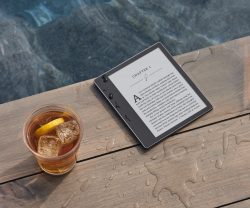
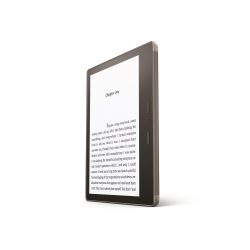
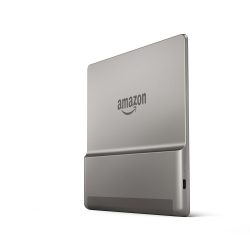
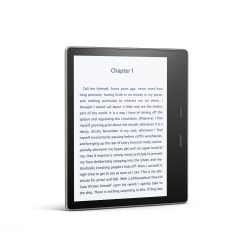
New Kindle Oasis is Waterproof, Costs $249, and Has a 7″ Screen

Amazon has replaced its least satisfactory and highest priced Kindle today after a brief 18 months on the market.

The new Kindle Oasis looks a lot like the earlier model, only it is waterproof and will cost $249 when it ships on 31 October.

And oh yes, the new Oasis has a 7″, 300 ppi E-ink screen.


Amazon’s newest Kindle has what Amazon is now calling a 7″ Paperwhite display. It has a frontlight and touchscreen, and a screen resolution of 1680 x 1264.

Edit: found it.

Amazon never got back to me on the screen resolution before this posted, so I’m not sure what it is – I’m not even sure if that is a 7″ screen and not an improved 6.8″ screen  similar to the one Kobo uses on the Aura H2O. (We’ll have to look into this later in the day.)

At 194 grams, the new Oasis is bigger than its predecessor, and also comes with more storage – 8GB or 32GB – but it still has the same lopsided one-handed design.

Don’t get me wrong, I like one-handed ereaders – it’s just that with the first Oasis, Amazon got cute by dividing the battery between the case and the ereader, forcing you to choose between either a lightweight device with disappointing battery life or a heavy one with adequate battery life. Not only did this take all the fun out of the design, faulty connections between the Oasis and its case resulted in several early reports of battery issues.

Fortunately, Amazon fixed that problem with the new Oasis model, putting the battery inside the Oasis, giving it an acceptable life measuring in weeks. And according to Amazon, it’s IPX8 rated to protect against immersion in up to two meters of fresh water for up to 60 minutes.

According to the press release, the new Oasis does not have a battery case, and that’s great news.

What’s also great news is that the new Oasis has Bluetooth (and Wifi, obviously). And to answer your next question, yes, you can pair the new Oasis with a BT speaker and play audiobooks. The previous model had audio, but only for its accessibility feature – and that required a USB dongle.

The new Oasis is better in every way, and that includes the software. According to the press release, the Oasis has 5 levels of boldness as well an option to invert the screen colors to give you white text on a black screen. You will also be able to increase the size of items like the text on the home screen and library as well as the book icons.

Between one thing and the other, the new software features are going to make the Kindle a heck of a lot nicer for those with vision impairment.

Amazon has given us many reasons to buy the new Oasis, but if you have an older Kindle, you’re in luck: they’re getting the new software features in an update which comes out today.

The listing for the new Kindle Oasis should be live by the time you read this post.

Amazon