Tunesviewer Brings iTunes U to Android, Linux

When Apple launched the updated version of iTunes U back in February, they had planned to only make it available on their hardware.Unfortunately for Apple, someone forgot to tell that to a Linux developer who has been working to make the content in iTunes U accessible to those not lucky enough to own an iPad or iPhone.

Tunesviewer is a 2+ year-old app for Debian, Fedora and Android. It predates the current iTunes U app by quite a bit, and it has one simple goal.  It helps Android owners (there’s more of them than Linux owners) find and download the podcast and videos in iTunes U.

The app won’t help you with the more sophisticated features that Apple added this year (like shared notes) but that’s okay.  It would require far more tricky programming to do more than simply download content. And it does show you everything that is currently available via iTunes U (I double checked with my iPad).

Update: The app has been updated and it now works for me.

TBH, I’m not sure it can even download content. I’ve now tried it on a couple Android tablets (including my eeePad Transformer) and I cannot download anything. I can find the course pages, but when I click the button nothing happens.

Right now I’m scratching my head.  This apparently worked for someone at some point, but it’s clearly not working for me. What’s more, I’ve looked through the various pages and I don’t see where I can do anything to change it. (Perhaps the app doesn’t like the latest version of Android?)

Even though I cannot get it to work, I’m posting this anyway. I’m hoping that it works for you and that someone might have pity on me and tell me how I can fix it. I am willing to put some work into troubleshooting my issues.

I definitely like the idea and I think the developer deserves a round of applause.

Tunesviewer

How to Add Android Market to Polaroid PMID702C

There are many many budget tablets on the market,  all with about the same specs and performance. Given that there’s not much to distinguish them (other than appearance), about the only way to choose among them is whether you can install Android Market and how well a tablet can run the apps you need.

This particular  tablet just arrived on the market this week, and as part of my plan to install Android Market on all my tablet I immediately tried my usual easy to follow instructions for installing Android Market. They worked.

Note that this isn’t  a set of instructions on how to hack the tablet; I’m only interested in achieving a certain minimum level of ability with the least work required.

Like the numerous other tablets I have hacked, installing Android Market was a straightforward process. All I did was repeat the steps listed in this post. It didn’t go quite the same way but the process achieved the goal.

  1. Download this ZIP file to your computer.
  2. Open the Zip file to your computer and copy the contents to a folder on your Polaroid tablet via a USB cable. Then unplug your tablet.
  3. Once you’ve done that, open the file manager on your tablet and go to the folder where you put the files. Try to install the following apps in this order (double click on the files in order to run them):
  • OneTimeInitializer-signed.apk
  • SetupWizard.apk
  • vending-3.1.3-signed.apk

As a 4th step you might want to press the home button, select the checkmark which says "open always with", and then select Launcher. This will guarantee that whenever you press the home button you will see the home screen and not be prompted with a menu.

Update: Does your tablet run Android 4.0 or above? Are you feeling lucky? Then you might want to try to install the file labeled "JB Play Store". This is a later version of the Play Store.  It only runs on Android 4.0 and above, and it doesn’t always work, but if you can successfully install it you will have a complete version of Google Play.

I have Aldiko and the Google Apps installed and they work fine. Note that I don’t have the Google videos working on the tablet and I have no way to test it due to the simple fact that I don’t buy my videos via Google Play.

Amazon Now Rejecting eBooks Made With Calibre

The open source ebook tool calibre has been able to make Kindle ebooks for several years now, and for mot of that time Amazon has accepted those ebooks into KDP with scarcely a murmur. While they often looked down their nose at the app, it wasn’t until very recently that  Amazon decided to start refusing to let authors submit ebooks made with it.

I found  thread over on MobileRead that a conversion specialist started earlier this week. The tech reported that one of their customers had a book bounced by Amazon. After first sitting on the ebook for close to a month, Amazon finally gave this explanation:

Our technical team has found that the content of your book was created by 'Calibre', hence it is not buyable on our web site.

Please upload your book in either a MOBI file created by KindleGen or upload the content file in Doc/HTML format. The book will then be made buyable and searchable in the next 24-48 hours after republishing.

Thank you for your immense patience and understanding during the time it took to research this issue.

That’s a first, not just for the specialist but for me and pretty much everyone who has submitted ebooks to Amazon. While Amazon doesn’t much like the fact we use unapproved tools, they’ve never gone so far as to refuse them simply because of the tools you used.

In fact, the only times I’ve heard of Amazon rejecting ebooks (including a retroactive rejection) were due to technical issues in the ebooks like poor image quality, horrendous formatting, and the like. (They also reject ebooks because they’re public domain or simply junk, but that’s not an issue here.)

And it turns out that in this case calibre probably did introduce some technical issues when the Kindle ebook was made. Another converter responded a few hours later with a similar report as well as a possible cause.

The problem is simpler than I expected. Calibre recently got the ability to make the combined KF8/Mobi ebook files that Amazon really wants you to submit. Unfortunately, it doesn’t do a very good job. According to Kovid Goyal, the primary developer of calibre (in reply to another comment):

If you were generating plain old MOBI files then that is highly unlikely as calibre’s MOBI output has not had any significant changes in a long time. If you were generating combined MOBI/KF8 then it is possible.

So it seems that Amazon might be rejecting ebooks because of flaws in how they’re made. That would be good news, because it means that you can fix and or prevent the problem by simply selecting the correct options while making the ebook.

I’d go back to simply making an ordinary Mobi ebook, at least for now. Leave the KF8 alone until the bugs get worked out of calibre.

But if you absolutely have to submit a KF8 ebooks, you could always try KindleGen or the Kindle Previewer. Both can make the new KF8 ebook format for you.

via


Yitoa Unveils a Flexible eReader in China (video)

Charbax is still on his trip to China and today he succeeded in uncovering a new ereader based on LG Display’s flexible 6″ E-ink screen.

Yitoa is a Chinese OEM, and it looks like they are showing off as clone of the flexible ereader I held in my hands yesterday. The ereader that Charbax found in their booth bears more than a faint resemblance to the Wexler FlexOne (including the Wexler label on the back). Of course, there’s a good reason for that; Yitoa is the manufacturing partner for Wexler.

As you watch the video, note that the listed specs has the wrong resolution; this device uses the plastic backed screen developed by LG Display; the correct resolution is 1024×768.

Hands On With the Wexler FlexOne eReader (video)

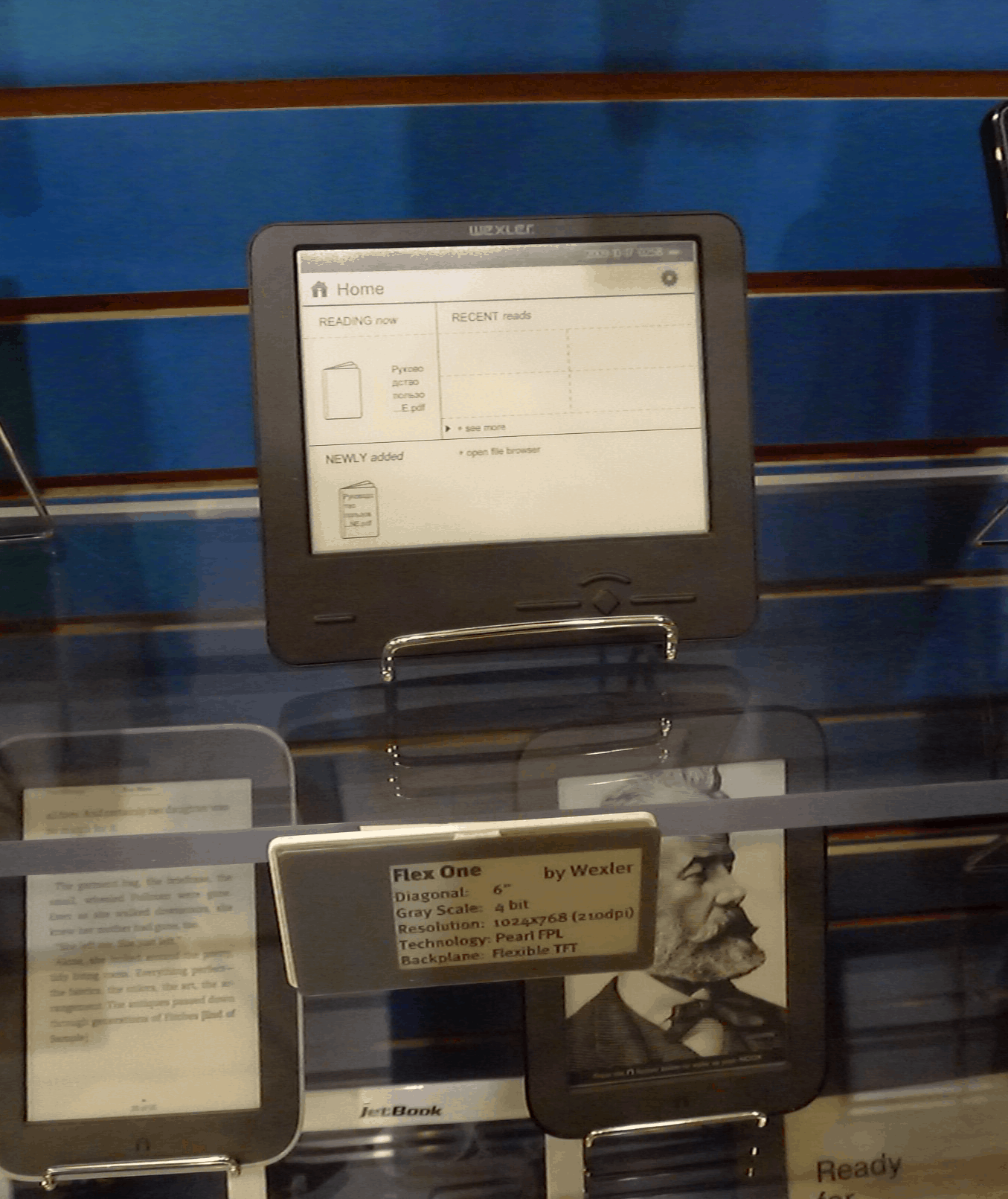
Wexler, a Russian ereader maker, was the first company to release an ereader which used the flexible 6″ E-ink screen made by LG Display. It’s been out in Russia for a few weeks now, but since Wexler won’t ship to the US this device hasn’t managed to cross the ocean.

Until now.

I got my hands on it for a few minutes yesterday, and the head of marketing at E-ink also helped Ron Mertens shoot a brief video (end of the post). I’m still trying to talk my way into buying it from E-ink (wish me luck). Just so you know, this is the screen that I was disappointed not to find in the LG booth, and I was a little surprised to see it in the E-ink booth.

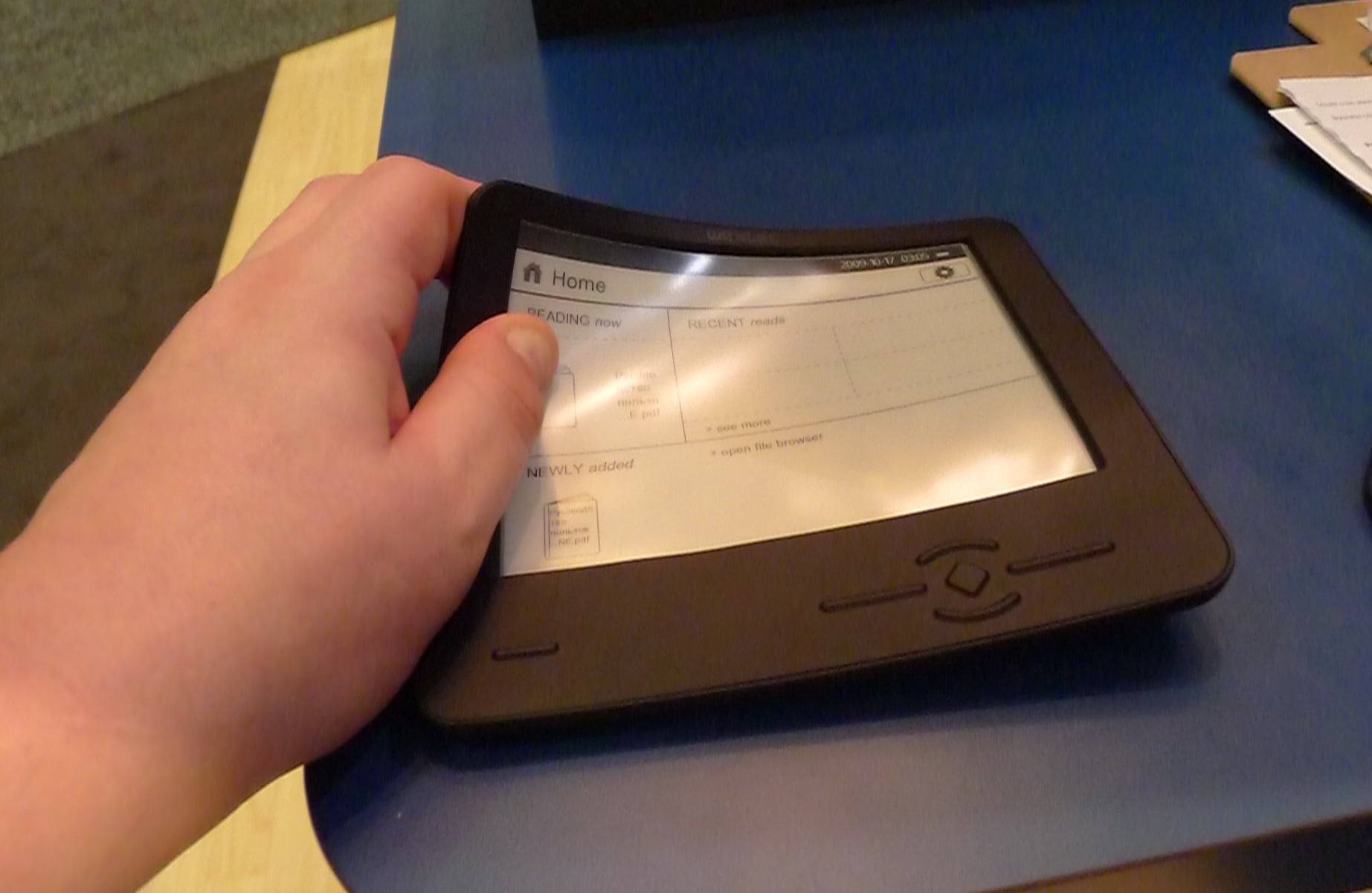
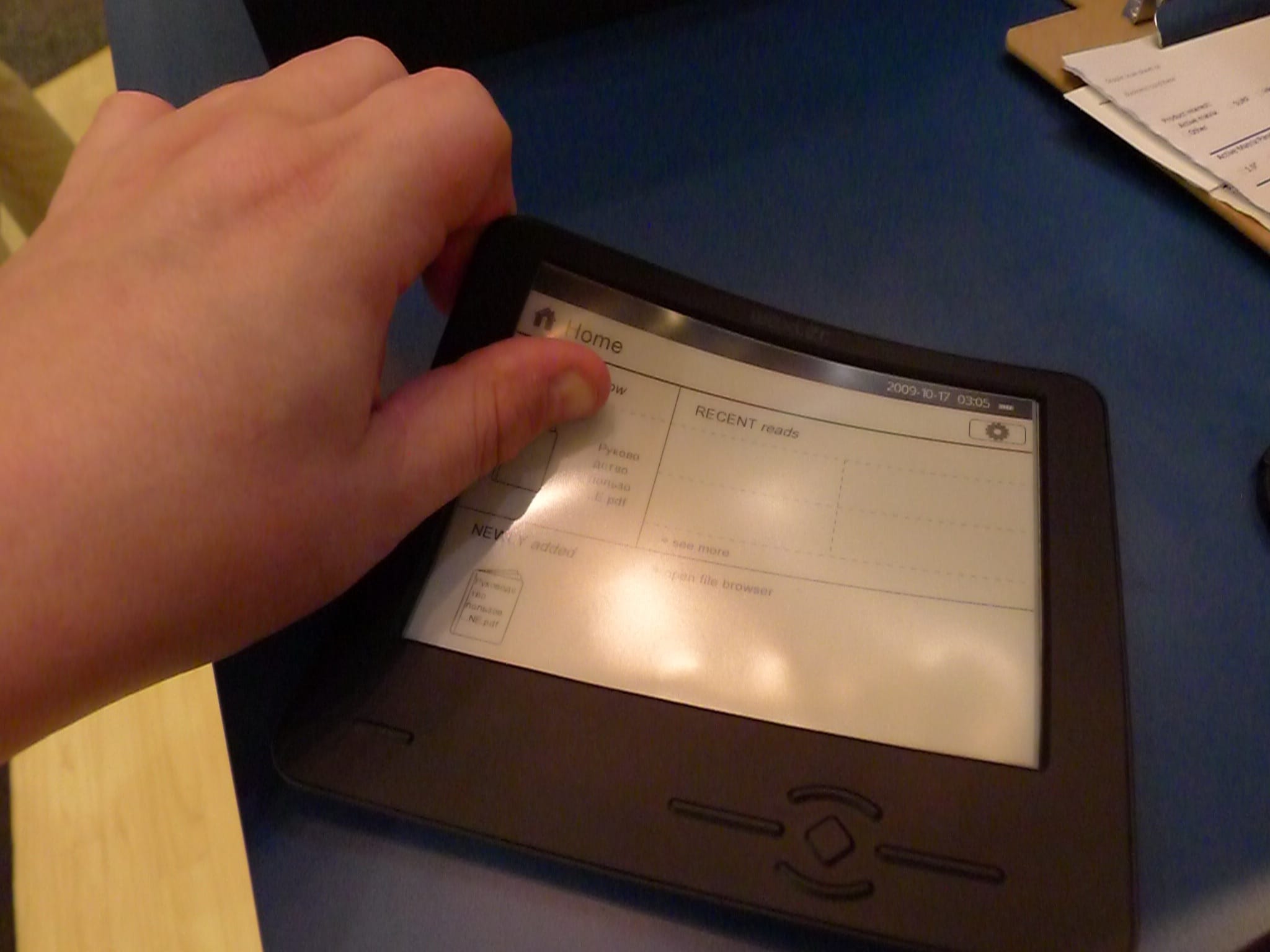
The FlexOne looks just like the unit shown in the abuse video I posted a few weeks back. It is indeed that flexible:

Naturally I didn’t dare put any real effort into killing it; it wasn’t mine after all (and I’m still trying to get it).

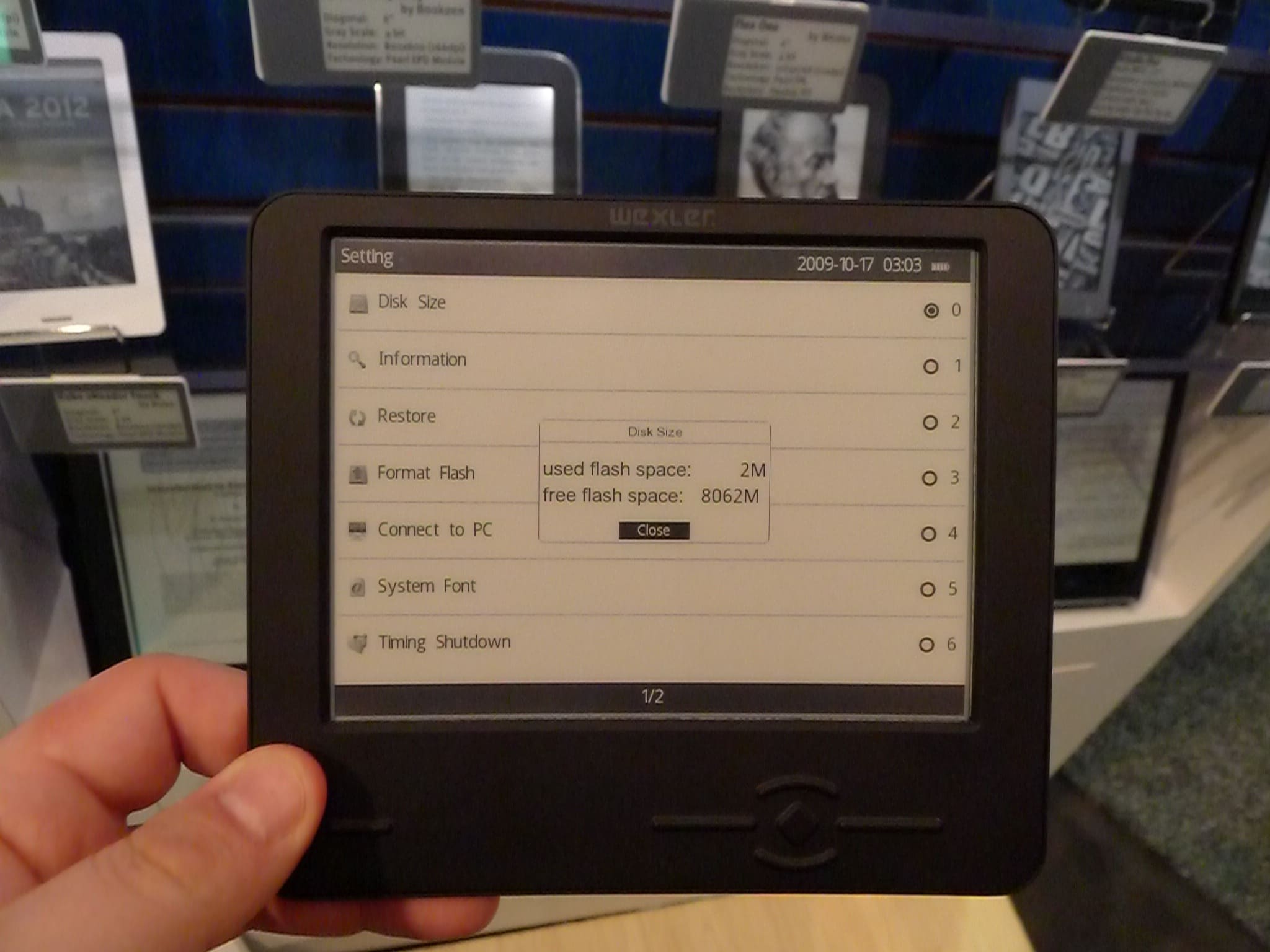
I also put a few minutes into trying out the features.  It’s a pretty basic device with no touchscreen, Wifi, or anything you wouldn’t expect to find on a cheap ereader. About its only remarkable feature is the flexible 6″ screen. I’m hoping to see it on the next Kindle or nook, aren’t you?


Sony Launches a Browser Based eBookstore (Finally)

This next piece of news comes from the "We’re not dead yet" dept.

Sony announced yesterday that their ebookstore was now available to browse and buy ebooks via any web browser.  This is a stellar achievement for Sony, and it comes a mere 6 years after they launched the Reader Store.

Nope, I’m not kidding there. Sony opened the Reader Store when they launched the PRS-500 way back in 2006. You could only access it via Sony’s app, which only ran on Windows (and poorly, at that).

In other news, Sony also released an updated version of the Reader app for Android. According to the listing in Google Play, the app has a new UI as well as several bug, stability, and performance fixes.


Plastic Logic’s New Color Screen Looks Better in Person

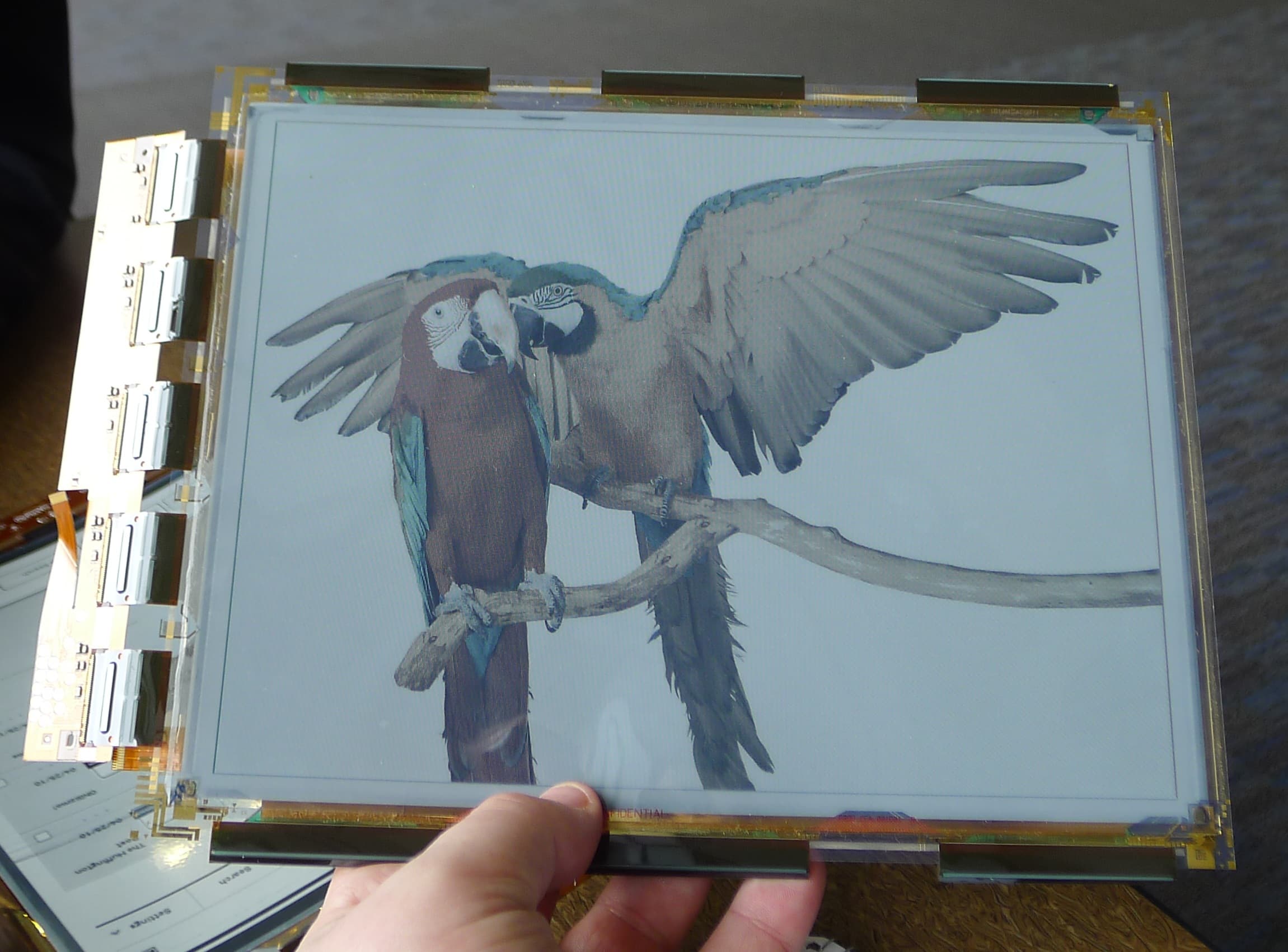
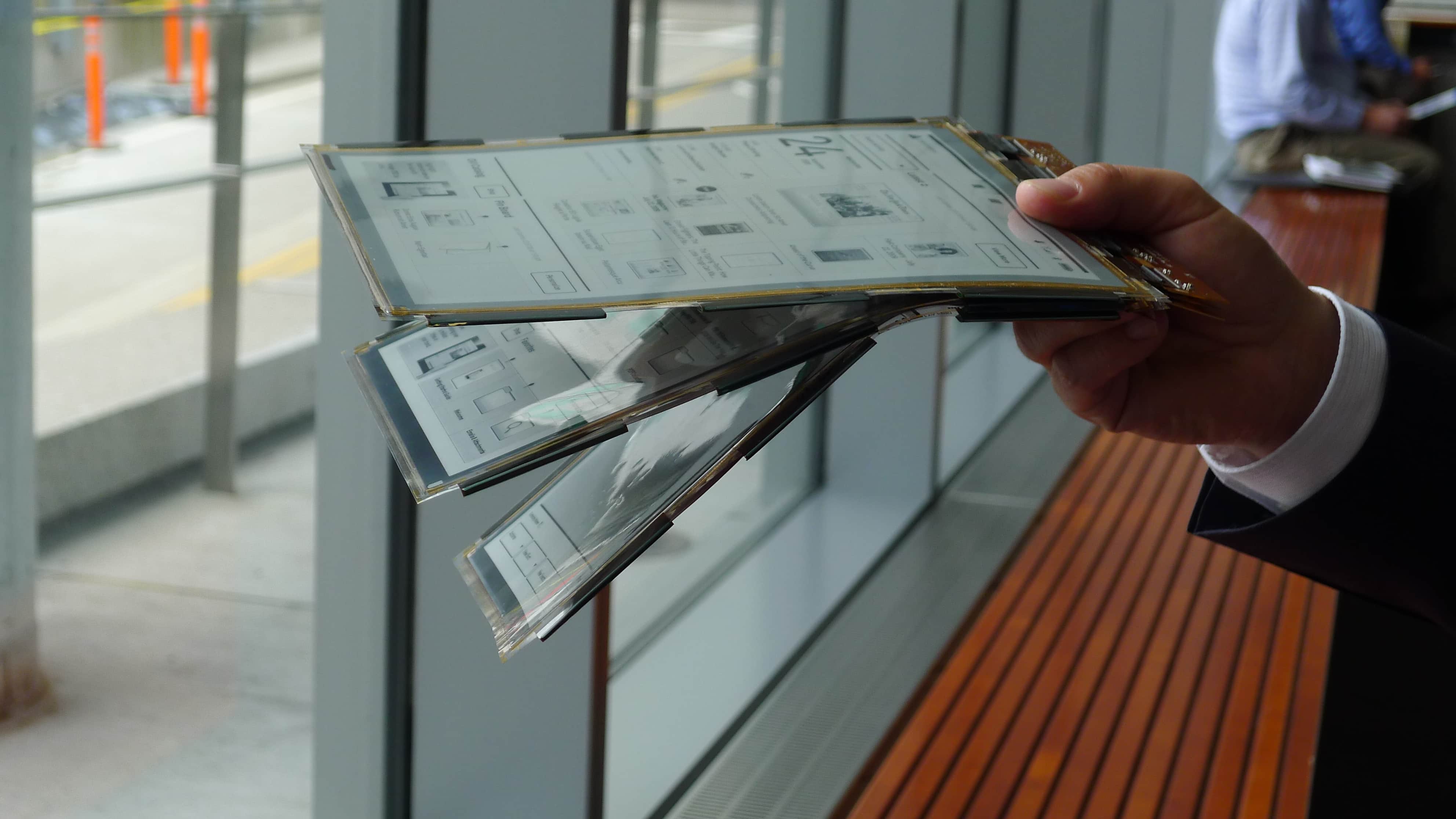
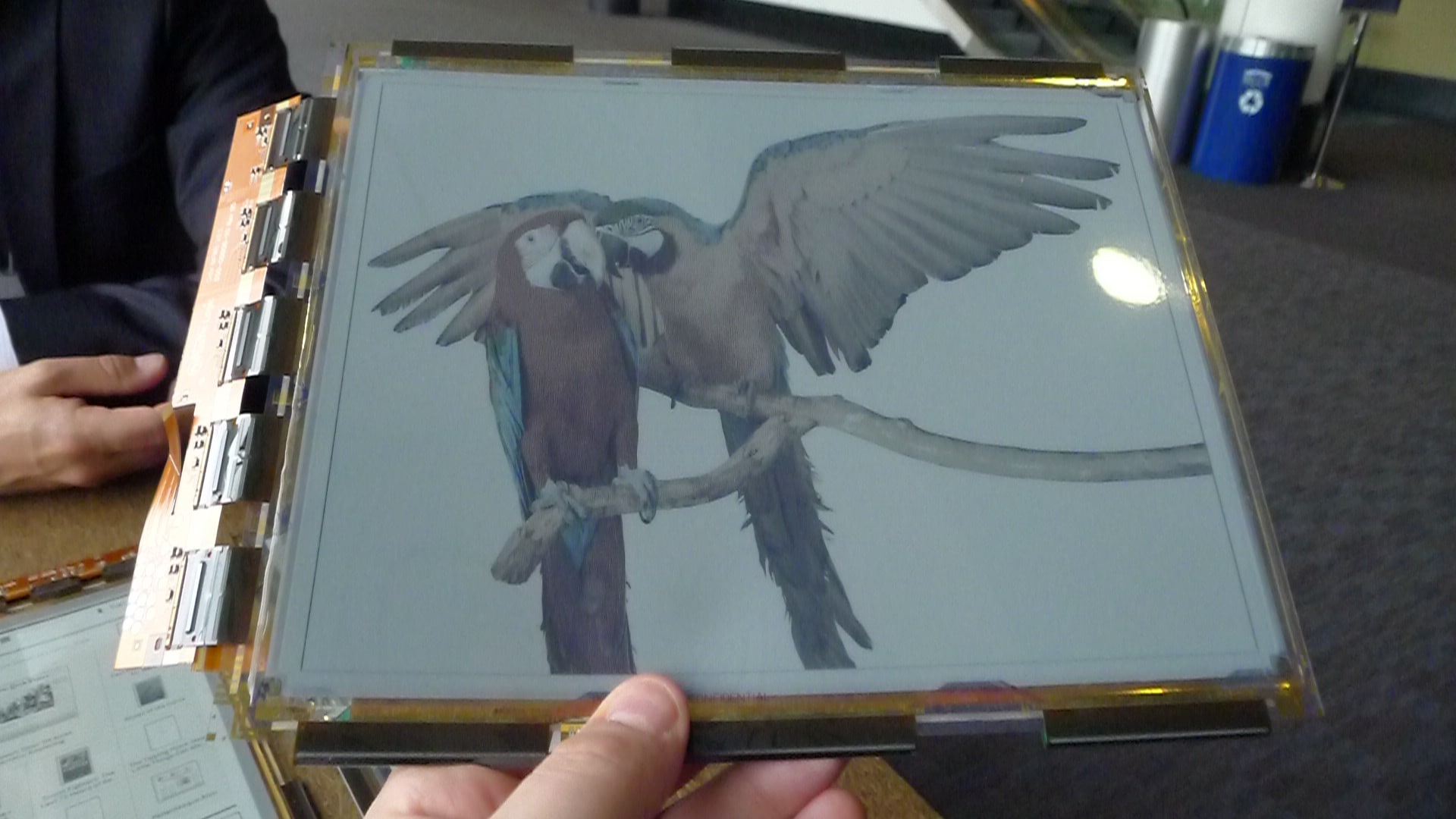
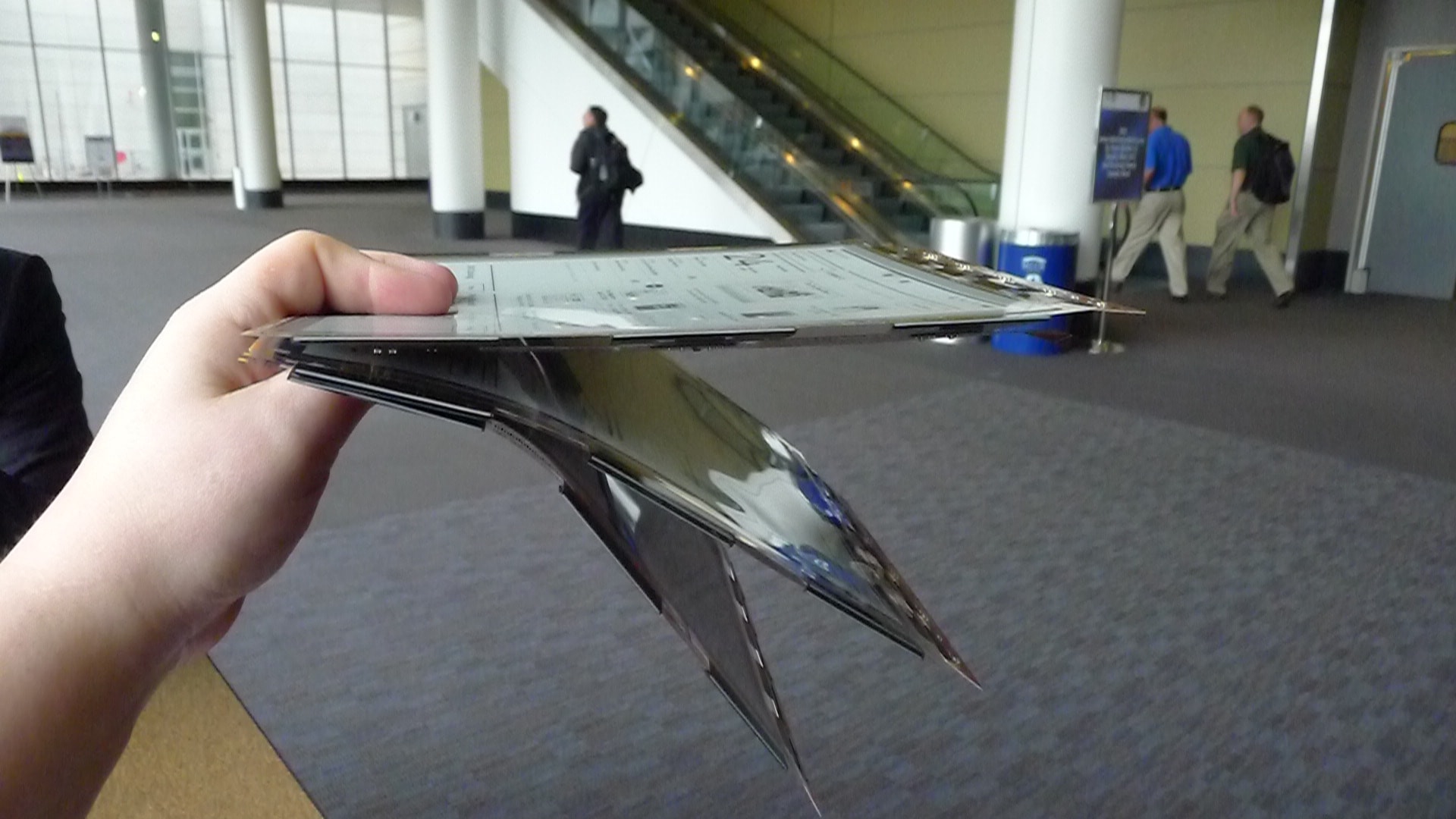
I finally got my hands on the new PlasticLogic screen today. I met with Dr. Peter Fischer earlier today and while there were a lot of questions he couldn’t answer, I did get some details as well as a bunch of photos.

When you look at the photos, note that the ones showing 3 screens also shows them bending at different rates. That’s not a trick; PlasticLogic has screens in 3 thicknesses (780, 330, 130 micrometers). The floppiest screen is the thinnest.

I also got a couple photos of Plastic Logic’s new color screen that I posted about a couple weeks ago. It’s about the same thickness as the 780 micrometer screen, and like the other 3 screens it uses Plastic Logic’s backplane to support an E-ink panel. yes, that’s the same screen material as used in a Triton E-ink screen, only PlasticLogic came up with their own backplane to mount it on. (Here’s what the E-ink material looks like before it is mounted.)

I thought the color screen looked a lot better than E-ink’s screen. It was much less gray and had a slightly higher resolution. And before you ask, I don’t know who did the color filter that is lying on top of the the E-ink component; Peter wouldn’t tell me.

PlasticLogic is still looking to sell this screen to partners, and Peter admitted to having met with the partners at this conference. Peter also told me that PlasticLogic might be postponing their plans for the new factory in Russia due to their recent withdrawal from the ereader market. They’re going to continue to make new screens at their current factory in Dresden.

I’ve Read the Past, And It Hurts

I took my new paper books on holiday recently. Now there’s a sentence I never expected to write.

According to all the Luddites in the mainstream media, something like 99 per cent of all known life are still reading paper books. Only freaks, geeks, and idiots currently buy ebooks. As a leading ebook blogger, I decided I ought to see what all the fuss is about so I bought some paper books.

I probably make that sound simpler than it really was. What I really did was: Drive to Books-a-Million… Not find all the books I want… Drive to 2nd & Charles… Still not find all the books I want… Drive to both local 2nd hand bookstores… Find a couple titles… Drive to B&N… Give up after spending a day in the car.

One unfortunate deficiency with paper books is that they cannot be downloaded the moment you buy them. They either take days to arrive by mail or you will be forced to spend hours in the car trying to find a bookseller that carries the titles you want.

But I did eventually get my suitcase packed with  the books I bought. Luckily I already had a larger suitcase to use; surprisingly paper books take up far more space than ebooks.

I stepped into the airport with my luggage rolling faithfully behind me, and went to the counter to check in. The clerk told me that I would have to check my bag. It seems that the dozen titles I bought, which would have fitted into an ereader without adding an ounce, weighed too much and took up too much space for them to come into the cabin with me.

My holiday companion sat beside me on the flight, smugly reading her Kindle. By the time we got to the pool (with me panting over my heavy paper books), she had finished her George RR Martin, and I had barely started my Hilary Mantel. With my old tried and true books, I was left behind.

And it was not an uneventful holiday. I was forced to go to a clinic not once but twice. Paper books, despite being reportedly more eco-friendly, are also more dangerous to use.  The edges of a page are quite sharp, leading to several cuts which got infected. What’s more, those hardback books were much larger and heavier than the paper books I had been told to expect. The effect they can have on your toes when knocked off a table are frightening to contemplate.

I got back from holiday with a limp, a bottle of antibiotics, and no lovely ebooks to share on one of the (authorized) lending sites, meaning that I was powerless to prevent my holiday companion from sharing Glen Beck’s latest work via my account then using the credit to borrow another ebook.

Next time I go on holiday, I’m taking only small, light, cheap ebooks, and then I’m going to bring them home and arrange them on Goodreads by author and title. I may be mistaken for a freak, a geek, and an idiot, but I’ll have read comfortably and I will be able to boast that I brought my entire library with me.

Editor’s Note: The above post was a satire of this article by Katy Guest. I hope you enjoyed it as much as I did.

image by nedrichards

Enhanced eBooks Don’t Enhance Literacy

An interesting but obvious report was released today by the Joan Ganz Cooney Center. This Sesame Street Workshop affiliate gathered 32 parents and their kids and had them read books, ebooks, and enhanced ebooks.  The goal was to see how the parent-child pair used each type of book and to see how much information the children retained.

I almost passed on this story because I guessed most of the results before I read them.

When print books were compared against enhanced ebooks, both the parents and the kids played far more with the extraneous features and the kids recalled much less from the enhanced ebook than from the print book.

That’s no surprise. Enhanced ebooks are more like games than they are like books. It’s easy to jazz up the content with extraneous material but it’s hard to integrate that content in a useful manner. Ask any teacher and they would have told you that the kids will be distracted by the noisy animation and miss important details in the text. Heck, most parents could have predicted that too.

If the goal here was to find out what we already know, then congratulations. They succeeded. But if you wanted to find new data you’re going to have to keep looking.

The data from the other part of the study is slightly more interesting. When comparing the print vs (basic) ebooks, the kids as well as the parents interacted more with the ebook than with the paper book and recalled more info from it. Interesting yes, but it was only a slight difference. Given the small study group (n=32), I’d hesitate to draw any conclusions from it.

In fact, the same goes for all the results. The only conclusion I’d draw from this is that the study should be repeated with a few hundred kids. I would expect that to provide more trustworthy results; with only 32 test subject pairs there’s a high chance that the test includes more outliers than  expected.

But until this study is repeated, about the only thing I draw from it is that enhanced ebooks shouldn’t be used to encourage reading. It doesn’t look like they will help. Clearly the game-like aspect is having a greater effect than the book content.

Here’s How You Should Look at The Taleist Self-Pub Survey

Taleist released the results of a survey of self-pub authors today. If you haven’t seen it yet, then you probably haven’t heard the statistics.

Good. That gives me a chance to explain my viewpoint. I read the results this morning, but it took me until this evening before I placed them into context.

Update: The Guardian has an article on these survey results and it’s an excellent example of not considering the context.

The thing is, no matter how little those authors made while self-publishing their ebooks, on average they are almost certainly better off than if they did not have the option of self-publishing.

Just over a thousand authors responded to the poll, and they made up a diverse group  (age, gender,and location). The results are only available as a Kindle ebook, so I went out and bought it. BTW, you can read it for free if you have a Kindle and an Amazon Prime membership.

Here are the highlights:

  • 72% of respondents lived in the US
  • 75% were between 30 and 60 years of age
  • Better than 65% had a college degree (BS, BA, or above)
  • One third work full time
  • Authors who got outside help earned 34% more on average
  • 53% self-published for the first time in 2011, with 20% having gotten a start in 2010
  • the 29% who went from a traditional publisher to self-publishing earned twice as much on their own as they did from their publisher
  • Only 60% of authors either could or would answer questions about their earnings
  • Average earning was $10k per author
  • Half of the authors earned under $500 in 2011 from their books
  • 10% of authors earned over 75% of the revenue
  • 97 authors indicated that they could live off of their ebook sales

The $500 median is probably the detail that will be repeated the most, and that is the one which I wanted to really understand before I  posted this. I expect those who need to defend traditional publishing will point to it as a sign that self-pub is a dead end and proclaim that traditionally published authors make more than that so it’s clearly the better system.

I see it differently. Over a third of the respondents couldn’t get a traditional publishing contract. If they earn so much as a dollar, it’s more than they would have under the old system.

While the published author might make more on average with a traditional publisher (disputable), I would bet that half or more of the 1,007 self-pub authors in the survey would never have been given the chance by a traditional publisher.  (In fact, 40% had tried to go the traditional route and still have the scars.) There’s a reason why we call them gatekeepers.

On the other hand, there is one point which I don’t mention above that I think is worth mentioning here. There might be a reason why those rejected authors were rejected. The indie authors who never tried to go the traditional route made an average of 41% more, suggesting that some of the rejections may have been justified.

All in all, it’s a fascinating read. You should go get it.


How Accurate is Digitimes?

Digitimes is the source of many, many rumors about tech products, but have you ever wondered just how accurate they are?

I got to pondering that question this morning, and after looking through the posts I’ve written about Digitimes it turns out that Digitimes is right less often than a magic 8 ball and nowhere near as good as a chimpanzee throwing darts to make stock choices.

In the time that I’ve been writing about Digitimes, I’ve mentioned them no less than 80 times, not all of which are rumors. I’ve also passed over a number of rumors, like the one which claimed the Google Tablet would hit the market in May. So for the sake of this post I’m going to take the most recent dozen rumors and see how accurate they are. But I’m going to leave out the ones which I cannot prove as well as the ones which haven’t happened yet

BTW, Harry McCracken wrote a similar post a couple weeks ago over at Technoligizer. That’s where I got the idea for this post.

Amazon can’t release a Kindle with a color E-ink screen because the only one under production is 9.7″.

Intel’s tablet turned out to be 7″, not the 10″ that Digitimes predicted.

See above.

  • Apple Not Releasing iPads in January? True

Even a broken clock is right twice a day.

  • Apple to Release 2 iPads in January?  Wrong Date

The iPads weren’t announced until March.

Digitmes reported that so-called industry insiders doubted the success of the Kindle Fire (before it shipped). Needless to say, they were wrong.

Amazon actually shipped 4 or so million Kindle Fires last year.

The second Nook Color looks just like the first and is produced by Inventec.

It wasn’t launched until November.

  • Kindle news: latest Amazon tablet rumors – by August or September  (TeleRead) Fiction

Kindle Fire didn’t launch until late October.

This Digitimes story contained a bunch of rumors about screen size, CPU, manufacturer. Some details were correct.

They got the date, price, and other details wrong but some were correct.

  • Rumor: Apple to release 7″ iPad Fiction

Yeah, like that ever happened.

Of the 13 times I’ve covered a Digitimes rumor in the past 18 months, they got the story right exactly once. On 4 other occasions they got some details right, but they also got some wrong. But on Eight out of the 13 predictions, Digitimes got it wrong.

Eight.

And this is the source that so many tech blogs watch and repost. We should be ashamed of ourselves.


Amazon Banning Junk & PD eBooks From The Kindle Store – What, Again?

Seth Godin of The Domino Project posted last night about an email he got from Amazon. It seems that Amazon is making another kill-sweep of the Kindle Store as part of a new effort to clean out junk ebooks.

Like any of the major self-pub platforms (except Smashwords), Amazon has a perennial problem with spam ebooks. Well, it’s not spam so much as its public domain ebooks that were grabbed off Project Gutenberg, content that has been scraped off of websites, as well as computer generated nonsense text. All this stuff can be vomited into the Kindle Store with little effort (it’s one of the downsides of the self-pub revolution).

Amazon wanted to make sure all authors were aware of their current policy:

Some types of content, such as public domain content, may be free to use by anyone, or may be licensed for use by more than one party. We will not accept content that is freely available on the web unless you are the copyright owner of that content. For example, if you received your book content from a source that allows you and others to re-distribute it, and the content is freely available on the web, we will not accept it for sale on the Kindle store. We do accept public domain content, however we may choose to not sell a public domain book if its content is undifferentiated or barely differentiated from one or more other books.

While some might applaud this move, I can recall that Amazon had reportedly pulled junk ebooks before. Back in December 2010, Amazon made a lot of noise about pulling public domain titles from the Kindle Store. I reported at the time that one small publisher had gotten the following letter:

We’re implementing a new policy that addresses the customer experience problem caused by multiple, undifferentiated copies of public domain titles in our Kindle catalog.

Our vision is to have high-quality editions of every public domain title in the world available on Kindle, including a free edition of each, and to avoid the confusion that is caused by having a large number of undifferentiated (or barely differentiated) versions of each.

I can tell you from personal experience that Amazon didn’t stick to their guns.  In the summer of 2011 I downloaded a number of public domain titles so my younger brother could use them for school. For every one title I got there were at least 4 options, including paid ebooks. What’s more, I own copies of a dozen or so freebie Kindle ebooks which are based on content compiled from Wikipedia. I got all of those ebooks this year. I didn’t think anything of it at the time, but clearly Amazon wasn’t being all that careful about their filters.

While I am hoping that Amazon will get it right this time, it does not seem likely. I suspect that Amazon doesn’t want to push too hard to get rid of the junk. It might thin out the number of titles on their virtual shelf, but Amazon might care more about keeping their numbers up more than they care about removing each bad title.

image by brewbooks

Students Are Using – But Not Buying – Digital Textbooks, Coursesmart Survey Shows

Coursesmart put out a press release today with the results of their latest survey.  While the press release is rather interesting, it hinted at some conclusions that weren’t stated. I asked for the actual results and I ended up with some rather interesting data.

The survey covered mobile devices and how students used them. A total of 500 students were polled. Only 2.8% didn’t have a mobile device and only 2.3% of those who had a device didn’t use it for school.

Far more students own a laptop (93%), or smartphone (57%) than own a tablet (22%, including the iPad). And only about 1 in 6 own an ereader. It’s not a surprise that tablets beat ereaders, but the important detail is what beat tablets. (More on this later.) The results also showed that far more students used their mobile device to send email (88%), research study topics (85%), or write papers (83%) than used it to read a digital textbook (45%).

The survey results cover much more than that, but I’m focusing on these 2 points because they tell a lot about the digital textbook market.

First and foremost, look at how many more people own a laptop than a tablet or iPad. If you’ve bought into the iPad hype as the future of education then that should give you pause.  The students clearly don’t think as much of the iPad as tech bloggers do.

I know that I’ve had reservations about iBooks before as well as digital textbooks in general, but it looks like I had a point. Everyone has a laptop but hardly anyone has an iPad. That leads me to wonder if Inkling or iBooks based digital textbooks aren’t going to fair well on the open market. Perhaps it might be better to say that they will need for students to either be forced to buy the iBooks edition or the textbook will need to be adapted so non-iPad owners can use it.

Once again, cross-platform content is the key. If only 1 student in 7 has an iPad in a given classroom, it’s going to be kinda hard for the rest of  the students to be required to buy the digital textbook in iBooks.

And the usage statistics also tell an interesting tale. College students use their mobile device for school, but they do much more with it than digital textbook. That was the least popular use of a mobile device, actually.

Still, 43.7% of all students use digital textbooks. That figure is far higher than I expected, so much so that I wish Coursesmart had asked about how the students had gotten their content (paid vs free vs pirated digital textbooks). You see, according to Rob Reynold’s book The Future of Learning, the college textbook market came to about $8.7 billion last year (estimated), and digital textbooks made up only 3% or so.

So we have over 40% of students using digital textbooks yet they only account for 3% of the market. That’s an awful lot of textbooks that they’re using but not buying. Note that I’m not saying the textbooks are pirated; we don’t know that for sure. A good portion of the unbought textbooks are  probably OER (open educational resource), and those can be legally had for free.

And I have good reason to think that they’re not pirating the content. A recent Bowker survey revealed that students were more likely to be using free and legal content than buying it. That data is from the UK, not US, but the student behaviors should be similar enough that US students likely had the same reasons for not buying.

If these numbers are to be believed, we’re already seeing a high ebook adoption rate among college students (higher than the rest of the population, according to Pew). But they’re not buying.  And unless something changes I don’t think they will buy. This does not bode well for publishers.

P.S. Here are the statistics I discussed above:

Percentage that own a device:
  • 92.9% own laptops
  • 57.5% own smartphones
  • 22.2% own an iPad/tablet
  • 16.9% own an ereader such as a Kindle or Nook
  • 2.8% own none of these
How are you using your device for school?:
  • 87.9% use it to send emails
  • 85.2% use it to research study topics
  • 82.8% use it to write papers and essays
  • 63.4% use it for class presentations
  • 61.2% use it to take notes
  • 45.0% use it to read an e-textbook
  • 16.7% use it for other purposes
  • 2.3% don’t use it for any of the above reasons

It’s Official: iBooks Now Supports Epub3

There still hasn’t been a public announcement (nor has the app been updated), but yesterday Apple made it official. iBooks now supports the advanced formatting options, interactive features, and embedded content found in the new Epub3 book format.

This makes the app the first commercial commercial app to support the new format – only it doesn’t, quite.

Apple sent out an email yesterday to the iTunes Connect mailing list. In what looks to be almost an afterthought, Apple told publishers and ebook creators about the change:

EPUB 3 Support
iBooks and the iBookstore now support EPUB 3 for flowing books. EPUB 3 includes new features to enrich your book including the pop-up footnote functionality.

This is good news, yes, but it’s not quite true.

I spent yesterday evening playing with Epub3 demo files, and it turns out iBooks still doesn’t completely support the new standard. Several of the demo files didn’t work, including one which was supposed to include a quiz widget. iBooks also failed to display the MathML demo correctly; that is in fact one of the core requirements so if it doesn’t work then the format arguably isn’t supported.

The current Epub3 support dates all the way back to January, when Apple launched iBooks Author. I’m not sure it was ever mentioned outside of the digital publishing community, but techies have been playing with the new features for some months now. Apple neglected to mention it at the time, but the new iBooks 2 app was released with partial support for the new format.

In any case, this is still big news; by making it official Apple is going to encourage their competition to get off their duff and complete their own apps. It moves the sale of EPub 3 ebooks one step closer to reality, and that’s a good thing.

Amazon Now the 3rd Biggest Tablet Maker in The World

NPD Display Search has just finished a report on worldwide gadget sales in Q1 2012. Much to no one’s surprise, Apple dominated the tablet market with their usual millions of iPads sold.

The report is behind a paywall so I cannot give you all the details, but DisplaySearch did release a few bits of information. The press release covers laptops, tablets, and mobile PCs as a whole, but the only one I care about is the tablet news.

Apples' share of the world tablet market slipped to a mere 62%, with 13.6 million iPads sold. That’s a tragedy, I tell you. Why, I can remember the day when Apple had 80% of the market, or more.

Kidding aside, the rest of the top 5 comes as little surprise. Samsung continues to hold second place with 1.6 million tablets sold, while Amazon secures a 3rd place position with 900 thousand Kindle Fires sold in the US market. RIM and ASUS fill out the top 5, with around half a million each.

I’m not surprised by the Samsung-Amazon positions because we’d already gotten a hint that it would happen. Earlier this month IDG released bits and pieces of data that said much the same thing. Both IDG and DisplaySearch report Amazon as having 4% of the market.

Of course, the reports disagree on how many tablets were sold over all, as well as the number sold by Amazon and Apple, so there isn’t much that you can rely on. But I do trust the relative rankings.

First, it doesn’t matter how many iPads they sold, we know that Apple led the tablet market. That’s a given. And I’m also not surprised by Samsung beating Amazon; the only shocking part is that the margin is so small.

Amazon only sells the Kindle Fire in the US, while Samsung sells tablets in markets all over the world.  I don’t keep track of all the places, but I do follow the Samsung-Apple patent fight, which now spans a dozen countries on 5 continents.  That’s a heck of a lot larger population to sell tablets to, so it makes sense for Samsung to beat Amazon.

In the long run that margin is going to shrink. It will not happen tomorrow, but Amazon will eventually start selling the Kindle Fire outside the US. When they do, Amazon will dethrone Samsung in a day. I wouldn’t be surprised to see Amazon sell 5 million or more Kindle Fires the quarter after they start worldwide sales.