Nate Hoffelder

Nate Hoffelder

Bexar County to Open Its Third All-Digital BiblioTech Library Branch in 2017

Bexar County made headlines in 2013 when it became one of the many libraries to open a book-free, all-digital library, but it didn’t stop there. Its second all-digital branch opened last year, and now the San Antonio Express-News reports that construction is underway on a third branch.

Located in the Wheatley Heights Choice Neighborhood development at 1203 N. Walters Street, the new branch will occupy 4,200 square feet, or about the size of a RadioShack.

According to my source, it will have a digital reading room, community room, children’s area, and study rooms. That’s a lot of activity rooms for such a small space, more than you would expect in a regular library, but Bexar County has a unique advantage. Its BiblioTech library system follows the trend seen in college libraries in that paper books have been displaced in favor of digital.

The all-digital collection lets the library system economize on space, so they can open smaller and cheaper branches, and extend to support more parts of the community. In addition to the BiblioTech branches in a housing complex and a county building on Pleasanton Road, the library system also supports ebook kiosks at local military installations and a hole-in-the-wall branch at the county’s Central Jury Room.

In an earlier age, those secondary locations would be served by bookmobiles, but now they have a permanent digital presence.

But is that an improvement? That remains to be seen.

The all-digital branches may have lower physical operating costs, but they also have much higher digital costs. Library ebooks costs four to six times as much as print books, are sold under expiring licenses, and require annual maintenance fees. Libraries also have to invest in additional hardware so the ebooks can be read, so it is far from clear whether the new idea is a net positive or a negative.

In any case, the third branch is expected to open early next year. Patrons will be able to access BiblioTech’s ebook catalog through Cloud Library, as well as other digital services like Hoopla and Zinio. That ebook catalog will be augmented by an additional 4,000 titles purchased with a generous $100,000 grant from the Kronkosky Foundation.

“Because BiblioTech is the first all-digital public library in Bexar County and our nation, children county-wide will be able to enjoy the marvelous new collection, and learn more about their heritage and heroes,” said Hidalgo Foundation president Tracy Wolff.

The Hidalgo Foundation is a local non-profit which supports the BiblioTech library system, as well as other endeavors in Bexar County. eBooks acquired with the grant will include titles for school-age children, adolescents and adults, Wolff said.
Onyx Boox Max is Not Your Typical eReader

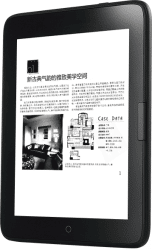
Thirteen inch ereaders are few and far between and far outside my budget, so when the Onyx Boox Max went up for pre-order a couple weeks back, I immediately begged to borrow a review unit.

This 13″ ereader retails for $650 plus shipping and VAT, putting it far outside my budget.

I got the Max on Tuesday, and started thinking about the review on Saturday night. Five days is not nearly long enough to really plumb the depths of a device as complex as the Max, but I have a good excuse for writing the review this early.

The review unit died Friday night. We think it’s just a loose cable, but since I can’t use the Max right now I decided to take a few minutes and share my thoughts.

This is going to be a difficult review to write. The Max is not an ereader, not in the way you think of an ereader or use one, and I don’t think it fits into any predefined category.

I haven’t had such a category-breaking device since the Entourage Edge, that dual-screen textbook reader from early 2010.

The Edge was a well-conceived device with solid hardware and software, but it flunked out with a lot of reviewers because they couldn’t grasp its purpose or function. They approached it as an ereader, and tried to compare it to a Kindle, when in fact the Edge was a niche product designed to serve just one market.

If you are looking to buy a Max, I suggest that you avoid the mistakes those reviewers made, and set aside any preconceptions that the Max was made for reading ebooks. Based on my time with it, I would say that it is more of a document viewer than an ereader. Its sheer size precluded me from using it as an ereader.

This is more of a device that you would hold up and use for showing off blueprints, or one which you would use to proof a document a page at a time. You might also lay it on a table, and have several people looking at the screen at one time.

Now that I have used the Max, I can understand why Pocketbook has branded their large ereader as a blueprint reader for the construction market, and why the Sony DPT-S1 only supports PDF and is targeted at the business market. I think both Sony and Pocketbook built a prototype, started using it, and realized that they would have more success if they focused on a limited number of use cases. That’s why they refined their software to better support those use cases (the Pocketbook CAD Reader has yet to be released, but still).

A device built around a 13″ E-ink screen is not a product for the broader ereader market, so it made sense for Sony and Pocketbook to focus on niche markets with specific uses.

And luckily for Max owners, they can define their own niche uses (including ones I have’t thought of).

The Onyx Boox Max is an open Android device. It runs Android 4.0 on a 1GHz CPU. You can install third-party apps, and it also comes with Google Play.

I didn’t get a chance to test app compatibility with the review unit, but I do want to point out that potential owners should think about the apps they might install, and the abilities and features those apps would add to the Max.

Max owners can define their own niche uses for the Max, and so while I might declare what the Max is not, I can’t tell you exactly what it is.

We really don’t know yet.

Boyue T63 Shine Android eReader to launch in China as the JDRead

The Chinese ereader OEM Boyue updated its website this week and has taken down the page for the long awaited T63 Shine. In its place is a new page for a new ereader called the JDRead, which has essentially the same hardware, only now with a new brand.

China’s second largest online retailer (after Alibaba) Jingdong is getting into the ereader biz. The retailer is in the middle of a crowd-funding campaign to raise interest in the JDRead, its first ereader.

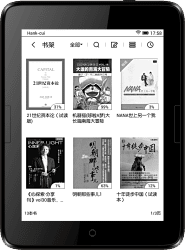
The JDRead features a 6″ Carta E-ink screen with frontlight and touchscreen, and like the earlier and related ereader Ridibook Paper, the JDRead runs Android an an dual-core 1GHz CPU with 512MB RAM and 8GB internal storage. It’s not known, however, whether the JDRead lets you access the Android and install apps (the Ridibook Paper does not).

Weighing in at 190 grams, the JDRead is a little heavier than the Kindle Voyage. It has a 1440 x 1072 resolution display, a 2.8Ah battery, Wifi, and a microSD card slot. It also has page turn buttons, and according to one source the JDRead has a haptic feedback system (it vibrates when you touch the screen). My Ridibook Paper doesn’t appear to have that option, so I can’t confirm this detail.

According to Boyue, the JDRead is going to launch/ship in May. Jingdong is charging 799 yuan for the ereader, or about $123.

Based on what I’ve seen with my Ridibook Paper, that’s not a bad price, although an English speaker is probably going to have trouble with the Chinese-language menus.

The language conflict is the single biggest issue for my Ridibook Paper, which I got in late December. It has been available in Korea from the bookseller Ridibook since last fall, but it’s not available internationally and even in Korea the supply was limited. I had to buy it through Ebay and put my money down on a pre-order with the hope that I wasn’t being cheated, and even then I still had to wait for a month.

The Ridibook Paper is a very pretty ereader, and it’s fast to turn the page, thin and light, and while the buttons are low profile I still find them easy to use.

If it had an English language option I would recommend that you get it, but as it stands, the Paper and the JDRead are best left to people who understand the language, or are willing to hack their ereader and install another firmware.

JD.com via AllChinaTech, CNW

How to Dispose of a Broken or Dead Kindle, And Earn a Few Dollars

I’ve already written a post about what you can do with an android tablet with a broken screen, but it occurred to me today that I’ve never published a similar post on what to do with a Kindle in a similar state.

Amazon has done everything they can to make each Kindle model more sturdy than the one before, but screens still break, and sometimes Kindles die for no reason at all. So what do you do with a Kindle that is totally nonfunctional and broken?

You cannot, for example, turn it into a weather station or a fridge magnet or a bike computer; the busted screen makes that impossible.

But you might still be able to sell that busted Kindle and make a few dollars. Another option would be to send it to a recycling center.

Or, if your Kindle still works and you simply don’t want to use it anymore, once you upgraded to a newer model, you might donate it to a literacy program like Project Hart (although you might want to refurb it first). Or you could use Amazon’s trade-in program to exchange the Kindle for an Amazon Gift Card.

And don’t forget, all Kindles – including refurbished units – come with a one-year warranty. So if your Kindle dies when it is less than a year old, be sure to contact Kindle support to see if you qualify for a free or discounted replacement unit.

How to Recycle a Broken Kindle

Short of dumping it in the trash, your easiest option is to send the broken Kindle to Amazon’s Take Back Program so it can be recycled.

If you are in the US, that program is handled by a contractor, and not Amazon itself. Fill out the form, and they’ll email you  a prepaid UPS shipping label that you can slap on the box before dropping the Kindle off at a UPS Store or at another UPS facility.

You can find more information here.

Amazon has a separate page for their Kindle recycling efforts in Europe.

How to Sell a Broken Kindle on Ebay

Dumping or recycling a broken Kindle is your easiest option but it’s not the most profitable.

It might surprise you to learn that you can sell a broken Kindle on Ebay or other auction sites. Yes, a Kindle with a broken screen or dead battery, or which is otherwise non-responsive, can get you any where from $10 to $29, depending on the condition and luck.


images by nickbrett, twirlop, kodomut

Free and Open eBooks Won’t Help Those on the Wrong Side of the Digital Divide

The Washington Post reminded us on Friday that the recently announced federal Open eBooks program could fail to reach those who need it the most.

While this program enables educators and librarians to grant students in need access to a library of free ebooks, it does nothing to solve the problem of making sure those same students have the hardware to read the ebooks:

The White House recently announced the launch of Open eBooks, an app giving access to thousands of free e-books to any educator, student or administrator at one of the more than 66,000 Title I schools or any of the 194 Defense Department Education Activity schools in the United States. It’s an admirable endeavor and recognizes that we have a literacy problem. However, it brings to mind Samuel Taylor Coleridge’s famous line: “Water, water, every where/ Nor any drop to drink.”

On that list of Title I schools: Crewe Primary. The whole of Nottoway County, Va., is a high-poverty tract; there is no public transportation, no fiber-optic Internet available for the county’s 16,000 residents. In Southside Virginia, the commonwealth’s poorest region, most schools don’t have broadband; Crewe Primary School has DSL but little more than 40 usable iPads (not counting the old and obsolete ones) for its 318 students.

The Nottoway County Public Library is the only location in the 316-square-mile county with publicly funded Internet access. To use Open eBooks at home, primary school students would have to rely on their parents’ phones and tablets. Older students may have their own devices, but downloading the e-books would eat into very pricey and limited data plans.

The WaPo is making the point that this program was launched in a country where only 45% of adults own a tablet, and 68% own a smartphone. With past surveys having shown us that gadget ownership and reliable internet access is concentrated among the upper classes and the better educated, just how many of those students at Title I schools do you think will benefit?

Not enough, and in fact the situation is worse than the Post makes it sound. They went to the wilds of rural Virginia to find a Title I school to write about, but they could have found them in NYC or the District of Columbia.

I’m having trouble finding a national list, but I have found that even a wealthy school district like Fairfax County has 44 Title I elementary schools. This is the same county that tried to switch to digital textbooks a few years back, only to discover that most students didn’t have adequate internet access at home. (With 44 Title I schools, I’m surprised that they expected it would succeed.)

So yes, access to that wonderful free digital content is a problem, and that’s true even in the major metro areas. That’s why public libraries like the NYPL lend 4G hotspots, and why that municipality and others are setting up free Wifi hotspots.

Those free Wifi hotspots, and the federal ConnectEd program, are the modern day equivalent of the New Deal’s rural electrification program, and they show just how bad the state of internet access is in 2016. We don’t just need that program out in the boonies; we also need it in the major metropolitan areas.

So while Open eBooks is a laudable program with admirable ideals, it is still a case of putting the cart before the horse. Without parallel programs to address hardware and access issues faced by students at home, the Open eBooks program won’t achieve its goals.

image by nooccar


Is There Really a Global Shortage of Colored Pencils?

I don’t think anyone would argue that the recent high demand for adult coloring books  had failed to cause a similar increase in colored pencils, but is there any truth to the claims that the high demand has lead to a shortage?

I’ll let you be the judge.

On Saturday the Telegraph became the latest publication to cover the "shortage" when they proclaimed the shortage in their headline, and then backed it up with an anecdotal assertion from coloring book designer Johanna Basford:

Colouring-in fans just love their pens and pencils, they become real artists. I get messages from people in New Zealand and Australia saying there are big shortages now. It’s really nice that something I was passionate about is now shared worldwide."

Colin Freeman, one of the writers of that piece, told me on Twitter that he also had reports from retailers which said that colored pencil supplies were in short supply, and he also noted in the piece that pencil makers are running extra shifts to meet demand, but I’m not so sure that is enough to conclude that there is a shortage.

Also, last October the NZ Herald mentioned that "leading colouring pencil manufacturers Staedtler and Stabilo (were) struggling to keep up with the worldwide demand." The Herald did not name a source for that statement, however.

While technically it does meet the dictionary definition for shortage, I have an aversion to clickbait-sounding headlines which made me go look for evidence to refute or support the claim.

For example, my favorite pencil shop, CW Pencil in Manhattan, said that they had not heard anything about a shortage. "To my knowledge, none of our distributors have communicated a specific shortage of pencils, spokesperson Caitlin Elgin told me by email. "We have certainly seen an uptick in sales of colored pencils because of the craze, particularly around the holidays, but for the most part haven’t had trouble stocking colored pencils (or regular pencils for that matter).

"The one exception would be the Irojiten Color Dictionary sets that we had a hard time getting for about two months (they come from Tombow in Japan), but again, our distributor didn’t mention that was because of a pencil shortage."

Emily Stone, a spokesperson for Faber-Castell concurred, telling BT.com that “We are not seeing a pencil shortage, but our production has increased significantly compared to the previous year thanks to the colouring trend.”

Sandra Suppa, a representative for a different part of Faber-Castell, shared more details with Inquisitr.com. “The production of our artists’ pencils has increased strongly compared to the previous year," she told them. "Currently, we are running more shifts than usual in our factory in Stein, Bavaria in order to satisfy the global needs for artists pencils related to the colouring trend for adults. The trend is continuing to this day and can be felt globally – from South America to Asia.”

So tell me, does that sound like a shortage to you?

In all honesty, there’s enough of a dispute here that one’s own bias will likely swing one’s answer either in favor or against. I don’t think this rises to the definition of a shortage, but I also have to say that I can see why others reached that conclusion.

Have you had trouble getting colored pencils?

image by arquera


How To Manually Update Your Kindle If You Miss the Deadline

It’s only a day past the 22 March deadline for the critical Kindle update, and early reports suggest that not everyone got the emails, post cards, and phone calls from Amazon about the update.

If you’re one of the Kindle owners who didn’t get the update in time, don’t panic. If you missed the deadline, there is still a way for you to install the update.

The process will require a computer, your Kindle, and and a USB cable to connect the two, and you should also fully charge your Kindle before you start just to make sure that you have enough power to complete the process.

Here are the first steps to manually update your Kindle.

  1. First, determine which model you have. The best way to do that is to match your Kindle to one of the models on this page. 
  2. And then to determine the firmware, open the settings menu.  Then open the dropdown menu and select the "device info" option. This will tell you which version of the firmware your Kindle is currently running. 

If the firmware number matches one of the numbers on this help page then you already have the update. Also, if you can’t find your Kindle on that second page then you don’t need the update at all.

But if the firmware number is different then you’ll need to keep going and install the update.

Here are links to the download pages:

You can visit the pages above to download the update. Depending on how long it’s been since your Kindle connected to the internet, you may need to install one or more updates.

Each update will need to be installed one at a time, in the correct order. Here’s how:

  1. Download the update to your computer, and then copy it to your Kindle using the USB cable.
  2. Disconnect your Kindle from your computer.
  3. Open the settings menu on your Kindle, and then open the dropdown menu. You should see an option labeled "Update your Kindle". Select it, and then confirm the update.

Your Kindle’s screen should then flicker a few times, and then you will see the update status as a progress bar.

If you don’t see the progress bar, or if the update fails, then you will need to contact Amazon and ask for technical help.

image by bfishadow


Do Self-Published Titles Make Up 22% of UK eBook Market, or 30%?

Nielsen has worked its consumer survey magic and come up with a new estimate of the UK ebook market.

From The Bookseller:

Sales of self-published e-books accounted for 22% of the digital book market in the UK last year, the Nielsen BookInsights Conference today (23rd March) was told, although growth in overall e-book sales is continuing to slow. By contrast sales of audiobooks continued to rise strongly – up by more than a quarter in 2015.

Steve Bohme, research director at Nielsen Book UK, said self-published titles rose from 16% of the e-book market by volume in 2014 to over a fifth of the market (22%) in 2015.

At the same time he said e-book sales grew by 5% in volume in 2015 – a lower growth rate than in 2013 and 2014, leading to the e-book share of books only rising marginally last year by 1% to 27% of the market from 26% in 2014.

it’s funny he should say that self-published ebooks made up 22%, because other sources would put that figure much higher.

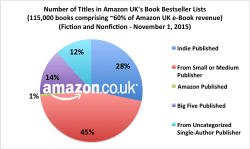
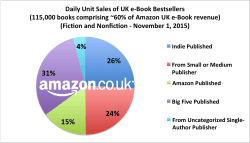
Back in November 2015 Data Guy turned the Author Earning Reports' spiders loose on the UK Kindle Store, and he found that self-published titles made up 40% of the titles on the best-seller list, and 30% of the revenue:

The Kindle Store dominates the UK market even more so than the US market, and for all intents and purposes it is the whole of the market (I wouldn’t argue if you called it a monopoly, even).

So which do you think is closer to being correct, Nielsen or Author Earnings Report?

Given what we learned about the AE Report at BDW, I have a higher confidence that the Report is correct than that Nielsen’s surveys would prove an accurate extrapolation of the aggregate UK consumer.

But that report is close to six months old, so the data is stale. But does that mean it’s no good?

image by MissMessie

"Stop Procrastinating" App Offers a Distraction Free Writing Experience, Can Save You up to $500

Saturday’s post on the Freewrite reminded me that there are more options for distraction-free writing than that $500 retro word processor or its cut-price competitors.

One could simply disable one’s internet access, but for those of us who lack the willpower (me) to leave it turned off there are more extreme options.

For example, apps like Stop Procrastinating let you block internet access for a set period of time.  You can choose how long the firewall will remain active, which sites will be blocked, and whether you want to keep the firewall active after you reboot your computer. (That last option was developed for those of us who know we’re going to enable the app and then want to disable it right away.)

If you’re wondering why one might need this app or apps like it, ask yourself the following questions: How often do you browse the web or use social media while in a meeting? How often do you use it on the toilet? Is getting on the internet the first and last thing you do everyday? Do you often lose track of conversations because you were distracted by the tiny screen in front of you?

If your answer to these questions is yes, then you could probably use an app like Stop Procrastinating to help you concentrate while working. The app is available for Windows and OSX, and costs $5 after a 90-day trial period.

image by Zak61099


Amazon Now Sending Snail-Mail Reminders to Update Your Kindle

Amazon really Really, REALLY, REALLY want you to update your Kindle.

Kindle owners at MobileRead and the eBook Evangelist blog are reporting that they’ve gotten notices in the mail from Amazon with nagging reminders asking them to update their older Kindles.

Last month Amazon started sending out email notices notifying Kindle owners of a small but critical firmware update which replaced certain security certificates.

This update makes it possible for the Kindle (including the older models like the 2007-era $399 original Kindle) to continue to communicate with Amazon over 3G and Wifi after Amazon changes its security on 22 March, and that makes it so important that Amazon is sending not only email notices but also post cards.

I got the email, but I have yet to receive a post card. I’m told that they read:

Dear Kindle Owner,

We’ve been trying to contact you via email and other methods to let you know that one or more of your Kindle e-readers requires a critical update.

To avoid interruption to your reading, please update your device(s) by March 22, 2016.

For step-by-step instructions on how to update your Kindle and to find out which devices require this update, please visit www.amazon.com/ku2016 .

We apologize for any inconvenience,
The Kindle Team

Not all Kindle owners have gotten an email, much less a post card. Amazon appears to only be sending the notices to Kindle owners that regularly disable the connectivity on their device.

But some are getting snail-mail from Amazon (image via eBook Evangelist):

Did you get the email? What about the post card?

Judging by the spike in traffic over the past couple weeks, a lot of owners of older Kindles are getting the notices. Many have expressed frustration or confusion with the update process.

"My K2 can still access the web but I keep seeing the “Basic Web is unable to make a secure connection at this time.” error message. Just assumed this was Amazon blocking my access," one wrote. "However, I just looked up the version of the Kindle OS I should be running to discover that I am not running the latest. I have 2.5.6 when I should be running 2.5.8." That user reported that even after installing the update, they still had issues.

Have you encountered any problems?

New E-ink Bus Signs Launching This Week in Las Vegas

Between Serelec, Dresden Elektronik, and GDS (and let’s not forget those E-ink bus signs currently being tested in London) there are any number of companies using epaper screens for street and bus signs.

But there’s always room for one more. A press release crossed my desk this morning with the news that CHK America has a digital bus sign.

Launching this week at Digital Signage Expo in Las Vegas, the ConnectPoint bus sign is a digital signage solution which will "provide transit riders with easily readable, up to date information at bus stops, under all lighting conditions". It’s going to be on display at the E-ink booth.

Based on a 9.7″ E-ink screen, the ConnectPoint sign can be powered either by batteries or via a solar panel. CHK is promising that this interactive display will be weather-proof and shock-proof, and can be remotely updated over Wifi or 3G.

According to the press release, the first units will be installed in Orlando and Pittsburgh.

Matthew Freidman, Director of Marketing, LYNX-Orlando, commented, “CHK has been a great partner during our wayfinding redesign. The natural next step for us to explore is their digital bus stop products, which are based on E Ink technology. We want to look at all amenity options for our current and new riders. After all, Orlando is the number one tourist destination in the world and we want to provide our customers what they expect as far as bus stop information without us incurring expensive infrastructure improvements.”

Scott Vetere, Director of Service Planning and Evaluation, Pittsburgh’s Port Authority of Allegheny County (PAAC), added, “This is the kind of game-changing infrastructure that will make our system easier to use and provide riders with information right at their fingertips. We are excited about this technology and look forward to testing it in the field.”


New Nook Hardware Could Become Worthless in the UK After May 2016

With Barnes & Noble set to shutter its UK Nook Store today, its customers are still scrambling to get their ebooks transferred to Sainsbury’s. Some report that the transfer service is flaky, while others say that they have yet to receive the email so they can start the transfer process.

Everyone is still trying to parse the frustratingly incomplete FAQs on the Sainsbury’s website and get their questions answered. For example, we know that Sainsbury’s is promising a credit for any title that doesn’t transfer from the Nook Store, but we still don’t yet know everything about whether you will be able to read them on Nook devices.

That question  came up in the comment section on this blog today, and after I spent a half hour tracking down the answer I realized that this was an answer worth sharing.

You see, Sainsbury doesn’t say anything about managing a Nook device after the transition, It has an FAQ which neglects to mention that you won’t be able to buy ebooks from the Nook any more (that would require B&N’s servers) while at the same time offering a less than complete explanation of how to load ebooks on to a Nook Uk device (the instructions will not work for the latest Nook model, the Glowlight Plus).

And to make matters worse, that FAQ leaves out a few important details. For example, I found a B&N FAQ which informs us that an unregistered Nook could become useless in the UK after the end of May.

Can I still side-load eBooks on my UK NOOK device after March 15, 2016?

After March 15, 2016 you can still side-load compatible eBooks on your registered NOOK device by using the microSD card or by connecting your device to a computer via USB cable.

Refer to your devices User Guide for specific side-loading instructions:

In order to continue to have access to your device for side-loading you must sign in on your NOOK device and remain signed-in BEFORE May 31, 2016.  After May 31, 2016 the option to sign in will no longer be available on your NOOK device.

In other words, if you should have to reset a Nook UK device in June, you won’t be able to reauthorize it to the same account. And if someone gives you a Nook UK device in June or later, you won’t be able to log in using your current credentials.

And since B&N requires that a Nook device be authorized before you can use it, that is a problem.

Sure, you might be able to set up a US account with bn.com and register the Nook to that account, but as I understand it that requires that the owner know about the option and (I think) have access to a VPN. And even at the best of times, the B&N website is wonky, so that option might not work.

B&N is about to render a lot of hardware worthless.

Okay, that sounds alarmist and clickbaity, but consider for a moment Nook UK device owners who are not particularly tech savvy. They will have a lot of problems come June if they try to register a Nook UK device.

And frankly, there’s not much we can do about it other than to help each other out. So if you figure out a trick, workaround, we’d like to hear about it.

Or if you have a question about your Nook UK device, feel free to ask in this comment section.

image by wizardjournal

Visionect Launches a DIY Signage Development Kit With 32″ E-ink Screen

If you’ve ever had the urge to develop your own 32″ E-ink monitor, Visionect  can help. This Slovenian startup is at the Digital Signage Expo 2016 this week to show off their latest development kit.

For the past several year Visionect has been developing E-ink based products for niche markets. They’ve released a smart meeting room sign, a 6″ wireless monitor or thin client, and signage development kits with screens ranging from 6″ to 13.3″. Now Visionect is supersizing the development kits with the addition of E-ink’s largest screen.

The new kit features either a 32″ b&w or color E-ink screen, and costs anywhere from $3,500 to $4,500. The price includes the screen, a controller board to drive the screen, and a license for Visionect’s software.

Like E-ink’s own  DIY kits and development kits, this is very much not for the end user. It requires that the buyer have a fair degree of skill at developing software, and is described as "a turnkey solution for rapidly prototyping new digital signage products and quickly transitioning them to real end products".

But on the plus side the kit comes with Wifi, 3G, and ethernet connectivity, and it is also capable of controlling a frontlight on the 32″ screen. That frontlight is not included in the kit, however.

You can find more details on the Visionect website.

Amazon Comments on TOC Crackdown, Inadvertently Confirms Kindle Unlimited Page Count Scam

News broke on Friday that Amazon was cracking down on authors and publishers who had put their TOCs at the end of the Kindle ebook, rather than at the beginning.

On Monday Amazon confirmed the report in a statement on the KDP support forums, while at the same time also confirming that the crackdown was indeed a response to a much larger problem.

But first, Amazon’s statement:

We have recently received a number of questions on topics such as TOC formatting and our policing of abuse and fraud among KDP publishers.

In many cases, putting a book’s Table of Contents (TOC) at the end of a book can create a poor experience for readers, and in general we suggest authors locate TOCs to the beginning of a book. If the formatting of a book results in a poor experience or genuine reader confusion, or is designed to unnaturally inflate sales or pages read, we will take action to remove titles and protect readers. That said, absent any other issues of quality, locating the TOC at the end of a book is not in itself outside of our guidelines.

Relatedly, some in the community have contacted us about the activities of a small minority of publishers who may attempt to inflate sales or pages read through the use of various techniques, such as adding unnecessary or confusing hyperlinks, misplacing the TOC or adding distracting content. We both actively police for this type of activity on our own as well as investigate when the community points out such abuse (thank you to those of you who have helped us in this regard). Any abuse we find results in the immediate suspension of a title. Some circumstances, including repeat offenses, will result in KDP account suspension. In any abuse cases, we will also remove related pages read from the allocation of the monthly KDP Select Global Fund.

When I covered the story on Friday, I reported on the crackdown but not the speculation that authors were getting caught up in a response to scammers who were using various means to artificially inflate their page counts in Kindle Unlimited.

As David Gaughran explained, and as was laid out in detail over on KBoards, scammers were using tricks "such as adding unnecessary or confusing hyperlinks, misplacing the TOC, or adding distracting content" to artificially  inflate the number of pages read by Kindle Unlimited subscribers.

This details matters because in July of last year Amazon started paying authors and publishers with ebooks in Kindle Unlimited by the number of pages read, rather than the number of times an ebook is borrowed. This was generally viewed as a response to authors who were cheating the system by uploading really short works and getting paid each time one was borrowed, and it was supposed to level the playing field by making sure that longer works are valued the same as a short story.

That’s the way things were supposed to work, but alas, the scammers are smarter than that.

As the theory goes, scammers had figured out that Amazon wasn’t counting the pages a KU subscriber had read in an ebook; instead Amazon was only measuring how far into a book the reader gets.  So if the scammer can trick a reader to jump to a point 90% of the way into a ebook, that scammer gets paid for that 90% of the ebook no matter whether it was actually read or not.

I have yet to confirm the accuracy of that theory, but it is the consensus opinion over at KBoards. David Gaughran also thinks that’s what’s going on:

The latest wheeze from this shady crew was to place a message at the start of their KU titles encouraging readers to click through to the end – because this fools Amazon’s system into thinking the entire book has been read, the author of that title then receives an inflated payout from the KU pot, and then honest, hard-working writers who aren’t pulling these cheap tricks on readers have less money to share. It’s a mess. These guys are peeing in the KU pool and Amazon is paying them by the gallon.

And it seems this is what triggered the TOC crackdown.

You can find one such book over here. The scammer’s notice is visible when you read the sample on the Amazon website, and it looks like this:

I have yet to confirm first-hand that this theory is true, but I do believe that Gaughran was right all along.

Amazon’s announcement this morning, as well as the spammy/scammy screensnap above, would only make sense if scammers had found a way to trick Amazon into paying for pages that weren’t read.

And that is frankly shocking. Who would believe that Amazon would decide to charge by the pages read and then not bother to count the pages correctly?

That just doesn’t make any sense, and yet it is what is happening here.

Clearly Amazon is going to have to come up with a more permanent solution. They could start by defining an algorithmic filter to catch the more obvious scams, but in the long run Amazon is going to have to change how they track what is read by Kindle Unlimited subscribers.

image by Matt From London

Infographic: Old World Language Families

For reasons both poetic and pragmatic, the tree has historically been the designer’s go-to inspiration for mapping relationships. In the infographic below, Finish-Swedish illustrator Minna Sundberg artfully uses this format to trace the world’s largest language families.

All of the languages illustrated here stem from subcategories of either Indo-European or Uralic origin, and on closer examination many fascinating links are revealed. Finnish, for example, is more closely related to Hungarian than its geographic neighbors, Russian and Swedish.

Coincidentally, the one language I can’t find on this graphic is Basque, which makes sense. According to Wikipedia, Basque is not an Indo-European language at all but instead is the descendant of a language which predates the rise of Indo-European languages.

Click to enlarge:

Stand Still Stay Silent via eBookPorn