"Stop Procrastinating" App Offers a Distraction Free Writing Experience, Can Save You up to $500

Saturday’s post on the Freewrite reminded me that there are more options for distraction-free writing than that $500 retro word processor or its cut-price competitors.

One could simply disable one’s internet access, but for those of us who lack the willpower (me) to leave it turned off there are more extreme options.

For example, apps like Stop Procrastinating let you block internet access for a set period of time.  You can choose how long the firewall will remain active, which sites will be blocked, and whether you want to keep the firewall active after you reboot your computer. (That last option was developed for those of us who know we’re going to enable the app and then want to disable it right away.)

If you’re wondering why one might need this app or apps like it, ask yourself the following questions: How often do you browse the web or use social media while in a meeting? How often do you use it on the toilet? Is getting on the internet the first and last thing you do everyday? Do you often lose track of conversations because you were distracted by the tiny screen in front of you?

If your answer to these questions is yes, then you could probably use an app like Stop Procrastinating to help you concentrate while working. The app is available for Windows and OSX, and costs $5 after a 90-day trial period.

image by Zak61099


Amazon Now Sending Snail-Mail Reminders to Update Your Kindle

Amazon really Really, REALLY, REALLY want you to update your Kindle.

Kindle owners at MobileRead and the eBook Evangelist blog are reporting that they’ve gotten notices in the mail from Amazon with nagging reminders asking them to update their older Kindles.

Last month Amazon started sending out email notices notifying Kindle owners of a small but critical firmware update which replaced certain security certificates.

This update makes it possible for the Kindle (including the older models like the 2007-era $399 original Kindle) to continue to communicate with Amazon over 3G and Wifi after Amazon changes its security on 22 March, and that makes it so important that Amazon is sending not only email notices but also post cards.

I got the email, but I have yet to receive a post card. I’m told that they read:

Dear Kindle Owner,

We’ve been trying to contact you via email and other methods to let you know that one or more of your Kindle e-readers requires a critical update.

To avoid interruption to your reading, please update your device(s) by March 22, 2016.

For step-by-step instructions on how to update your Kindle and to find out which devices require this update, please visit www.amazon.com/ku2016 .

We apologize for any inconvenience,
The Kindle Team

Not all Kindle owners have gotten an email, much less a post card. Amazon appears to only be sending the notices to Kindle owners that regularly disable the connectivity on their device.

But some are getting snail-mail from Amazon (image via eBook Evangelist):

Did you get the email? What about the post card?

Judging by the spike in traffic over the past couple weeks, a lot of owners of older Kindles are getting the notices. Many have expressed frustration or confusion with the update process.

"My K2 can still access the web but I keep seeing the “Basic Web is unable to make a secure connection at this time.” error message. Just assumed this was Amazon blocking my access," one wrote. "However, I just looked up the version of the Kindle OS I should be running to discover that I am not running the latest. I have 2.5.6 when I should be running 2.5.8." That user reported that even after installing the update, they still had issues.

Have you encountered any problems?

New E-ink Bus Signs Launching This Week in Las Vegas

Between Serelec, Dresden Elektronik, and GDS (and let’s not forget those E-ink bus signs currently being tested in London) there are any number of companies using epaper screens for street and bus signs.

But there’s always room for one more. A press release crossed my desk this morning with the news that CHK America has a digital bus sign.

Launching this week at Digital Signage Expo in Las Vegas, the ConnectPoint bus sign is a digital signage solution which will "provide transit riders with easily readable, up to date information at bus stops, under all lighting conditions". It’s going to be on display at the E-ink booth.

Based on a 9.7″ E-ink screen, the ConnectPoint sign can be powered either by batteries or via a solar panel. CHK is promising that this interactive display will be weather-proof and shock-proof, and can be remotely updated over Wifi or 3G.

According to the press release, the first units will be installed in Orlando and Pittsburgh.

Matthew Freidman, Director of Marketing, LYNX-Orlando, commented, “CHK has been a great partner during our wayfinding redesign. The natural next step for us to explore is their digital bus stop products, which are based on E Ink technology. We want to look at all amenity options for our current and new riders. After all, Orlando is the number one tourist destination in the world and we want to provide our customers what they expect as far as bus stop information without us incurring expensive infrastructure improvements.”

Scott Vetere, Director of Service Planning and Evaluation, Pittsburgh’s Port Authority of Allegheny County (PAAC), added, “This is the kind of game-changing infrastructure that will make our system easier to use and provide riders with information right at their fingertips. We are excited about this technology and look forward to testing it in the field.”


New Nook Hardware Could Become Worthless in the UK After May 2016

With Barnes & Noble set to shutter its UK Nook Store today, its customers are still scrambling to get their ebooks transferred to Sainsbury’s. Some report that the transfer service is flaky, while others say that they have yet to receive the email so they can start the transfer process.

Everyone is still trying to parse the frustratingly incomplete FAQs on the Sainsbury’s website and get their questions answered. For example, we know that Sainsbury’s is promising a credit for any title that doesn’t transfer from the Nook Store, but we still don’t yet know everything about whether you will be able to read them on Nook devices.

That question  came up in the comment section on this blog today, and after I spent a half hour tracking down the answer I realized that this was an answer worth sharing.

You see, Sainsbury doesn’t say anything about managing a Nook device after the transition, It has an FAQ which neglects to mention that you won’t be able to buy ebooks from the Nook any more (that would require B&N’s servers) while at the same time offering a less than complete explanation of how to load ebooks on to a Nook Uk device (the instructions will not work for the latest Nook model, the Glowlight Plus).

And to make matters worse, that FAQ leaves out a few important details. For example, I found a B&N FAQ which informs us that an unregistered Nook could become useless in the UK after the end of May.

Can I still side-load eBooks on my UK NOOK device after March 15, 2016?

After March 15, 2016 you can still side-load compatible eBooks on your registered NOOK device by using the microSD card or by connecting your device to a computer via USB cable.

Refer to your devices User Guide for specific side-loading instructions:

In order to continue to have access to your device for side-loading you must sign in on your NOOK device and remain signed-in BEFORE May 31, 2016.  After May 31, 2016 the option to sign in will no longer be available on your NOOK device.

In other words, if you should have to reset a Nook UK device in June, you won’t be able to reauthorize it to the same account. And if someone gives you a Nook UK device in June or later, you won’t be able to log in using your current credentials.

And since B&N requires that a Nook device be authorized before you can use it, that is a problem.

Sure, you might be able to set up a US account with bn.com and register the Nook to that account, but as I understand it that requires that the owner know about the option and (I think) have access to a VPN. And even at the best of times, the B&N website is wonky, so that option might not work.

B&N is about to render a lot of hardware worthless.

Okay, that sounds alarmist and clickbaity, but consider for a moment Nook UK device owners who are not particularly tech savvy. They will have a lot of problems come June if they try to register a Nook UK device.

And frankly, there’s not much we can do about it other than to help each other out. So if you figure out a trick, workaround, we’d like to hear about it.

Or if you have a question about your Nook UK device, feel free to ask in this comment section.

image by wizardjournal

Visionect Launches a DIY Signage Development Kit With 32″ E-ink Screen

If you’ve ever had the urge to develop your own 32″ E-ink monitor, Visionect  can help. This Slovenian startup is at the Digital Signage Expo 2016 this week to show off their latest development kit.

For the past several year Visionect has been developing E-ink based products for niche markets. They’ve released a smart meeting room sign, a 6″ wireless monitor or thin client, and signage development kits with screens ranging from 6″ to 13.3″. Now Visionect is supersizing the development kits with the addition of E-ink’s largest screen.

The new kit features either a 32″ b&w or color E-ink screen, and costs anywhere from $3,500 to $4,500. The price includes the screen, a controller board to drive the screen, and a license for Visionect’s software.

Like E-ink’s own  DIY kits and development kits, this is very much not for the end user. It requires that the buyer have a fair degree of skill at developing software, and is described as "a turnkey solution for rapidly prototyping new digital signage products and quickly transitioning them to real end products".

But on the plus side the kit comes with Wifi, 3G, and ethernet connectivity, and it is also capable of controlling a frontlight on the 32″ screen. That frontlight is not included in the kit, however.

You can find more details on the Visionect website.

Amazon Comments on TOC Crackdown, Inadvertently Confirms Kindle Unlimited Page Count Scam

News broke on Friday that Amazon was cracking down on authors and publishers who had put their TOCs at the end of the Kindle ebook, rather than at the beginning.

On Monday Amazon confirmed the report in a statement on the KDP support forums, while at the same time also confirming that the crackdown was indeed a response to a much larger problem.

But first, Amazon’s statement:

We have recently received a number of questions on topics such as TOC formatting and our policing of abuse and fraud among KDP publishers.

In many cases, putting a book’s Table of Contents (TOC) at the end of a book can create a poor experience for readers, and in general we suggest authors locate TOCs to the beginning of a book. If the formatting of a book results in a poor experience or genuine reader confusion, or is designed to unnaturally inflate sales or pages read, we will take action to remove titles and protect readers. That said, absent any other issues of quality, locating the TOC at the end of a book is not in itself outside of our guidelines.

Relatedly, some in the community have contacted us about the activities of a small minority of publishers who may attempt to inflate sales or pages read through the use of various techniques, such as adding unnecessary or confusing hyperlinks, misplacing the TOC or adding distracting content. We both actively police for this type of activity on our own as well as investigate when the community points out such abuse (thank you to those of you who have helped us in this regard). Any abuse we find results in the immediate suspension of a title. Some circumstances, including repeat offenses, will result in KDP account suspension. In any abuse cases, we will also remove related pages read from the allocation of the monthly KDP Select Global Fund.

When I covered the story on Friday, I reported on the crackdown but not the speculation that authors were getting caught up in a response to scammers who were using various means to artificially inflate their page counts in Kindle Unlimited.

As David Gaughran explained, and as was laid out in detail over on KBoards, scammers were using tricks "such as adding unnecessary or confusing hyperlinks, misplacing the TOC, or adding distracting content" to artificially  inflate the number of pages read by Kindle Unlimited subscribers.

This details matters because in July of last year Amazon started paying authors and publishers with ebooks in Kindle Unlimited by the number of pages read, rather than the number of times an ebook is borrowed. This was generally viewed as a response to authors who were cheating the system by uploading really short works and getting paid each time one was borrowed, and it was supposed to level the playing field by making sure that longer works are valued the same as a short story.

That’s the way things were supposed to work, but alas, the scammers are smarter than that.

As the theory goes, scammers had figured out that Amazon wasn’t counting the pages a KU subscriber had read in an ebook; instead Amazon was only measuring how far into a book the reader gets.  So if the scammer can trick a reader to jump to a point 90% of the way into a ebook, that scammer gets paid for that 90% of the ebook no matter whether it was actually read or not.

I have yet to confirm the accuracy of that theory, but it is the consensus opinion over at KBoards. David Gaughran also thinks that’s what’s going on:

The latest wheeze from this shady crew was to place a message at the start of their KU titles encouraging readers to click through to the end – because this fools Amazon’s system into thinking the entire book has been read, the author of that title then receives an inflated payout from the KU pot, and then honest, hard-working writers who aren’t pulling these cheap tricks on readers have less money to share. It’s a mess. These guys are peeing in the KU pool and Amazon is paying them by the gallon.

And it seems this is what triggered the TOC crackdown.

You can find one such book over here. The scammer’s notice is visible when you read the sample on the Amazon website, and it looks like this:

I have yet to confirm first-hand that this theory is true, but I do believe that Gaughran was right all along.

Amazon’s announcement this morning, as well as the spammy/scammy screensnap above, would only make sense if scammers had found a way to trick Amazon into paying for pages that weren’t read.

And that is frankly shocking. Who would believe that Amazon would decide to charge by the pages read and then not bother to count the pages correctly?

That just doesn’t make any sense, and yet it is what is happening here.

Clearly Amazon is going to have to come up with a more permanent solution. They could start by defining an algorithmic filter to catch the more obvious scams, but in the long run Amazon is going to have to change how they track what is read by Kindle Unlimited subscribers.

image by Matt From London

Infographic: Old World Language Families

For reasons both poetic and pragmatic, the tree has historically been the designer’s go-to inspiration for mapping relationships. In the infographic below, Finish-Swedish illustrator Minna Sundberg artfully uses this format to trace the world’s largest language families.

All of the languages illustrated here stem from subcategories of either Indo-European or Uralic origin, and on closer examination many fascinating links are revealed. Finnish, for example, is more closely related to Hungarian than its geographic neighbors, Russian and Swedish.

Coincidentally, the one language I can’t find on this graphic is Basque, which makes sense. According to Wikipedia, Basque is not an Indo-European language at all but instead is the descendant of a language which predates the rise of Indo-European languages.

Click to enlarge:

Stand Still Stay Silent via eBookPorn

Amazon Now Resetting Some Account Passwords?

Remember about four months ago when Amazon was resetting account passwords for some users in the US and UK?

They’ve started doing it again. Over the weekend a member of MobileRead Forums reported that they received this email from Amazon:

Hello,

At Amazon we take your security and privacy very seriously. As part of our routine monitoring, we discovered a list of email address and password sets posted online. While the list was not Amazon-related, we know that many customers reuse their passwords on several websites. We believe your email address and password set was on that list. For your security, we have assigned a temporary password to your account.

You will need to reset your password when you return to the Amazon.com site. To reset your password, click "Your Account" at the top of any page on Amazon.com. On the Sign In page, click the "Forgot your password?" link to reach the Amazon.com Password Assistance page. After you enter your email or mobile phone number, you will receive an email containing a personalized link. Click the link from the email and follow the directions provided.

Your new password will be effective immediately. We recommend that you choose a password that you have never used with any website.

Sincerely,
Amazon.com

That email is similar to the one Amazon back in November 2015, and in fact similar emails date back as far as June 2011. I found a copy of that earlier email in a four-month-old Reddit thread, and both emails say basically the same thing.

It’s not clear whether Amazon found another security issue, the same one cropped up again, if Amazon is simply recycling the email text whenever they want you to reset your password, or if some scammer copied that earlier email for a new phishing attempt.

In any case, if you get one of these emails you should take it seriously, and follow the appropriate steps:

  1. Do not respond to the email, and do not click any links in the email.
  2. Instead, open a new browser tab and visit Amazon.com to reset your password.

Scammers sometimes use this type of email to trick the unwary into handing over their login info, which is why you shouldn’t click a link in or respond to the email itself.

In fact, that’s exactly what might be happening here. This email was reportedly sent to an address not associated with an Amazon account, which suggests that this email did not come from Amazon.

But the email did not have any outbound links, so it’s not clear what a scammer would gain.

I haven’t gotten the email, so I can’t comment first hand, but if I had would indeed take the steps to change my password from "Passw0rd" to "Pa55w0rd".

Better safe than sorry.

image by christiaan_008

Andrew Savikas Departs Safari Books Online Amidst "Massive" Layoffs

There was a quiet uproar at O’Reilly Media’s subscription ebook service this week  as a result of "massive layoffs".

A confidential source has tipped me to the news (and LinkedIn confirms) that Andrew Savikas, formerly of O’Reilly Books, has left his position as CEO of Safari Books Online.

Savikas had been the CEO since December 2010, and his departure was described by O’Reilly spokesperson Sarah Winge as part of a period of restructuring, "O’Reilly acquired full ownership of Safari in 2014, and as of January 2016, we are integrating the two businesses. They are quite complementary, and we see lots of opportunity ahead," she told me by email. "Today’s restructuring announcements are about aligning O’Reilly’s resources with its strategy, now that O’Reilly and Safari are one company. That company is in great shape, and we’re excited about the future."

Winge would not say how many people were laid off this week, however.

Update: Savikas confirmed his departure on his blog on Medium. "As some of you already know, I’ve left my role after 5 years as CEO at Safari Books Online, which is now part of O’Reilly Media. As O’Reilly works to fully integrate Safari with the rest of their operations, Tim O’Reilly and I agreed this was the right time for me to step away," he writes. "Anyone paying attention to technology, publishing, or education (and especially the places they intersect) knows that a lot can change in 5 years.That is true for companies like O’Reilly and Safari, and it’s also true for people."

Launched in 2000, Safari Books Online was the original subscription ebook service. Originally starting with just the technical titles published by O’Reilly, it now offers a catalog of 30,000 videos, books, and training courses for a monthly subscription cost of $40 (individual) and up.

This is the service which proved that the ebook subscription concept could work with the right model and in the right market niche.

The only wonder is that it took trade book publishers thirteen years to be willing to try to replicate the idea with consumer titles. Both Scribd and Oyster failed to follow in Safari’s footsteps, of course, but that stemmed less from any flaw in the basic idea than from a doomed plan to pay retail rates while charging for subscription access.

image by magerleagues

How to Downgrade Your Fire HD 7, HD 6 Tablet from Fire OS 5 Bellini to OS 4 Sangria

Not everyone is happy about the most recent update which added Fire OS Bellini to the Fire HD 7, Fire HDX 8.9, and Fire HD 6 tablets.

Users are complaining on Amazon’s support forums, the comment section of this blog, and elsewhere about the missing carousel, radical changes to the interface, the font size, and oh yes, the removal of device-level encryption.

I find myself indifferent to the change (although I would agree that the new interface is not an improvement) but I can appreciate that Bellini is such a major change from Fire OS 4 Sangria that I can see why some people would hate it.

Bellini replaces the carousel with a more complicated multi-page, multi-directional home page that is frankly less useful at helping you find and use your content (but I’m sure it’s going to do wonders for pitching you content Amazon wants you to buy).

Luckily, there’s a way to downgrade certain Fire tablet models, to go back to the older version of Fire OS.

Amazon has published a new help page which informs us that owners of Fire HD 7, Fire HD 6, and Fire HDX 8.9 can reset their tablets and reinstall the older OS, Sangria.

The option can be found on the "manage your content and devices" page on the Amazon website:

The process involves a complete hardware wipe and re-installation of the older OS, according to Amazon:

Downgrading to Fire OS 4 requires a factory reset and will remove all of your personal information, Amazon account information, downloaded content and application from internal storage.

Fire OS 4 will be available from the cloud within 72 hours and requires that your device be powered on, connected to Wi-Fi and with battery level at least 50% to downgrade. Fire OS 4 will download in the background and the device will reset and downgrade when the download completes and the device is idle. It is not possible to cancel the rollback process once the request has been made.

If you want to go through with it, go to the manage your content and devices page, select the "devices" tab, and then choose the specific tablet. You can find the downgrade option in the dropdown menu (see the above screensnap).

This process will wipe everything from your tablet, so make sure that all of your personal files are backed up before you begin. In fact, you might want to have two backups, just in case.

image by darinmarshall


Amazon Now Freaking Out Over TOC Location in Kindle eBooks?

Every so often Amazon decides to crack down on violations of some rule in its voluminous ToS or Kindle publishing guidelines, or even just because readers are complaining.

In the past Amazon has gotten serious about on keyword stuffing in titles; public domain, GPL-licensed, and other works found freely available on the web; and now David Gaughran tells us that Amazon is getting serious about the location of the table of contents in Kindle ebooks.

Apparently the logical location, putting the TOC at the end of the ebook, is not the Amazon-approved location:

We’ll get to what might be the root cause of this crackdown in a moment, but Amazon is claiming that having a TOC in the end-matter instead of the front-matter is a breach of the (ever-changing, 100+ pages) Kindle Publishing Guidelines (PDF). Amazon says that rear TOCs result in a poor reader experience, and it has very suddenly decided to clamp down heavily on this practice, without notifying the community-at-large, even though moving extraneous front-matter to the end of the text has been fairly standard practice for years.

Some individual authors are receiving Quality Notices warning them that their title will be removed from sale unless the TOC is moved to the front. Normally these notices – which appear to be generated by bots – give us just five days to comply. Other writers are having their buy buttons removed without receiving these notices.

To give you an idea of how disruptive this can be, read the story of author Walter Jon Williams – who had his Nebula-nominated SF novel Metropolitan removed from saleduring a BookBub promotion. Can you imagine?

His buy button was eventually restored around a week later, but Amazon wasn’t finished. After he moved his TOC to the front of the book and uploaded the new version, Amazon then sent an email to all previous purchasers of the book saying that the author had now corrected serious formatting and editorial issues. Walter Jon Williams said that there were no such issues with this book – which has been on sale in one form or another since 2005 when it was originally published by HarperCollins – and the sole change he made was to move the TOC, as requested.

I can’t confirm that Amazon is cracking down, but I can tell you that section 5.1 of the publishing guidelines does recommend that you put the TOC at the beginning of the book.

Amazon has some sound technical reasons for that recommendation, but a lot of authors and publishers have tended to ignore those technical reasons in favor of good design principles. A ToC is largely redundant in fiction, so there’s no need to waste a reader’s time by making them page through it at the beginning of an ebook.

That’s how Baen Books has been formatting their ebooks since before I started buying them over a decade ago, and it makes as much sense now as it did then.

In fact, putting the TOC in the back makes more sense in 2015 than it did in 2005.  Now Kindle ebooks have an external TOC which arguably makes the internal one redundant, so one could argue that you don’t need to put a TOC in the ebook any more.

But apparently Amazon thinks it’s still important – so much so that they’re threatening authors over the matter.

Weird.

image by Jason Hargrove

Four Reasons PDFs Are Better Than Epub

Epub, Epub, Epub.

Ask anyone in digital publishing today and they will tell you that Epub is the be-all and end-all of document formats. This ones-size-fits-all format can do anything (just ask Bill McCoy).

Or, you could look past the propaganda and realize that there are better formats. PDF, for example, is better than Epub in many ways.

Here are four (out of dozens, so if you know of other reasons please  feel free to leave a comment).

#1 PDFs can be read on any platform

Pull a computer out of the box for the first time, and try to read an Epub on it, I dare you.  When that fails, search for the user manuals on the hard disk. Guess what format they’re in?

If you said anything other than PDF, you’d be wrong.

Name any device, beit a cellphone, smart fridge, pez dispenser, , and odds are good it can read a PDF. (And if it can’t, it won’t be able to read an Epub either.)

#2 PDFs can be made with just about anything

Not only can you make PDF as a print/export option for office suites, cloud office services, note-taking apps, it’s now a standard printer option on Windows 7. Tools to make PDFS are literally everywhere, embedded in every type of app.

Got a Touchpad, a Twinkie, and a tissue? You can make a PDF.

Got an old Psion handheld and a couple of Q-Tips? You can make a PDF.

#3 Epub 3

'Nuff said.

#4 Compatability & Accessibility

Have you ever tried to take an Epub from say, Apple’s proprietary Epub format and convert it to say, Kobo’s proprietary Epub format? Ever try to extract the content from a fixed-layout Epub?

It goes something like this:

images by jurvetson,  ralphbijker, wheany,  Adam Greig

Kindle for iPad, iPhone v4.18 Adds OpenDyslexic Font, New Author Follow Option

Amazon rolled out a new update for the Kindle iOS app earlier this week.

Kindle for iPad, iPhone v4.18 adds new Audible audiobook integration which enables you to listen while the app highlights each word, and it also has a new "Follow the Author" feature (it sounds like this is "Amazon Follow").

The iOS app also now offers the OpenDyslexic font choice which Amazon added to the Kindle Paperwhite last month (OverDrive, Pocket, and other companies also offer similar font options).

The font is supposed to help those with reading disabilities. As the thinking goes, it makes characters easier to recognize by emphasizing certain parts of each character.

Experts dispute whether it is effective, but as you can see in the screen shot it is distinctive.

Thanks to Jiminy Panoz for the screenshot; I have somehow misplaced my iPad (it’s chaos here due to a family emergency).

You can find the app in iTunes.

Nielsen: Kids/YA Category Immune to Digital Cannibalization

Kristin McLean of Nielsen Book revealed in her session at DBW 2016 Launch Kids conference (*) that the Kids/YA segment continues to be overwhelmingly print-focused.

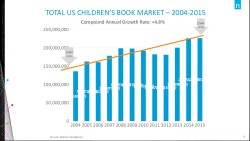
According to Nielsen’s consumer surveys, this segment has been trending upwards for the past ten years, and growing by an average of 4.8%. eBooks do appear to have trimmed print sales for a couple years, but in recent years print has made a resurgence while ebook revenues have continued to grow:

It’s not all good news, however; Nielsen’s surveys showed that ebooks still make up a small fraction of the juvenile segment, even though ebooks accounted for half of the adult fiction market in 2014.

Depending on your viewpoint, that could be good news. It’s a sign that digital still has a lot of room to grow, but I wouldn’t bet on it.

One detail that has been reiterated over and over at DBW today was that surveys have shown that teens and the younger crowd are committed to paper. Even though kids are heavy users of digital services and social networks, they still prefer paper books over ebooks.

It’s not that they dislike ebooks so much as they like to share their books with friends, and that’s something which you just can’t do yet with ebooks. (And given that kids tend to borrow more titles than they buy, I’d say cost is another factor.)

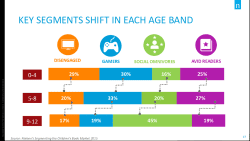
The surveys have also shown that avid readers and social onmivores, two groups that make up most of the juvenile book reading population, account for almost two-thirds of the 9-12 age cohort.

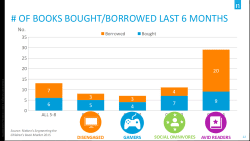
These two groups tend to buy more ebooks than gamers or the disengaged, but they also tend to borrow a lot more books than the other groups:

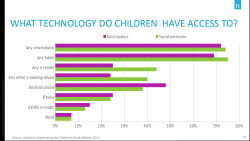
As you can see in the last slide, both avid readers and social omnivores are far more likely to have access to a smartphone or tablet. And contrary to what one might expect, avid readers were less likely than social omnivores to have access to an ereader (I would have expected that to go the other way, for obvious reasons).

So while there’s potential to sell more kids' ebooks to this market, it looks like authors and publishers would have more luck if they focused on digital content which is both easily sharable, and free.

P.S. While they are often referred to collectively as DBW, there are several conferences running concurrently this week in NYC. The session I attended was Launch Kids.

image by Julian Partridge

German Court Rules that Amazon Can’t Cut You Off From Your Kindle eBooks

Amazon has gotten a lot of bad press each time they banned a former customer and in doing so cut them off from the purchased ebooks, and now a German court is slapping the retailer on the wrist.

Lesen.net reports that a former Amazon customer in the German state of North Rhine-Westphalia sued the retailer in Köln over the following clause in its ToS:

We reserve the right to withhold your services on the website, to close member accounts or remove or edit content, if you violate any applicable laws, these Terms or any other applicable rules or guidelines.

The Oberlandesgericht Köln has now ruled that this passage is illegal under German law. It’s described in the announcement as putting customers at an unreasonable disadvantage, and the court also criticizes the clause for being too broad and lacking specifics that define when an account will be closed. The ruling, which has yet to take effect, can be downloaded as a PDF.

There’s no word yet on whether this ruling will affect all customers world wide, but I would hope it does (especially the point about specifics). Consumers have frequently been at a loss to explain why Amazon will close an account.

This is Amazon’s usual response should they decide a customer has made too many returns, but sometimes the retailer has closed an account for mysterious reasons and then refused to explain why (or so the complaining consumer has stated).

I have contacted Amazon, and asked about how this ruling might affect Kindle owners in Germany and around the world. I’ll update this post with Amazon’s response.

image by John Pastor