What do You Think of Amazon’s New Font, Ember?

Ember bookerly Early last year Amazon released a firmware update for the Fire tablets with a custom serif font, Bookerly, which was developed exclusively for Amazon’s use on its Kindle platform. Now Amazon is about to release a sans-serif font, and you can get an early look.

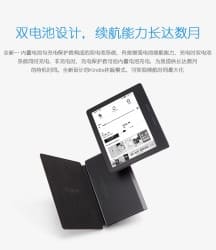
When the Kindle Oasis starts shipping next week, it’s going to include a new font called Ember. Developed by font foundry Dalton Maag, Ember is a custom font developed just for Amazon. It’s already started showing up in recent updates for the Kindle ereaders as well as in early hands on videos of the Kindle Oasis, and now you can download it and try it yourself.

A friend was kind enough to snag a copy of the font family for me, and I have attached it below.

I haven’t tried the font in its native environment, yet. It is not listed as an option in either my Fire tablets or my Kindles (although I have been told that Amazon is already using it in the menus on the Kindle).

But I plan to go test the font by embedding it into an Epub file.

If you try it, let me know what you think.

image by jm3

Onyx Boox Kepler Pro Coming Soon – Android 4.0, Waterproof, Flush-Mounted Carta E-ink Screen

Here’s an interesting addendum to yesterday’s ereader video from Charbax. Regular TDR commenter Hrafn has identified the 6″ ereader shown late in that video, and posted the info over at MobileRead.

It’s called the Kepler, and Onyx has already posted the product listing. There are going to be three models, and one, the Kepler Pro, will be a competitor to the 3rd-gen Kindle Paperwhite (we don’t have the specs for the other two models).

The Kepler Pro runs Android 4.0 on a 1GHz CPU with 1GB RAM, 16GB internal storage, and a microSD card slot.

It has a flush-mounted Carta E-ink screen (1442 x 1072 resolution) with frontlight and either a capacitive touchscreen or a digitizer with stylus (the listing contradicts itself, but no stylus was shown in the video). Under that screen you’ll find Wifi, Bluetooth,a 3Ah battery, all  wrapped in a waterproof shell.

For obvious reasons there’s no headphone jack or speaker, but the Kepler Pro does have audio support via Bluetooth. It can play mp3 files or stream TTS over a Bluetooth speaker.

Weighing in at 205 grams, the Kepler Pro measures 8 mm thin.

All in all, this ereader is bound to appeal to a wide variety of users. If the flush-mounted high resolution screen doesn’t draw you in, the waterproof shell might, or Android, or the Bluetooth support.

All in all, this is about three-quarters of the ereader many wish the Kindle Oasis would have been. The only way Onyx could improve upon this design is to put page turn buttons on one side of the screen to make it easier to use one-handed.

Who knows, maybe that will turn up in the next model.

Will Google Ever Reopen Its eBook Publisher Portal?

Earlier today someone made the unsubstantiated declaration that Google had closed its publisher portal "forever". While there is zero evidence to back up that assertion, I fear that it will be proven correct.

It was around this time last year that I broke the news that Google had a industrial-scale piracy problem. I showed how ebook pirates were basically setting up their own ebookstores in Google play, pirating ebook after ebook with impunity. All Google did to fix the problem was to remove ebooks in response to DMCA notices and issue a bland statement about "taking the issue seriously".

Google proceeded to ignore the negative press coverage, but they did finally respond when the Dutch publishers trade group NUV demanded that Google fix it.

Google responded by closing the publisher portal to new signups on 25 May 2015, saying that:

We’ve temporarily closed new publisher sign ups in the Play Books Partner Center, so we can improve our content management capabilities and our user experience. We’re working to reopen this to new publishers soon. Thanks for your patience.

The Play Books Partner Center is Google’s equivalent of KDP. Authors and publishers (and pirates, for that matter) can use it to upload ebooks for sale through Google Play books.

If you have an account, that is. Google hasn’t let anyone sign up for a new account since last May, and you shouldn’t expect them to.

As I explained to a reader in March, Google has only a minimal interest in ebooks.  Google isn’t Amazon. One is a retailer, but Google is an ad network giant which is not driven by sales and really only wants ebooks so it can complete a checklist of content types.

Since Google has ebooks from publishers, and from distributors like Vearsa, Streetlib, and eBook Partnership, it doesn’t need to reopen that portal.

In short, the Play Books Partner Center probably will be closed forever (good luck getting Google to admit it, though).

image by cowbite


Barnes & Noble, Kobo Have Shut Down Their HTML5 Reading Apps

In 2011 browser-based HTML5 reading apps were hailed as a rebuff to Apple’s demand for a vig. Everyone from Kobo to Nook to Kindle were releasing their own app, and there were even a couple independent platforms like Bookish. The ebook market was showing every sign of going for web apps over native apps, but as the years passed the momentum swung the other way.

First Ibis Reader and then Booki.sh were acquired and shutdown, and now both Kobo and Barnes & Noble have quietly retired their web apps.

Over the weekend a reader tipped me to the news that Kobo had quietly removed the install option for Kobo Instant Reader. Launched in 2012, this app was one of the better HTML5 reading apps (I seriously couldn’t tell that it wasn’t the iPad app). You could use it to read ebooks offline, and even buy the ebooks in the app.

Alas, the great experience wasn’t enough to keep the app around. It is now gone, and Kobo is not responding to queries on the topic.

While we don’t know why Kobo abandoned their app, we do know a little more about B&N’s Nook for Web.  That app was lost in last year’s botched relaunch of the B&N website. Barnes & Noble did not bring the app from the old site to the new one, and I can understand why.

Launched in July 2012, Nook for Web was never fully developed. It was a frankly shitty app which did not work offline, could not remember to keep you logged in, and didn’t support all browsers or even most mobile devices.

Its demise went unremarked but not unnoticed. With the B&N website working about as well as a one-legged man in a butt- kicking contest, the death of that web app was relatively unimportant. (Plus there was the chance that B&N might fix the app, or replace it.)

But with Kobo having dropped their app as well, it was worth noting that B&N had passively let Nook for Web die. It’s gone now, and that leaves just Amazon, Google, and OverDrive (they bought Booki.sh) with web reading apps.

image by Ultra

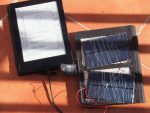
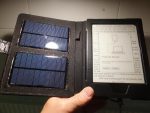
DIY Solar Case for the Kobo Aura H2O

Amazon is reportedly planning to release a solar-powered case for the Kindle Oasis, but thanks to one industrious hacker it’s going to be the second premium ereader with a solar case, rather than the first.

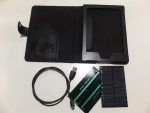
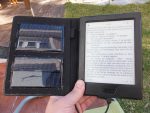
A Kobo Aura H20 owner has crafted a one of a kind case for their ereader. They combined a cheap after market case with a couple solar panels and a USB cable to create a case which can charge their ereader on the go.

The hacker cut out sections of the inner liner to fit the panels, wired them to the USB cable, and glued them in place.

The resulting DIY solar-case can’t match the output of a standard wall charger, but the hacker did report that the panels provided enough power, both in direct sunlight and inside a building, to trickle charge the Aura H2O.

They haven’t posted a complete set of instructions, but the photos I found over at MobileRead look straightforward enough.

It shouldn’t be too hard to duplicate this project if you have the necessary skills.

I don’t, so if I were in need of a solar charger I would get one off of Amazon or Ebay. You can find all sorts of chargers there, including ones with a USB cable, and best of all those commercial kits are both cheaper than the home-made charger shown above as well as more useful (they’re capable of charging items other than just an ereader).

That’s why I have never been tempted to copy the solar-powered ereader mods I’ve seen over the years.


MobileRead

Kindle Oasis FCC Paperwork Show Bluetooth, Audio Support

When Amazon announced their latest ereader last week, they told us it had Wifi, page turn buttons to one side of the screen, and a ridiculously high price tag, but that’s not all it can do.

Newly uncovered FCC filings have revealed that the Kindle Oasis might have a few hidden abilities. The paperwork doesn’t name the Kindle and can’t be tied directly to Amazon, but all signs point to this being Amazon’s hardware.

The two filings listed below tell us that last week two faceless companies each sent a Wifi- and Bluetooth-equipped tablet like device through the FCC. Neither company exists online or in the real world, and yet both coincidentally used the same model number, had their device tested on 10 July last year, and then filed the FCC paperwork on 12 April 2016 while having all the useful images embargoed.

Also, that model number has been positively tied to the Kindle Oasis. In other words, these belong to Amazon.

The paperwork doesn’t show us what was tested (we have to wait until October to find out), but it does tell us that both devices were tested for Wifi and Bluetooth. One was even tested with a Bluetooth earphone, thus confirming audio support.

There was also a report (from AFTVNews, the blog that found the filings) that the test units had a headphone jack, but I can’t find any evidence to support that.

While the Kindle Oasis does not officially have Bluetooth, the first leaks suggested that it would have this feature. I was in fact the first news site to report on that leak (I also beat the WSJ to the news on the battery case), and now it has been confirmed.

Alas, I can’t tell you why Amazon left this feature out or disabled it, but I’m sure I’m not the only person looking forward to the teardowns which will reveal whether the Oasis still has the chip for Bluetooth.

Do you suppose Amazon is going to add Bluetooth-support in an update?

If nothing else, it would go a long way towards justifying the Oasis’s $290 price tag. Bluetooth support would let you stream audio to a BT speaker, or connect the Oasis to Amazon’s home automation.

Amazon might be planning to enable BT when they release a matching keyboard case.  While that is pure speculation, I don’t think it is such a crazy idea given that the case already has its own battery.

How would you like to use the Bluetooth on the Kindle Oasis?

FlexCase Puts an E-ink Screen Inside Your Smartphone Case

About three months back word went around that Microsoft was working on some type of secondary E-ink screen for smartphones. We knew almost nothing about the screen at the time, but this week we got our first look.

Gizmodo has turned up a video from one of Microsoft’s research teams which shows the FlexCase, Microsoft’s concept for the future of the smartphone case.

Developed in partnership with researchers at Joanneum Research and the University of Applied Sciences Upper Austria, the FlexCase combines a flexible 4″ E-ink screen with a touch sensor and flex sensors to give you more ways to interact with your smartphone.

This isn’t even close to the cover guessed at three months ago. T^hat sounded more like the PopSlate or secondary E-ink screens like the ones Alcatel was working on in years past.

Instead, the FlexCase is more like a smartphone-sized version of the never-released Microsoft Courier. It should also remind you of one of the research projects we’ve seen from Queens University. As you can see in the following video, a user can tap on the secondary screen or bend it to use it as an input device.

The researchers have proposed several modes of use, including book mode (as seen in the lead image), where a user holds the phone in one hand and uses the other to manipulate the screen. There’s also a laptop mode, and an option for folding the screen behind the phone.

It’s a great concept, but this strikes me as one of those ideas that would not last long in the real world. The flexible part would wear out quickly whether through use or simply through getting banged around in your pocket.

Still, one can dream.

What do you think of the design?

Report: That Shortened URL You Just Shared Could Also be a Shortcut to Your Sensitive info

URL shorteners are a great way to clean up long and messy links and share them, but their use comes with a security warning: don’t click on links from people you don’t know/trust.

Now we have a new rule: don’t use one to share personal documents or information which may compromise your privacy.

A new report (PDF) from the Freedom to Tinker Foundation has revealed that the random-looking shortened URL you shared earlier today isn’t nearly as safe or anonymous as one might think.

Most shortened URLs consist of a known service like Bitly followed by strings of 5 to 8 characters, and researchers have found that it is not impossible to randomly guess those strings and get back links to sensitive info.

Do you know how security experts say you’re not supposed to use a short password because it can be guessed? Some URL shortener services have that exact same problem (or at least they did).

For example, the researchers found that users are sharing links to OneDrive which lead to documents anyone can edit:

We show how to use short-URL enumeration to discover and read shared content stored in the OneDrive cloud, including even files for which the user did not generate a short URL. 7% of the OneDrive accounts exposed in this fashion allow anyone to write into them. Since cloud-stored files are automatically copied into users’ personal computers and devices, this is a vector for large-scale, automated malware injection.

The researchers also found that once they had a link to a file in a OneDrive account, they could traverse the account and find other public files, thus compromising an entire account through one lapse in security.

Fortunately the trick the researchers used no longer works, but this is no guarantee that a hacker won’t find other tricks. So caveat emptor.

The researchers also identified a problem with Google Maps' own URL shortener. Google is now using 11 character strings for any URL shared via Google Maps, but at the time the researchers were investigating the service Google Maps was only using a 5 character string on shortened URLs.

Again, the researchers found one could guess at shortened URLs and find valid links, including to personally identifiable info:

The endpoints of driving directions shared via short URLs often contain enough information to uniquely identify the individuals who requested the directions. For instance, when analyzing one such endpoint, we uncovered the address, full name, and age of a young woman who shared directions to a planned parenthood facility. Conversely, by starting from a residential address and mapping all addresses appearing as the endpoints of the directions to and from the initial address, one can create a map of who visited whom. Fine-grained data associated with individual residential addresses can be used to infer interesting information about the residents. For instance, we conjecture that one of the most frequently occurring residential addresses in our sample (see Figure 4) is the residence of a geocaching enthusiast. He or she shared directions to hundreds of locations around Austin, TX, many of them specified as GPS coordinates. We have been able to find some of these coordinates in a geocaching database.

You can find the full report here.

The report is scary reading, but rather than getting bogged down in the details, I think we should instead consider what we can learn from this report.

This report found flaws in OneDrive and Google Maps, but it also points to a more general problem with how people are using URL shorteners.

My takeaway is that now is a good time to make sure that our cloud storage accounts are secure. Yes, this report focused on OneDrive and didn’t say anything about other services, but I’d rather secure my accounts now than learn about a security flaw after the fact.

Also, we need to be more aware of how easy it is to guess a shortened URL from the services we use. Twitter, for example, now uses a 10-character string consisting uppercase, lowercase, and numbers. At 62^10, that’s 839 quadrillion possible combinations. Amazon’s URL shorterner, on the other hand, only leads to Amazon links so its 7-character string is relatively safe – but easy to guess, so you might want to be careful about sharing links to sex toys and the like.

Those are just two of the many tech companies with their own URL shorteners. Each one needs to be evaluated in terms of security and any service which is not secure should be avoided.

Basically you should ask yourself if you would feel safe using the string from a shortened URL as your secure password. If the answer is no then you should not use the service that gave you the shortened URL, either.

FTTF via Techdirt, Ars Technica

images by vetaturfumare, ** RCB **, Prayitno

Google’s New "Save to Google" Chrome Extension is a Half-Hearted Clone of Pocket, Instapaper

OMGChrome reports that Google has released a new "Save to Google" Chrome extension which looks like it is intended to be a Pocket or Instapaper competitor.

The official Chrome Web Store description for the browser bolt-in puts it thusly:

Easily save interesting webpages to Google with the new Save to Google extension.

One-click save: Click the star to save webpages for later viewing. Easily navigate your saves via an intuitive visual UI.

One spot for webpages and Images: Your saved webpages and saved images from Google Image Search will live together at google.com/save.

That certainly sounds like an alternative to Pocket, but in reality it falls far short.

I tested the service and can report that "Save to Google" doesn’t snag a copy of the article; it creates a bookmark. There’s no option to read the article you’ve saved; instead you are taken to the original page. In spite of the confusing name, this is less a save-for-later service than an uber-bookmarking service where you can bookmark a link and then tag it, edit the description, and organize the links into folders and groups.

That’s great, but it’s really only about half of the features promised by the name and description, making this only about half as useful as the competition.

And frankly, I’m not surprised. There was a time where Google could release a product like Gmail, Chrome, or Google Reader and absolutely trounce the competition. Sadly, as we saw with Chrome’s distraction-free reading mode last year and now the new "Save to Google" service, that time is long past.

Have you tried the service yet? Is it any good?

Chrome Web Store via TNW

Kobo Expands KWL’s Author Services With Editorial, Conversion, Design Services

Kobo announced on Wednesday that it had negotiated deals with digital publishing service companies to offer discounts to authors and publishers who contract through Kobo Writing Life's Author Services.

Initially announced in August 2015, Author Services was launched earlier this year to offer authors and publishers a discount on audiobook production and a (worthless) discount on ISBNs.

And now Kobo is expanding Author Services. According to the press release(PDF), authors and publishers can now secure editorial, cover design, formatting, and other services through the portal. The services are provided by experts at companies like Aptara, Nord Compo, AcePub, and NewGen, rather than Kobo.


Or at least that is what the press release says; the Author Services page disagrees.

I just logged into my KWL account to check which services are available, and when I clicked the "get more info" buttons for each of the offered services, only about half of the response emails explained how I could move forward. The other half indicated that they were under development.

When this service has been set up, we will reach out to our authors with more information.

According to Kobo’s own website, I can’t get an ISBN, audiobook, or editorial services through Kobo Writing Life. And that’s strange because two of the three were supposed to have been set up back in January.

Isn’t it odd that Kobo would send out this email when their site still isn’t up and running?

Is anyone else wondering whether this ill-considered press release for an under-prepared portal might be a response to some other company’s ereader launch today?

image by Matt Hampel

The $290 Kindle Oasis Wants to be Your Refuge in a Reading Desert

We have had so many leaks over the past couple weeks that the launch of the Kindle Oasis is almost an anti-climax, but there is still more to report.

Amazon’s latest ereader went live this morning both on Amazon’s site and was announced via a press release. It costs $290 and comes with a battery-case, a 300ppi Carta E-ink screen, and page turn buttons to one side of the screen, as we expected.

Thanks to Paul Durrant of MobileRead, I can point you to the quick start guide and the user manual. I also have a bevy of links to first-hand reports, but first let me answer one question which had been vexing me.

Yes, the Oasis has a USB port.

There was some unhinged speculation over at Teleread a few weeks back to the effect that Amazon might drop the USB port from the next Kindle, and that has not happened. Len Edgerly of The Kindle Chronicles said that both the battery-case and the Oasis have their own charging ports. (He was at the launch event last week.)  A photo from Engadget showed the USB port on the upper edge of the Oasis next to the power button.

Here’s a list of the reviews. The posts by Mashable, Re/code, TechCrunch, Fortune, and TNW are not really worth your time.

If you are short on time then read The Verge’s piece, or what Slashgear says about the construction. There’s also a discussion on Slashdot.

So tell me, are you going to get one?

I am sorely tempted.

1985 Pop-Up Book Takes Us Inside the PC (video)

The latest pop-up books can take us on a tour of the White House or remind us of the phobias we’d rather forget, but that’s nothing compared to what has been published in the past.

I’ve just come across a video for a 30-year-old pop-up book called Inside the Personal Computer. The book takes readers on a tour of the latest computer tech from 1985, showing them everything from the case to the chips inside, the floppy drive, and the printer. It even explains what binary is, how a CRT screen works, and what ASCII codes are.

The book is a fun reminder of just how far computers have come in the past 30 years. And coincidentally, you can buy this book on Amazon.

If the commentary on this video bothers you, there is a similar video on Vimeo. It has a sound track but no commentary.

The level of detail is fascinating, but this book would be a whole lot cooler if someone had published it in 2016. Thanks to Raspberry Pi and other cheap single-board computers, it’s now possible to build an actual computer into a pop-up book rather than just a model.

True, I don’t know where you would put the screen, but it’s not the craziest of uses of a pop-up book. One designer has invented a pop-up book which is also a functional camera. Her other pop-up book uses a smartphone (not included) to become a planetarium or  speaker.

Really, the only thing stopping someone from building a Raspberry Pi into a pop-up book is that no one has thought to try it yet (or rather, I can’t find any sign that some has).

Does anyone want to give it a shot?


Kindle Oasis Leaks on Amazon.Ca, Lists For $999

When I reported on the leaked Kindle Oasis images this morning I wasn’t sure whether they were real or a hoax, but now Amazon has removed all doubt.

Someone at Amazon.ca has inadvertently updated the listing for the Kindle Paperwhite with a new comparison. The Kindle Oasis has been added to the chart. I have pasted a screensnap of the chart below (and uploaded a copy to the Internet Archive), but the short version is that  the leaked chart confirms just about every detail we learned this morning.

The Kindle Oasis has a lopsided design built around a 6″ Carta E-ink screen. It weighs 131 grams, comes with a touchscreen, page turn buttons, and the battery-cover. It will come in both Wifi and 3G varieties, and boasts a battery life of months.

Virtually everything we thought we knew from this morning has been confirmed, leaving only two details unknown.

We don’t know the price, or the release date.

The latter is not mentioned in the comparison chart, and the chart says that the Oasis will cost $999 CAD. Obviously that is a placeholder for the real price, which Amazon will probably announce this week.

The latest guess says that Amazon will announce the Kindle Oasis on 13 April – Wednesday. While I expect that rumor to come true, I have no evidence to back it up.

Stay tuned.


Kindle Oasis Leaks in China, Has an Asymmetrical Design

Jeff Bezos promised us we would hear more about the next "top of the line" Kindle this week, and once again we didn’t have to wait for official sources.

A new leak out of China confirms that the new Kindle Oasis has the battery-case, page turn buttons, and accelerometers mentioned in previous leaks, only they’re not quite in the places you would expect.

Update: Amazon leaked additional details on its Canadian website which confirm this report.

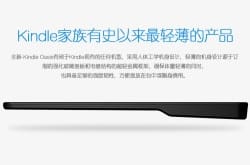
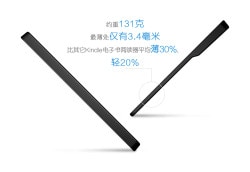
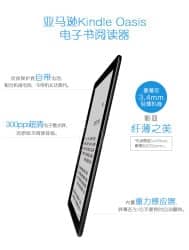
If these images are real (and I’m still waiting for a denial/confirmation from Amazon) then Google Translate tells us that the Kindle Oasis will measure 3.4mm thick at its thinnest point, weigh 131 grams, and have a 300 dpi E-ink screen. (In comparison, the Kindle Voyage weighs 180 grams, and measures 7.8 mm thin.)

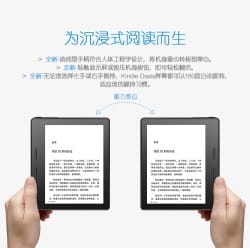
And best of all, the Oasis appears to feature an asymmetrical design with page turn buttons on one side of the screen. Far from being a one-handed design, the Oasis will use the accelerometers to automatically invert the text when you flip the device around and hold it with your other hand:

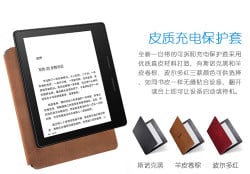
The leak also suggests that the Oasis will have a frontlight which has 60% more light sources, and another image confirms the powered connection between the case and the Oasis:

I’m still putting the images through Google Translate so I can parse additional detail, but that’s all I have for now.

I have not, for example, found a mention that the new Kindle is waterproof. So it looks like that guess was wrong.

If you would like to help translate the text in the images, I have embedded them below.

P.S. This is not the first ereader with a lopsided design, though it will certainly be the most famous. The never-released txtr Reader had a left-handed design when it was announced in 2009, and Ukrainian ereader maker Pocketbook has released a couple 8″ models, including the Pocketbook Inkpad. I fucking loved mine, so don’t listen to naysayers who call the new Oasis ugly. Try it first.

Edit: Pocketbook also released the 360, a one-handed ereader with a 5″ screen. That was a great device, which could even play Doom.


Thanks, Steve, for the tip!

Tapas Wants to Gamify the eBook Market, But Will Consumers Go Along?

Publishers Weekly brings our attention to Tapas Media, an ebook startup which wants to gamify ebook retailing by selling in-app credits which can then be used to buy segments of an ebook.

The company’s newest product is Tapas, a mobile app and marketplace that takes the company’s model of providing content in small amounts and applies it to literary content. The app uses the “freemium” business model—offering some content to consumers for free as an incentive to pay to get more—that has proven successful in the mobile gaming market and brings it to the mobile reading market. Readers are able start books and other stories for free, and then pay to unlock subsequent episodes, or pay for the entire book or story, with prices based on the books’ current market value. Essentially, it’s Candy Crush for books.

Tapas, available on iOS and Android, provides a range of media (all literary at the moment), from books to comics, created by professional writers, all in the form of what Tapas refers to as “bite-sized micro chapters,” or episodes, of 2,000 to 4,000 words. In addition to the freemium model, it enlists a user-engagement model, with features such as rewards for peer-to-peer sharing.

In-app purchases are a big deal in the games/apps market, and that segment accounts for a larger share of revenue that app/game sales.

This has inspired some to think the same model could work for ebooks. Chang Kim, CEO of Tapas Media, told PW that: “We’re trying to apply the proven business model and user-engagement model from the mobile gaming world to reading. If there’s one industry that’s figured out how to monetize content and engage users on mobile, it’s really the gaming industry.”

The problem with that argument is that it overlooks fundamental differences between the ebook market and the app/game market. It also sidesteps the question of whether authors and publishers should want the new model.

One key difference between the ebook and game markets is that it’s easy to download a sample of an ebook and see if it’s any good, but it’s not so easy to sample a game before you buy it.  As a result consumers are less willing to buy a game because they don’t know whether it will suck or not.

Also, ad-supported games have inculcated the expectation that games should be free, and free-to-play games with in-app purchases are arguably just an extension of that trend. (The ebook market has free ebooks, though, which might be pushing that market in the same direction.)

Another difference is that both of the two major app stores (Apple and Google) support in-app purchases. The largest ebook retailer, Amazon, has in-app purchases for games and a digital currency (Amazon Coins), but the coins can’t be used to buy ebooks – not yet, anyway.

With Amazon dominating ebook sales, Tapas' plan to gamify ebook sales will only succeed if Amazon adopts it (Apple and Google will follow suit). Until then, it will remain a niche market, at best.And even if the plan does succeed, Tapas will only play a tiny part, with most of the revenue passing through Amazon, Apple, and Google.

And it’s not clear that the model will succeed, or that authors and publishers should push for it. Right now there’s hardly any content in the Tapas app, but that should change as it leaves beta.

But the more important question is whether authors and publishers should want this model to take hold in the ebook market. Yes, it works in apps/games, but how well?

Given that half of the in-app purchase revenue comes from a fifth of one percent of users, the model arguably doesn’t work very well:

As the 2015 annual Swrve Monetization Report reveals, 64% of all revenues from IAPs in F2P games comes from a mere 0.2% of all players. This number reveals an increase from last year’s report where only 50% of all revenues came from the top 10% of paying players. Further to the point, 60% of all payers (players who make at least one purchase) contribute just a tad over 8% of a game’s total revenue, also known as not enough for developers to care about or cater to.

Do you want that model to become the standard in ebooks?

image by tao_zhyn