Nate Hoffelder

Nate Hoffelder

iOS 8.4 Arrives, Brings Apple Music, Changes to iBooks

Apple’s latest update to its mobile OS arrived on schedule on Tuesday.

Along with the usual bug fixes, the update adds the new Apple Music app and makes changes to iBooks. Its launch coincides with the new Beats One webradio station. iOS 8.4 is available for the iPad 2 and newer, the fifth-generation iPod Touch, and the iPhone 4S and newer.

In terms of iBooks, the app now supports playing audiobooks inside the iBooks app. Apple has also moved the audiobook section of iTunes into the iBooks app. Playback remains unchanged, however.

The iBooks app on the iPhone also now support digital textbooks made with iBooks Author (which had previously only worked on the iPad). Android support for iBooks is still nonexistent, of course.

In terms of bug fixes, the update repairs the bug where a specific set of characters could crash the operating system, and it also fixes the intermittent problem which "prevented GPS accessories from providing location data". And best of all, the update "fixes an issue where deleted Apple Watch apps could re-install".

This is probably going to be the last update to iOS until iOS 9 is released this fall. The new version of iOS isn’t expected to do much in the way of ebooks but it will come with the Apple News app, split screen and multi-tasking modes, and a couple minor features like the Save to PDF sharing option.

ArsTechnica


Dasung’s 13.3″ E-ink Monitor is Now Shipping

Over the past couple weeks many readers have asked for a status update on the Paperlike E-ink monitor I bought back in April.

It has finally shipped, and FedEx says that it will arrive next week.

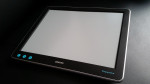
The Paperlike is a one of a kind USB-powered monitor based around a 13.3″ Fina E-ink display. It first made an appearance at CES 2015, but despite press reports to the contrary this device has not yet been released to the market. Production has so far been limited to a total of 50 units which were pre-sold in April. I got one, and I’m looking forward to its arrival.

And so are many other people. This monitor is the work of Dasung, a Chinese tech company, and it has captivated our attention because its E-ink screen promises to offer a unique solution to the LCD headache problem.

LCD screens don’t bother me that much but some people get migraines and vision problems when they stare into a backlit screen for too long. Since E-ink doesn’t have a backlight, it is viewed as a possible solution for office workers who have found that a Pixel Qi screen simply doesn’t cut it.

Pixel Qi makes a type of LCD screen which degrades from color to grayscale in full sunlight, and (on some models) also offers a backlight which can be turned off. Some users swear by it, but others say that it is a less than complete solution (they still get headaches).

The Paperlike cost about twice as much as a Pixel Qi monitor, and it’s not without its own problems. E-ink has a far slower refresh rate than LCD screens and only offers 16 levels of grayscale, and to get around the refresh limitation Dasung has developed new refresh modes, including  mode with only 5 shades of gray as well as a mode with 2 (black and white, basically). That black and white mode hearkens back to 1980s era monochrome monitors and is said to be nearly as fast as an LCD screen.

I’d take that with a grain of salt; that claim was made about a display unit on the show floor at CES 2015. We have yet to receive any reports of real world performance.

But that will change next week.

eBooks Made up 6.4% of France’s Book Market in 2014

The French publishing trade group SNE held its general assembly last week. Mixed in with the Amazon cursing and laments for the good old days, SNE president Vincent Montagne shared the latest stats on France’s publishing industry.

Book sales in France totaled 2,652 million euros on 422 million units sold in 2014. That’s down 1.3% in value and 1.2% in volume compared to 2013, which is relatively good news considering that the music market dropped a reported 7%, and the video sales decreased by 10%.

The SNE reported that 98,306 books were published in 2014, up 3% from 2013. They also reported excellent growth in the translation rights markets (a 6% increase over 2013).

The ebook market also grew in France in 2014; it now represents an estimated 6.4% of book sales in France, up from 4.1% in 2013. France’s ebook market totaled 161.4 million euros in 2014, up 53.3% from the previous year.

That 6.4% is concentrated in specific sectors, including professional publishing, where digital already accounts for over 40% of publishers' sales. Similarly, ebooks represent almost 25% of total sales in the social sciences category.

Curiously, ebooks still make up a negligible part of consumer book sales ( 2.9%, up from 2.3% last year).

And as for self-published ebooks, the SNE is unable to account for the number of self-pub ebooks sold in France last year. The above figures only reflect industry revenue, and thus they are missing anywhere from 10% to 50% of the French ebook market.

I know that is a broad range of possible error, but there’s a method to my madness. The lower end assumes that France has a small self-pub industry segment, while the upper end assumes that the French are buying a lot of ebooks from foreign publishers who sell ebooks cheaper than French publishers (not an outlandish idea, I think).

SNE via IDBoox

image  by jeroen_bennink

Comixology to Launch "All You Can Read" Subscription Plan

There’s an unsubstantiated, unverified,  and unsupported (but almost certainly true) rumor going around today that Comixology is about to offer a Kindle Unlimited type of subscription service for digital comics.

We know literally nothing about the service, but the current speculation is that:

At the behest of their new owners Amazon, the leading digital comics distributor and publisher ComiXology will be offering all-you-can-eat subscription services to readers, allowing them to pay a fixed fee, then have unlimited access to select comic books.

So is this true? Almost certainly.

Comixology’s new service would not be first to offer digital comics as a subscription. Scribd has been offering them since February (and now stocks over 10,000 titles), and a startup called ComicsFix has been running a digital comics subscription service for the past year. They don’t have the two major comics publishers (DC and Marvel) but they do have a large selection of titles from indie publishers.

Speaking of Marvel, this publisher has its own subscription service called Marvel Unlimited. That only offers backlist titles, but it still tells us that Marvel is not opposed to the idea.

I’m still waiting for Comixology to get back to me with a statement, but at this time I am almost certain that this rumor is true. To begin with, my source was also the first to report the Comixology acquisition rumor last year.

What’s more, I predict that the new service is going to be announced next week at the San Diego Comic-Con, when the press is gathered to cover the latest comics and related TV and movies news.

And that’s not all.

I’m betting that the new service will include both independent publishers as well as titles from Marvel. I can’t tell you the size of the catalog, but I do recall that Marvel recently signed a contract with Amazon which made Marvel titles exclusive to Comixology and the Kindle Store.

Do you really think that contract didn’t include a provision for a subscription service?

I think it does have that provision, although I’m not sure which store will be offering the subscription service.

With Marvel titles now in the Kindle Store, it’s entirely possible that Amazon could be planning to expand Kindle Unlimited by adding digital comics.

This is pure speculation, but it would tie in well with  the changes Amazon recently made to the KDP Select payment terms.

A couple of weeks ago Amazon announced that they would pay indie authors who choose to put their titles into Kindle Unlimited based on the number of pages read, with each page read counting for one share of a limited pool of revenue.

Don’t you think that pay-per-page model would work great for digital comics?

I do, and I’m betting that Amazon will be using that new model to pay the indie comics publishers who put their titles into Amazon’s new service. (Marvel could have gotten a special deal because they’re bigger.)

If anyone cares to take the other side of this bet, I know of a bookie in Vegas who can be trusted.

Drop me a line and we’ll talk about it.

image by Sam Howzit

Infographic: The History of Science Fiction

If you like to get lost in impossibly large charts like the Stephen King Universe then I have a treat for you.

I’ve just come across a drawing/infographic/chart by Ward Shelley which plots the history of science fiction from its earliest precursors, the epic myths lost to time, through the enlightenment and the gothic novel to the birth of the first true SF novel, Frankenstein.

Things get awfully complicated after that point as SF branches off into multiple subgenres which split and recombine in surprising ways. Click on the infographic below to see more detail.

But before you get lost in the drawing, I wanted to point out that you can buy this as a print. At 40″ by 22″ it is not a large poster, but it is an expensive one.  It cost me $44.

Too much, do you think?

How to Add a Kindle DRM-Removal Plugin to calibre

Update: These instructions were updated on  11 July 2015. They worked for me on that day.

DRM is the bugaboo of ebooks.  It’s the cause of more pain and agony than a Snooki photo, and today I plan to help fix that. I have long been on the side of removing DRM (it’s the best way to protect your purchases), but up until today I had never gone beyond pointing my readers at tools.


The process is minimally difficult and I’d like to share it with you. But first, a few warnings.

Warning

  • Note that these instructions are Windows only, and some details will be different between the various versions of Windows.
  • Note that these instructions were written without the permission or participation of Kovid Goyal, the creator of calibre.
  • These instructions are written in order to assist the average user in protecting their purchases. I did not write it to assist in committing piracy; I believe in buying content, when possible. But I also believe in controlling the content I buy and that is why I strip the DRM.

TL;DR

Here’s the short-short version: You need to get the DeDRM plugin from Apprentice Alf and install it in calibre (and reboot calibre). Once you’ve installed the plugin, all you have to do is find where Kindle4PC put the ebooks on your computer and drag each ebook into calibre (everything else is automatic).

Luckily for you, you only have to go through the set up process once in order to remove Kindle, Nook, and Adobe DE DRM. (Kobo is a separate process.) If you’ve followed my instructions for removing Nook DRM then you’ve already finished the process of setting up to strip Kindle DRM, and you can skip to the end of this post.

First Things First

You need to download and install these apps on your computer. If you have either of them then you do not need to install them again:

Calibre is of course the ebook library management tool. I’ve mentioned it once or twice, and that’s what you’re going to use to remove the DRM.  And K4PC is how you’ll download the ebooks.

Install the apps one at a time (and set up your account with the K4PC app, if you haven’t already). While it’s being installed, go to the Apprentice Alf website and download the ZIP file full of plugins.

Got everything installed? Good.

  1. UnZip the ZIP file you just downloaded. Open the folder called calibre and you should see a folder full of plugins.
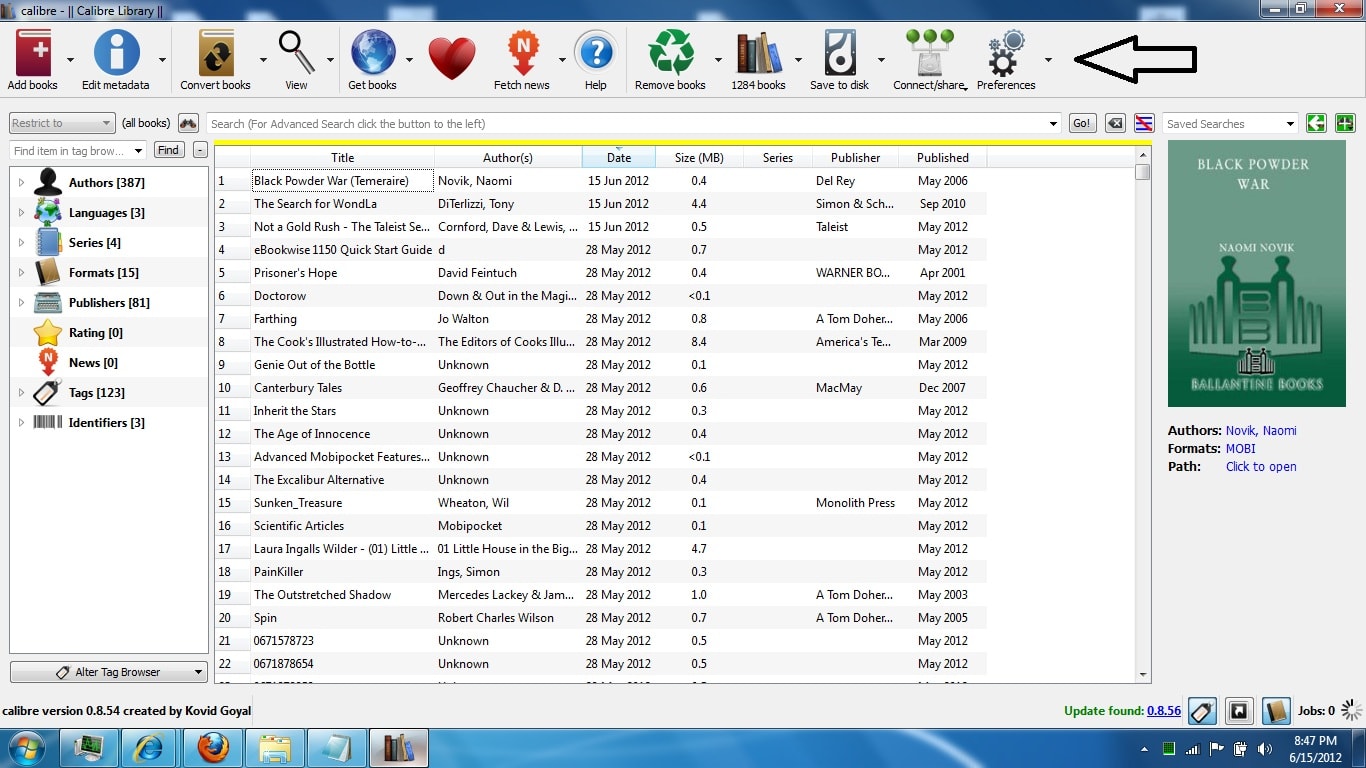
  2. Launch calibre. When it’s open, look at the icons on the top row. There’s one on the far right called "Preferences". Click on it.
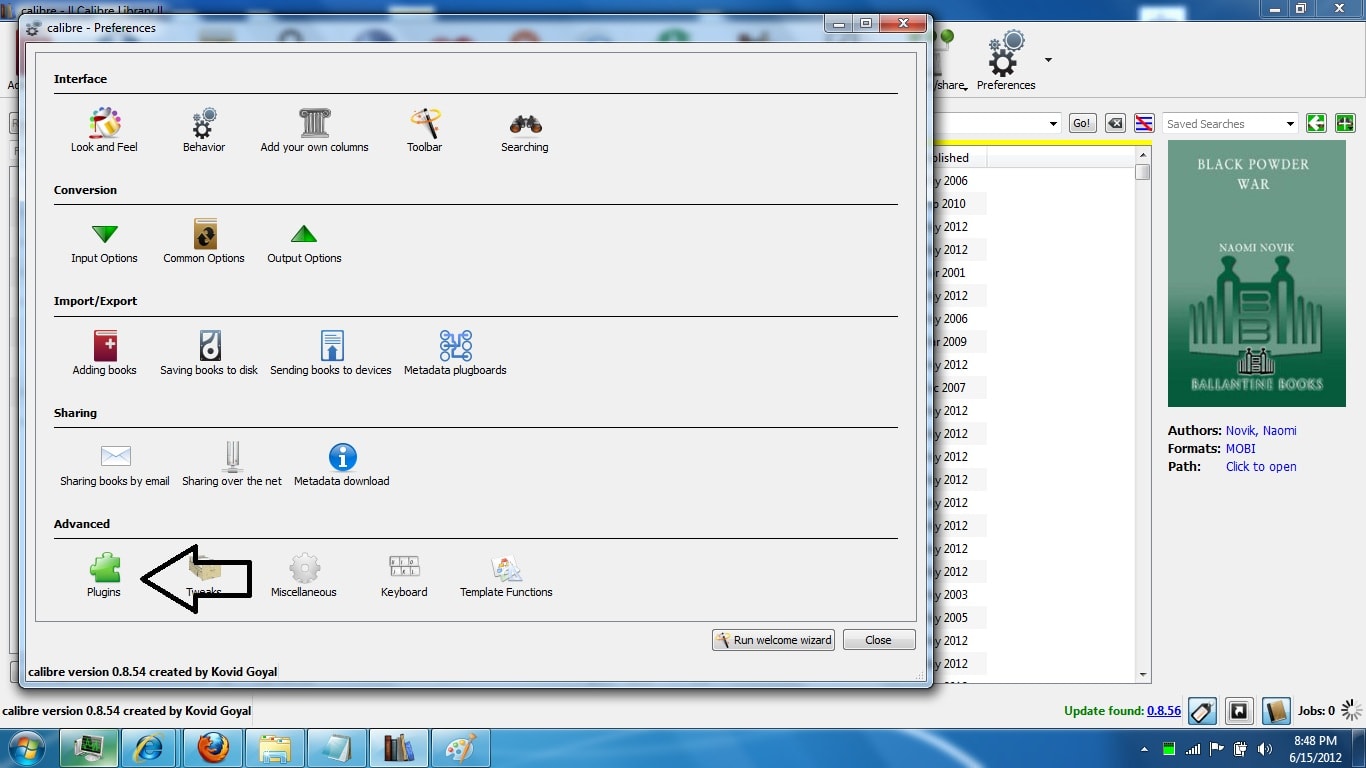
  3. It will bring up a new window with a bunch of icons.  Look on the bottom row for the one that says "plugins". Click it.
  4. And now you’ll get another new window. Look at the buttons on the bottom row. Click on the one that says "load plugin from file".
  5. Use the file browser window to find the folder you downloaded. Open it, and then open the DeDRM_calibre_plugin folder.
  6. There should only be a single ZIP file in that folder, and it should be called "DeDRM_plugin". Double click to select it.
  7. Shut down calibre and launch it again. Some times the plugin won’t kick in until you after you do this.

Yippee!

You’ve just installed and configured the plugin (assuming all went well).  You should be able to copy any ebook you’ve downloaded from the K4PC app to calibre.  Calibre should now be able to read the ebooks and convert them to whatever format you prefer.

But before you can do that you’ll need to find out where the Kindle ebooks are stored. This varies depending on which version of Windows you’re running, but they can usually be found under the My Documents folder.

I’m looking at my Win 7 laptop right now and the  Kindle ebooks are found in "My Kindle Content" under My Documents.

The ones you will need to copy are:

  • AZW/AZW1/AZW2/AZW3
  • MOBI
  • PRC
  • TPZ

After you copy the files into calibre, you might have some trouble getting calibre to open them so you can read them.   Windows will need to be told that calibre can open the files. This should only happen once, so it’s a relatively minor issue.

Note that if you simply convert the ebooks to Epub, you won’t have this issue.

images by pellesten, Rosino

How to Add a Nook DRM-Removal Plugin to calibre

Updated: 11 July 2015

What with B&N giving up on the international Nook Store and having trouble getting their new site to function properly, I’ve decided to dust off this two-year-old post and update the instructions so that they are applicable to users who find the post in July 2015.

It’s easier than ever before to strip the DRM from your legally purchased ebooks, but it does still take some work to rescue your purchases.

TL;DR

The short-short version is that you need to get the DeDRM plugin from Apprentice Alf and install it in calibre (and reboot calibre). Once you’ve installed the plugin, all you have to do is find where NookStudy or Nook4PC put the ebooks on your computer and drag each ebook into calibre (everything else is automatic).

Luckily for you, you only have to go through the set up process once in order to remove Kindle, Nook, and Adobe DE DRM. (Kobo is a separate process.) If you’ve followed my instructions for removing Kindle DRM then you’ve already finished setting up to strip Nook DRM, and you can skip to the end of this post.

Warnings

But if you’re finding this post for the first time, let me start with the standard warning:

  • These instructions are written in order to assist the average user in protecting their purchases. I did not write it to assist in committing piracy; I believe in buying content, when possible. But I also believe in controlling the content I buy and that is why I strip the DRM.
  • Note that these instructions are Windows only, and some details will be different between the various versions of Windows. They were also written without the permission or participation of Kovid Goyal, the creator of calibre.

First Things First

You need to download and install these apps on your computer. If you have either of them then you do not need to install them again:

Calibre is of course the ebook library management tool. I’ve mentioned it once or twice, and that’s what you’re going to use to remove the DRM.

And NookStudy is one of the PC apps that B&N released to read Nook ebooks. B&N no longer supports NookStudy, but it still works and you can use it to download your Nook ebooks (You can also use Nook for PC).

Set up NookStudy, and make sure you download the ebooks you bought. Install calibre. While it’s being installed, go to the Apprentice Alf website and download this ZIP file full of plugins

  1. UnZip the ZIP file you just downloaded.
  2. Launch calibre. When it’s open, look at the icons on the top row. There’s one on the far right called "Preferences". Click on it. See Pic 1.
  3. It will bring up a new window with a bunch of icons.  Look on the bottom row for the one that says "plugins". Click it. See Pic 2.
  4. And now you’ll get another new window. Look at the buttons on the bottom row. Click on the one that says "load plugin from file". See Pic 3.
  5. Use the file browser window to find the folder you downloaded. Open it, and then open the DeDRM_calibre_plugin folder.
  6. There should only be a single ZIP file in that folder, and it should be called "DeDRM_plugin". Double click to select it.

Tell calibre to install the plugin, and once it is down shut down calibre and restart it.

And that’s it. You’re done. At this point the plugin should be working, but we won’t know until you try it for the first time.

How to Remove the DRM

The DRM removal process is simple in practice. You just need to find where NookStudy put the ebooks on your computer, and copy+paste them into calibre. On Windows 7, the ebooks are stored in a folder with a location similar to:

  • C:UsersusernameDocumentsMy Barnes & Noble eBooksemail

You can tell that the process worked by using calibre to open one of the ebooks.

Addendum: Just so you know, there are files which NookStudy won’t download. That app doesn’t support everything B&N sells, so for some ebooks you will need to get the files off your smartphone of tablet and then copy them into calibre.  (I’m still working on a process to get those ebooks.)

images by Svadilfari,  Son of Groucho

How to Download Kobo eBooks (Including the Ones They Won’t Allow) And Strip the DRM

For as long as I’ve shopped there, Kobo has always had an issue with not letting customers download copies of all of the ebooks they buy.  I’ve never understood why and they’ve never supplied a consistent answer, but some of the ebooks bought at Kobo can only be read in Kobo hardware and apps.

Edit: This post is being updated on 29 January 2019.  The instructions worked on that day.

Historically this has been a minor issue, but there are a growing number of reports lately, both on Dear Author and on MobileRead Forums, that suggest that the problem may be getting worse (there’s also one report that claims this is a new problem, but it is bogus).

It’s not clear whether the increase in reports are the result of more titles being affected rather than more customers encountering the issue, but since there are a growing number of complaints I would like to offer a solution.

There is a calibre plugin which can grab all of your Kobo ebooks, convert them from Kobo’s own funky Kepub format, strip the DRM, and add them to your calibre library.

It’s called oboK, and it works with the Kobo for PC app. You’ll  need to download the ebooks with Kobo’s app first, and then run calibre. With a minimum number of clicks, the oboK plugin should be able to rescue most of your DRMed ebooks. Some formats aren’t supported by the Kobo4PC app (graphic novels, for example) and can’t be downloaded.

You can download the plugin here:

https://the-digital-reader.com/wp-content/uploads/2015/02/obok_plugin-3.1.1_trad.zip

Or the older version here:

https://the-digital-reader.com/wp-content/uploads/2014/10/obok_plugin_3.0.7.zip

***

The Usual Disclaimer

oboK, and the instructions provided to help install it, is intended strictly for personal use to enable a reader to rescue their purchases from the clutches of Kobo and the publishers. Please don’t pirate.

***

Like any calibre plugin, you can install it by right clicking on the preferences button, scrolling to the bottom of that menu, and then selecting the plugins option. When that menu pops up, select the option to load a plugin from a file.

Installation should be easy, and once it’s complete you should have a new button on the menu bar. Click it and the oboK plugin will spring into action. A new menu will appear and prompt you to select which of you Kobo ebooks you would like to rescue.

To be completely honest, I have not been able to get the plugin to work. But I am told other people have, and so I am sharing it with you today.

Update: I’ve solved my problem by deleting and reinstalling the Kobo app. Now Obok is able to rescue my Kobo purchases.

If you have a problem getting oboK to work, and then solve that problem, please leave a comment. I would like to be able to use it myself. Thanks!

Draft2Digital Adds Oyster to Its Distribution Network

The ebook distributor Draft2Digital already covers most of the major ebookstores, and today it expanded its service further into the subscription ebook market.

Draft2Digital announced on Wednesday that it had signed a deal to distribute its catalog of 50,000 self-published titles Oyster. Self-published authors will soon have the option to opt into Oyster’s subscription service, Oyster Unlimited, which has more than a million titles in its library.

Until D2D made this deal, indie authors would have had to rely on Smashwords to get their books into Oyster (and Scribd).

D2D offers a distribution service which can get an author’s ebook into iBooks, Nook, Kobo, Tolino, Inktera, and Scribd. Like its much larger competitor Smashwords, D2D has no upfront costs and is commission based. According to the site, D2D collects about 10% of an author’s revenues.

While Draft2Digital is one of the smaller distributors, I’ve never had any complaints cross my desk. So far as I am aware D2D has maintained a low profile in the crowded ebook distributor field, along with eBookPartnership, BookBaby, XinXii, EpubDirect, Smashwords, Ingram, Createspace (POD), and Lightning Source (POD).

With all that competition, it’s probably a good thing that this type of service can be highly automated. That keeps overhead low by enabling companies to keep their staff small.

image by mpclemens


eBooks Won’t Actually Be Getting a Curfew in Germany

This blog broke the news late last week that German regulators were tightening the sales restrictions on adult ebooks. My two local sources had said that German ebook retailers would have to apply age verification and enact a curfew which restricted the sale of adult ebooks to between 10 pm and 6 am local time.

Yes, that is as crazy as it sounds, but now it appears that German regulators recognize that fact as well. A new story crossed my desk this morning which suggests that the curfew might not be enforced after all.

Boersenblatt has published an interview of Susanne Barwick, a lawyer with Boersenverein (the German book industry trade group). The interview is in German and is rather lengthy, but the key detail is that ebook retailers will probably not have to implement a curfew.

Yes, the ebook retailers will have to start verifying customer’s ages, but Barwick says that in the long run they will not have to restrict the hours in which they sell adult ebooks.

Edit: Boersenverein has also released an English language statement which makes the same argument. It’s in high legalese, but readable.

I don’t have the legal background to argue the point, but I can add that past events do bear out her argument.

A reader pointed out earlier this week that in late 2012 Nintendo was caught up in a similar situation. Due to German laws, Nintendo was abruptly forced to restrict online sales of adult-rated video games which it was selling in its Wii U eShop.

Engadget reported at the time that sales were limited to a four hour stretch between 11 pm and 3 am local time. And since Nintendo’s servers were based in Germany, sales to the rest of the EU were also restricted by that curfew.

That curfew was lifted four months later, in March 2013, after Nintendo showed that its systems ( the Parental Controls system on Wii U and Nintendo 3DS, to be exact) were capable of keeping kids from accessing adult content.

eBook retailers will probably be able to reach a similar accommodation with German regulators in short order. After all, the major ebook retailers already have some type of parental control.

Amazon has Kindle Freetime, and Kobo has a Kid’s Store as well as child accounts (not yet available in Germany).

What’s more, both Google and Apple have parental controls on their devices and currently sell adult content (apps, videos) in Germany. I would expect that both Google and Apple already comply with the relevant German laws and will simply adapt their policies and procedures to cover ebooks as well.

However, I don’t know yet exactly how the ebook retailers will respond; I queried several retailers on Friday but have yet to receive a response.

image by psd

First Look at the Boyue Shine (T63) – Android, 300PPI Screen

For the past week or so I’ve been tracking hints of a new ereader from the Chinese company Boyue, and today I finally have something to report.

First discovered by MR member hob last Monday, the Boyue Shine is Boyue’s next-gen ereader. The product renders suggested that this device would sport a design inspired by the Kindle Voyage with its flush glass screen, and the photos recently posted to Baidu confirm that report.

One lucky soul got their hands on what they’re calling the Boyue T63 and posted a set of photos last week on Baidu. They didn’t share much in the way of technical details (scroll down for more info), but they did mention that this device sports a 6″ 300ppi resolution screen.

They posted a total of 4 photos. The photos don’t show much, but they do confirm the basic design and that Boyue is working on a high-end ereader with a hardware design intended to compete with the Kindle Voyage.

Note that I said that the hardware is on par with the Voyage; I’m not so sure that the software will be its equal.

Boyue makes ereaders that run Android. I like them, but I agree with the general consensus among owners that the software isn’t too great. Sure, the reading app works okay and you have the option of installing Android apps, but many owners complain of problems with battery life and stability issues.

We know almost nothing about the Boyue T63 Shine, so this warning could be for naught. But this is a point I will be checking when the T63 Shine is released to market.

I have no inside info on the release date, but I am hoping that this device will be available in the next couple months with a price tag between $150 and $200. That is a higher price tag than the new Kindle Paperwhite ($139) or the Kobo Glo HD ($129) but I think the Android OS makes up for the difference.

Update: A reader pointed me to a listing for the Boyue T63 on a wholesaler website. These specs are not accurate and thus might not be legit, but according to the site this device does have a screen resolution on par with a Carta HD E-ink screen (for some reason, Pearl E-ink is mentioned instead).

According to the site, the Boyue T63 has a wholesale price of $70 with a MOQ of 100 pieces. This coulde asily be a $130 ereader when it hits the market.

Boyue T63 Specs

  • OS: Android 4.2 Jelly Bean
  • CPU: dual-core 1GHz
  • RAM: 512MB
  • 6″ E-ink screen with touchscreen and frontlight
  • Resolution: 1440 x 1080
  • Storage: 8GB, microSD card slot
  • Wifi
  • Audio
  • Dimension: 154 x 114 x 8mm
  • Weight: 160 grams

It’s Now Illegal to Sell Adult eBooks Before 10 PM in Germany

Germany has just given us a graphic example of what can go wrong when one unthinkingly applies decades old legal concepts to modern web tech.

Heise.de and Boersenblatt reported on Friday and Thursday that the Jugendschutzbehörde (Youth Protection Authority) has handed down a new ruling which extended Germany’s Youth Media Protection Law to include ebooks.

As a result of a lawsuit (legal complaint?) over the German erotica ebook Schlauchgelüste (Pantyhose Cravings), the regulators have decided that ebook retailers in Germany can now only sell adult ebooks between 10 pm and 6 am local time (4 pm and midnight, eastern US).

Update: Or perhaps not. A publishing industry lawyer is disputing the accuracy of the early media reports. She says that there will be no curfew.

No, seriously, I’m not joking. Germany really does have this law (Jugendmedienschutz-Staatsvertrag, JMStV). It was passed in 2002 and has been on the books ever since then, but regulators only just now decided that it applied to ebooks.

According to Wikipedia, the law (JMStV) covers a number of areas, including "the protection of minors in advertising and teleshopping". In this case it is intended to protect kids from adult ebooks, and it is backed up by fines of up to 500,000 euros.

Given that the law was written in the internet era, I am astounded that regulators would actually apply it in this manner. (I am also astounded that the regulators had not noticed the erotica and other adult content in the ebookstores in the four years since the Kindle Store launched in Germany, but that’s a whole other issue.)

Boersenblatt says that the 10 pm to 6 am window originally came from restrictions on adult cinema (where it made sense), but I still don’t understand what the regulators were thinking in applying that rule to the internet. Do they really believe that the adult internet, including porn sites, pirate sites, video sites, etc, is going to be turned off for 16 hours a day?

Maybe they do believe that, but I can assure you that said sites worked fine when I visited one earlier today (it was strictly a work-related activity, I swear).

And apparently that is how they want the ebook retailers to operate. According to my sources, the retailers are going to have to start tracking which titles count as "youth-endangering" under German law. Those ebooks will have to be isolated in a specific section of each ebookstore, which (theoretically) can then be made invisible using filtering software.

In a way, the new classification and the new filter are not dissimilar to the adult filter Smashwords applies in its ebookstore. It is also similar to a suggestion I made in late 2013 just before everyone got caught up in that moral panic over self-published ebook erotica.

But not too similar; the new German adult section will of course contain a different cross section of content from the titles swept up in the purge in 2013. In addition to the aforementioned self-published titles, erotica titles published by legacy publishers will also be folded in.

It is not clear at this time how the ebook retailers will respond. I have queried my contacts at Kobo and Amazon, and will report back with their responses.

Until I get a response, I will be sitting here pondering the sheer pointlessness of this legal decision. Given the prevalence of adult content on websites outside of Germany, trying to control access on sites in Germany  is just nuts.

Even King Canute knew that he could not hold back the tide, but apparently German regulators lack that level of common sense.

image by Jan Tik

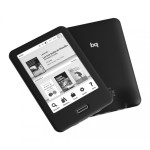
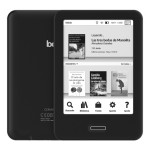
Is the Booq Cervantes the First Open-Source eReader ?

A reader has tipped me to the news that Booq, the Spanish ereader importer, is now promoting one of its ereaders as an open-source device.

Booq has been selling ereaders bearing the Cervantes name since at least 2010, but the latest model is a little different. This 6″ ereader has relatively unimpressive specs for its 140 euro price, but it does have one feature which could set it apart. Booq says that they have released its code under a GPL license, making the software easy to modify should the Cervantes fall into the right hands.

Update: Or at least it would be easy to modify if the Cervantes were in stock. According to the store page (which I didn’t think to check before) this device is not in stock.

The Cervantes boasts a 6″ Pearl HD E-ink screen with a frontlight, IR touchscreen, and Wifi. It runs a version of Linux on a 1GHz CPU with 512MB RAM, and 8GB internal storage.

Weighing in at 195 grams, the Cervantes measures 8.5mm thick and packs in a 1.5Ah battery. There is also a microSD card slot for additional storage, but no audio.

You can buy the Cervantes from the Booq website for 140 euros. I don’t think the specs justify that price, not when you can get a much better Kindle or Kobo device for less, but those other devices don’t have this promise on their product listing:

If you’re an advanced user and you’ve installed the developers’ version of the bq Cervantes’ firmware, you can modify the interface yourself. We’ve published the source code for our software under a GPL*, and you can find out all the details on this website.

Hacking ereaders to add additional features is a pastime that dates back to at least the first Sony Reader, and some of the more popular ereaders have their own dedicated hacker fanbases (Kobo, especially), so the idea of adding 3rd-party code to a commercially released ereader isn’t new.

But I can’t recall any ereader being pitched as an open-source device. Is that unusual, in your experience?

Update: Apparently my memory is not as good as it used to be. A reader reminded me that back when Irex made ereaders, they released the source code. Thanks, Gertjan!

Thanks, kuzelnik!

Marvel Renews Comixology Deal, Expands Exclusive Digital Comic Deal to Include Kindle Store

Amazon’s purchase of Comixology last year started paying the expected dividends this week.

Marvel and Comixology announced on Thursday that they had signed a deal to extend their exclusive relationship on single issue comics. Marvel’s digital floppies will continue to be exclusively available through Comixology (graphic novels are of course available more widely). And now that Amazon owns Comixology, you can also find the digital comics in the Kindle Store.

"Marvel, Comixology and Amazon are committed to bringing Marvel’s amazing stories to current and future Marvel fans across the globe," said Comixology CEO David Steinberger. "And this historic extension of our relationship with the expansion of Marvel’s single issues to Amazon’s Kindle platform is an enormous opportunity to reach more fans."

In one fell swoop Amazon has added 12,000 single issue digital comic books to its Kindle catalog, titles which can’t be found elsewhere.

Those comics are now available in a new section in the Kindle Store, and can be read on the Kindle Paperwhite and Voyage, Fire tablets, and in the Kindle apps for Android, iPad, and iPhone. The several listings I checked indicated that the prices are set by the publisher, making this effectively another agency deal.

The comics are also available through Comixology and its apps for the web browser, Android, or iOS. And of course you can find them in the Comixology-powered Marvel app.

The terms of the deal were not revealed, but it is safe to say that Amazon continues to pay a pretty penny for the exclusive distribution rights. that is money well spent, IMO. Comixology’s previous deal with Marvel kept it in the dominant position in the digital comics market and helped strangle potential competitors like Diamond Digital.

Amazon’s new deal with Marvel will guarantee Comixology’s continued dominance of the digital comics market.

Bonnier to Go DRM-Free in Germany

When it comes to the major publishers of the world, most insist on DRM, but Bonnier is breaking ranks. This Sweden-based media conglomerate is going to be dropping DRM from the ebooks published by its German subsidiaries.

Lesen.net reports that Bonnier Media Deutschland will be going completely DRM-free starting next month. This includes German publishers such as Piper, Carlsen, and Ullstein.

Update: Buchmarkt.de confirmed the news, but did not have anything new to add.

Do you know the tale about the book publisher who would love to go DRM-free – if their multi-national media conglomerate corporate parent would let them? That is more or less what is happening here.

Update: On maybe not. A helpful reader corrected me in the comments. He points out that Bonnier was one of the Swedish publishers who had switched from Adobe DRM to digital watermarks 2010. He sees this as the Adobe-free policy expanding to new markets. Thanks, Bjorn! 

While Bonnier is relatively unknown in the US (aside from that contretemps last year with Amazon), this is not a small publisher. In fact, in 2013 Bonnier had revenues greater than Simon & Schuster. Bonnier is rarely mentioned in book publishing circles in the US, where it owns over 40 magazine titles and a single book publisher, Weldon Owen. The conglomerate also owns book and magazine publishers in the UK, Germany, and Sweden as well as other media properties including tv stations, film studios and theatres in Sweden as well as properties in Poland, Russia, Eastern Europe, and elsewhere.

If you are looking for a way to view Bonnier, it might be better to consider them as a smaller version of Viacom, S&S’s parent company, rather than as a book publisher. Both Viacom and Bonnier are diversified multi-national media conglomerates.

That makes this a far more important story that Macmillan’s dalliance with going DRM-free by dropping DRM from ebooks published by Tor-Forge.

There’s no word at this time whether Bonnier’s other book publishing divisions will also forgo DRM, but it is not out of the question.

Lesen.net

image by jepoirrier